How I Beat 81 Million Password
Spraying Attempts
Seven fixes, one malicious campaign
Date Published: 03/07/2026 / Author: Baizaar Lee / Last Updated: 03/07/2026
TL;DR:
Microsoft 365 password spraying protection is not switched on by default, and a Huntress-tracked campaign reported by BleepingComputer proved it in June 2026, logging more than 81 million login attempts against Microsoft 365 and Azure CLI accounts over a two-week window. This guide is a vendor-neutral walkthrough of the seven fixes that deliver real Microsoft 365 password spraying protection, with clearly marked recommendations along the way for anyone who wants a password manager sorted today.
Want the fastest fix first? Skip straight to the tool that closes the credential-replay gap this whole campaign exploited. See Proton Pass Plus at 50% off →
BAIZAAR earns a commission if you buy through links on this page, at no extra cost to you.
- What Is Password Spraying, Actually?
- Fix 1: Understand What the 81 Million Attempts Actually Showed
- Fix 2: Stop Relying on Password Complexity
- Fix 3: Turn On Microsoft Entra Smart Lockout Properly
- Fix 4: Configure Conditional Access and Identity Protection
- Fix 5: Enforce MFA the Right Way
- Fix 6: Fix Your Password Policy for Humans
- Fix 7: Monitor and Correlate, Don't Just Log
- M365 Password Spraying Protection Limitations
- Recommended Tool
- How I Beat 81 Million Password Spraying Attempts (FAQ)
What Is Password Spraying, Actually?
Password spraying flips the usual attack logic on its head. Rather than throwing thousands of passwords at one account, attackers try one or two passwords against thousands of accounts, then move on before any single account trips a lockout. That low-and-slow approach is exactly why Microsoft 365 password spraying protection has to be built deliberately, not assumed, and it’s the starting point for every fix in this guide.
Huntress, a managed cybersecurity provider, tracked a campaign between 12 and 26 June 2026 that generated more than 81 million login attempts against Microsoft 365 and Azure CLI accounts, first reported by BleepingComputer. This is not an official Microsoft statistic. It is observed threat activity disclosed by a third-party security vendor, and that distinction matters if you’re briefing a board or a client on real risk.
The attackers authenticated using previously breached, unrotated username-and-password pairs via the ROPC (Resource Owner Password Credentials) OAuth flow, a legacy mechanism that bypasses MFA in tenants with incomplete Conditional Access coverage. Huntress confirmed 78 accounts across 64 organisations were compromised during that window, and separately reported a 155-fold increase in password-spraying volume across its customer base over six months. Real Microsoft 365 password spraying protection starts with taking that scale seriously, rather than assuming it’s someone else’s problem.
Fix 1: Understand What the 81 Million Attempts Actually Showed
The headline number is startling, but the mechanism behind it matters more for building genuine password spraying attacks M365 defences. Huntress found the attackers weren’t guessing new passwords at all. They were replaying old, breached credentials that had never been rotated, validated at scale through a legacy authentication flow.
That detail changes the fix entirely. If credentials are stale and reused, password complexity is irrelevant, because the password itself was already leaked somewhere else. Organisations that had disabled legacy protocols and blocked ROPC through Conditional Access were largely unaffected by this specific campaign, which is the clearest real-world proof of concept for Microsoft 365 password spraying protection done well.
The lesson repeats across most incident write-ups: modern password spraying attacks M365 tenants face are usually credential-replay problems wearing a brute-force costume, not a puzzle of guessing cleverer passwords. It’s also worth being precise about terminology here, since the two get confused constantly: password spraying tries a handful of common passwords across many accounts to dodge lockouts, while credential stuffing replays entire username-password pairs already confirmed to work elsewhere. The June 2026 campaign was closer to the second, using stolen credential pairs at scale through ROPC rather than guessing fresh passwords.
Fix 2: Stop Relying on Password Complexity
Standard complexity rules were built to slow brute force, not distributed credential replay. Mixing cases and bolting on a symbol looks tidy in a policy document and does very little against an attacker using passwords stolen from an unrelated breach years earlier.
NIST’s Digital Identity Guidelines have moved away from mandatory complexity and forced rotation, recommending long, unique passphrases instead, alongside screening new passwords against known-breached password lists. That single change, checking for breached credentials, does more for real-world Office 365 security measures than any symbol requirement ever did, and it’s a low-effort win any admin can implement this week.
If you’re the one responsible for rolling this out across a team, our password manager comparison for remote teams breaks down exactly which tools handle breach screening and passphrase generation without adding friction for staff.
Screen every password against known breaches automatically, without a policy PDF nobody reads. Proton Pass flags reused and leaked credentials the moment they’re entered. Start Proton Pass free →
Fix 3: Turn On Microsoft Entra Smart Lockout Properly
Microsoft Entra Smart Lockout is the first line of defence against password spraying, and it is enabled by default in Entra ID, though its default thresholds favour convenience over strict security. Smart Lockout tracks failed attempts per user and per IP, locking out the specific pattern that looks malicious rather than an entire account after a couple of typos.
The catch is that the default threshold, ten failed attempts before the first lockout, is too generous for a tenant facing an active spraying campaign. Microsoft recommends tightening both the lockout threshold and duration for organisations with a higher risk profile.
Smart Lockout alone won’t stop a well-distributed spray, since each account might only see a handful of guesses. It’s a necessary baseline for M365 brute force protection, not a complete Microsoft 365 password spraying protection strategy by itself, which is exactly why the next fix matters more.
Fix 4: Configure Conditional Access and Identity Protection
This is the fix that actually catches distributed attacks, and arguably the single most important layer of Microsoft 365 password spraying protection available today. Microsoft Entra Conditional Access is a policy engine that evaluates real-time signals, device, location, and application, before granting or blocking access. Microsoft Entra ID Protection sits alongside it, adding risk-based detections that flag sign-ins looking automated, impossible, or anomalous against a user’s normal behaviour.
Neither is meaningfully active by default. Both require a Microsoft Entra ID P2 licence and deliberate configuration, including blocking or restricting legacy authentication protocols and the ROPC flow the June 2026 campaign exploited. That gap between what ships and what’s actually configured is where most breaches quietly happen, and it’s the single biggest reason default Microsoft 365 password spraying protection settings aren’t enough on their own.
Getting it right means requiring MFA or blocking access entirely for legacy client types, restricting Azure CLI access to users who genuinely need it, and testing policies with the Conditional Access “What If” simulator before relying on them in production.
Fix 5: Enforce MFA the Right Way
Multi-factor authentication remains the single biggest lever against password spraying, but only when configured to close the gaps attackers actually exploit. The June 2026 campaign succeeded in many cases precisely because MFA was bypassed through ROPC and incomplete Conditional Access scope, not because MFA itself failed.
Not all MFA methods carry equal weight. SMS codes can be intercepted or socially engineered, and legacy authentication flows can skip the MFA prompt entirely if Conditional Access doesn’t explicitly cover them. Phishing-resistant methods, such as passkeys or FIDO2 hardware keys, close far more of the gap than a one-time code sent by text, and our guide to the most secure password managers with built-in hardware key support walks through how to roll these out without a helpdesk revolt.
When I helped a client retune their Conditional Access and MFA scope after a near-miss spraying attempt, password-reset tickets rose noticeably in the first fortnight. Six weeks on, sign-in risk alerts had dropped substantially, and legacy protocol traffic, the exact thing the June 2026 attackers relied on, had effectively disappeared from their tenant logs.
Passkey support without the helpdesk chaos. Proton Pass generates and stores passkeys alongside your passwords in one vault. See how passkeys work in Proton Pass →
Fix 6: Fix Your Password Policy for Humans
Good password policy accepts how people actually behave rather than fighting it. Nobody memorises a genuinely random string, so demanding one without giving them a tool to manage it just guarantees sticky notes and reused passwords elsewhere.
NIST’s updated guidance is unambiguous: prioritise length over complexity, drop forced periodic rotation without cause, and screen every new password against known-breached credential lists. A password manager operationalises all three automatically, generating long, unique passwords and flagging when one has appeared in a public breach.
This is also where removing human-generated passwords from the equation pays off fastest, since it directly closes the exact weakness the June 2026 campaign exploited: old, reused, never-rotated credentials sitting quietly in a breach dump somewhere. Consistent Office 365 security measures built around a password manager, rather than a policy PDF nobody reads, is what actually moves the needle here. For a deeper look at how these tools compare on breach monitoring and team rollout, see our Proton Pass review.
Fix 7: Monitor and Correlate, Don’t Just Log
Password spraying is designed to look like background noise. A concentrated brute-force attack floods logs and screams for attention. Spraying whispers, a handful of failed logins scattered across a directory that logs thousands of legitimate failures anyway.
Identity Protection’s risk detections give administrators a starting point for investigation, correlating anomalous sign-ins with device, location, and behavioural signals rather than treating each failed login in isolation. Microsoft’s incident response playbook walks through exactly how to investigate a suspected password spray once flagged, including which logs to pull and what indicators of compromise to look for. Key signs to watch for include a high failure-to-success login ratio, failed attempts against inactive or disabled accounts, and the same password tried across many usernames from dispersed IP addresses.
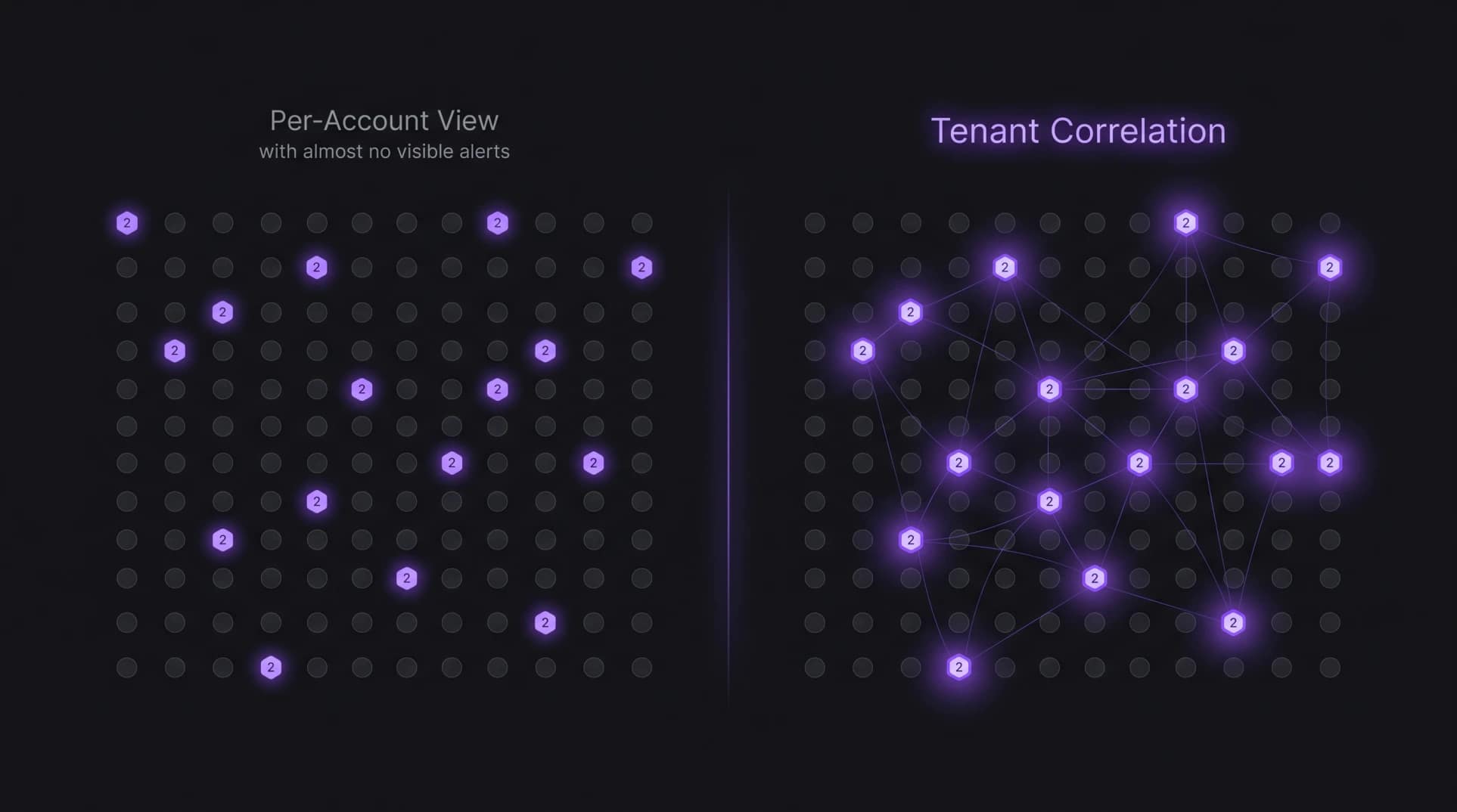
Correlating a flagged sign-in with a subsequent permission change or unusual mailbox rule tells a very different story than the sign-in alone. That correlation step, not raw log volume, is what separates organisations that catch a campaign in hour one from those reading about their own breach in an incident report three weeks later, and it’s the final piece that makes Microsoft 365 password spraying protection genuinely operational rather than theoretical.
| Control | What it catches | Enabled by default? |
|---|---|---|
| Smart Lockout | Concentrated brute force per account | Yes, with loose defaults |
| Conditional Access | Legacy auth, risky locations, device non-compliance | No, requires Entra ID P2 |
| Identity Protection | Anomalous sign-in risk, leaked credentials | No, requires Entra ID P2 |
| MFA | Stolen or guessed passwords alone | Partial, gaps via legacy protocols |
| Correlated monitoring | Multi-stage compromise patterns | No, requires configuration |
M365 Password Spraying Protection Limitations
No single control delivers complete Microsoft 365 password spraying protection alone. Smart Lockout misses well-distributed sprays, Conditional Access and Identity Protection both require the paid Entra ID P2 tier that most small organisations don’t hold by default, and MFA can be bypassed entirely through legacy protocols if Conditional Access scope is incomplete, exactly as the June 2026 campaign demonstrated.
MFA fatigue is a real and growing problem separate from spraying itself. Attackers deliberately trigger repeated approval prompts, hoping a tired employee taps “approve” just to stop the notifications. The control meant to stop credential attacks becomes its own attack surface if push notifications aren’t paired with number matching or context checks.
Budget is a genuine constraint too. Entra ID P2, the licence tier required for Conditional Access risk policies and Identity Protection, costs more than baseline M365 plans, and plenty of organisations run on defaults that were never designed to withstand a determined, patient attacker replaying breached credentials at scale.
Recommended Tool
If there’s one fix a privacy-conscious individual or a stretched IT admin can action today without touching a single Entra policy, it’s removing weak and reused passwords from the equation entirely.
Proton Pass Plus generates and stores long, unique passwords for every account, includes a built-in 2FA authenticator, unlimited hide-my-email aliases, dark web monitoring, and passkey support. It’s currently 50% off at $2.49/month on the 12-month plan ($29.88 billed for the first year, renewing at $35.88), backed by a 30-day money-back guarantee. Get Proton Pass Plus at 50% off →
Already leaning toward the full stack? Proton Unlimited bundles Pass Plus with premium encrypted email, calendar, cloud storage, and VPN under one login, currently 30% off at $9.09/month on the 12-month plan ($109.12 billed for the first year, renewing at $119.88), also with a 30-day money-back guarantee. Compare Proton Unlimited’s full feature set →
Last updated: July 2026
How I Beat 81 Million Password Spraying Attempts (FAQ)
Does Microsoft 365 detect password spraying automatically?
Not by default. Smart Lockout catches concentrated attempts against single accounts, but genuine Microsoft 365 password spraying protection against distributed campaigns requires Conditional Access and Identity Protection, both of which need Entra ID P2 licensing and deliberate configuration.
What’s the difference between Smart Lockout, Conditional Access, and Identity Protection?
Smart Lockout blocks repeated failed sign-ins per account or IP. Conditional Access is a policy engine that grants or blocks access based on real-time signals like device and location. Identity Protection adds risk scoring on top, flagging sign-ins that look anomalous compared to a user’s normal behaviour.
What’s the difference between password spraying and credential stuffing?
Password spraying tries one or two common passwords against many different accounts to avoid triggering lockouts, without needing any prior breach data. Credential stuffing replays entire username-password pairs already confirmed to work from a previous breach, which is closer to what the June 2026 Microsoft 365 campaign actually did through the ROPC flow. Both attack the same weak point, stale and reused credentials, just through different mechanics.
Is Microsoft forcing passkeys, and does that stop spraying attacks?
Microsoft has made passkeys the default sign-in prompt for new accounts and is actively nudging existing users toward them, though passwords remain supported for now. Passkeys close the specific gap password spraying exploits, since there’s no password to guess or replay in the first place, which makes them one of the strongest long-term answers to Microsoft 365 password spraying protection, alongside FIDO2 hardware keys.
Can a password manager really stop password spraying attacks M365 organisations face?
Not on its own, but it removes the exact weakness the June 2026 campaign exploited: old, reused, unrotated credentials. Unique passwords per account mean a leaked credential from one breach can’t be replayed successfully against a Microsoft 365 login, which is the core of any lasting Microsoft 365 password spraying protection plan.