why I Quit Google Drive in 2026
the Honest Productivity Aftermath
(And What I Use Now)
I quit Google Drive in 2026 because it stopped feeling like a handy tool and started feeling like a landlord with a spare key to my working life. For more than a decade, I had client work, personal records, tax files, photos, and a graveyard of half dead shared folders sitting on somebody else’s servers, under somebody else’s rules, with just enough convenience to keep me quiet. That is the real trap: not scandal, not drama, just a slow and deeply irritating realisation that your entire digital life is balanced on a service you do not control.
If you are here, you are probably in the same uncomfortable headspace I was. You know Drive is convenient and familiar, but you suspect the privacy trade offs are no longer in your favour. You are quietly worried that ripping it out of your workflow will nuke your productivity, terrify your clients, and leave you wading through broken links for months.
This is what actually happened when I left, how I rebuilt my system around Proton Drive and pCloud, and the exact steps I would follow again if I had to do it tomorrow, coffee in one hand and regret in the other.
- Why I put up with it for so long
- What finally made me say I quit Google Drive
- Do not migrate in a panic
- Proton Drive vs pCloud vs staying with Google Drive
- I rebuilt storage around how work actually feels
- What happened to my workflow after I quit Google Drive
- How I quit Google Drive: the five step layered process
- Who probably should not leave Google Drive yet
- Since I quit Google Drive: what I use today
- proton Drive+ (Reader Exclusive)
- pCloud Lifetime Offer
- Proton Unlimited
- FAQ: leaving Google Drive without wrecking your life
Why I put up with it for so long
For years, Google Drive was just where files went. It came bundled with Gmail, tied into Docs and Sheets, and made collaboration feel almost magical compared with emailing attachments around like it was still 2003. The free tier looked generous, the paid plan felt harmless, and slowly it stopped being a choice and started being wallpaper.
From a pure convenience standpoint, it is still hard to beat. Mainstream reviews routinely rank Google Drive near the top of general purpose cloud storage lists thanks to integration and a reasonable free allowance.[1] It is the default for millions of people for a reason.
The cracks only show once your files stop being disposable. A shopping list is one thing. Contracts, identity documents, tax records, investor decks, research notes, and client strategy docs are something else entirely.
At some point I realised I was not just renting storage. I was renting peace of mind from a landlord who could change the rules whenever it suited.
What finally made me say I quit Google Drive
Nothing exploded. There was no dramatic lockout, no Hollywood betrayal. It was a slow build up of little frictions and stories that all pointed in the same direction.
The first was the interface. Drive’s Home screen started to feel more like a “stuff happened to you” feed than a power tool. When I need a contract, I do not want magic. I want a boring folder that opens when I click it. I wrote about the same pattern in apps in our piece on digital minimalism and focused productivity, and Drive had definitely crept into the “too noisy” category.
The second was policy risk. Read enough support threads and news pieces about files being automatically restricted under abuse policies and you realise you have effectively outsourced final say over access.[2] That is annoying for holiday photos and terrifying for legal or identity documents.
The third was privacy fit, and this is the one that actually changed my behaviour.
Picture this. It is 4:45pm on a Wednesday. A client is about to walk into a board meeting to present a strategy deck you spent three days writing. You shared it via Drive a fortnight ago. They click the link from your email. Instead of the document, they get a friendly notice telling them the file cannot be accessed right now. No useful explanation, no quick fix, and four minutes until the meeting starts. Your file. Your work. Your reputation. Somebody else’s toggle switch.
Versions of that story have already happened to other people. I did not fancy being the next character in it.
I also knew I was done trusting a model built around “we can see a lot, but we promise to behave”. What I wanted was storage grounded in zero knowledge style architecture, where the provider is structurally incapable of reading your files, not just occasionally too busy to bother. Proton’s own security documentation explains that Proton Drive encrypts files on your device and cannot decrypt them server side.[3]
That was the point where convenience stopped winning the argument. I quit Google Drive because the logic of staying no longer made sense.
If you want the technical breakdown of the options that pushed me over the line, I have already done the legwork in our big review on Proton Drive vs pCloud in 2026, which sits alongside the broader roundup of the best cloud storage for privacy in 2026.
Do not migrate in a panic
Ripping out a core tool without designing the replacement is how you turn a valid concern into a self inflicted crisis.
Before I moved a single file, I made three decisions on paper.
- Which tools would replace which parts of Drive.
- How the new file system would look, on paper, before any migration.
- How to run a small “test move” before committing fully.
The replacements will not shock you if you frequent BAIZAAR.
- Proton Drive for anything with legal, financial, or reputational blast radius.
- pCloud for large media libraries, creative assets, and day to day working folders.
That split matters. The old pattern treated a passport scan and a B roll folder as if they were the same category of object. They are not.
If you want to see how these two platforms actually stack up before committing, the Proton Drive vs pCloud article goes into pricing, encryption models, and workflows in frankly unnecessary detail so you do not have to spend a fortnight reading marketing pages and half baked Reddit threads.
Proton Drive vs pCloud vs staying with Google Drive
A quick snapshot of what this looks like in practice:
| Use case | Google Drive | Proton Drive | pCloud |
|---|---|---|---|
| Sensitive identity and legal docs | Scanned, policy enforced, provider can access content for abuse detection | End to end encrypted, zero access design, Swiss legal context | Optional Crypto vault for extra locking; stronger than generic cloud, but not default E2EE |
| Active projects and media | Familiar, but messy at scale and noisy UX | Works, but overkill and slower for everyday media | Fast sync, previews, strong fit for recordings and assets |
| Privacy posture | Strong policies, but built on data processing and scanning | Storage designed so provider cannot casually inspect content | Mix of convenience plus hardening options via Crypto |
| Backup strategy | Cloud only; still a single provider | Works best combined with offline encrypted drive | Works best combined with offline encrypted drive |
I rebuilt storage around how work actually feels
The process of how I quit Google Drive was as much a productivity reset as it was a privacy decision. Research on digital file organisation is blunt: the messier your structure, the longer it takes to find anything and the more cognitive load you burn on navigation instead of work.[6]
So I treated the move as an excuse to fix the underlying system properly.
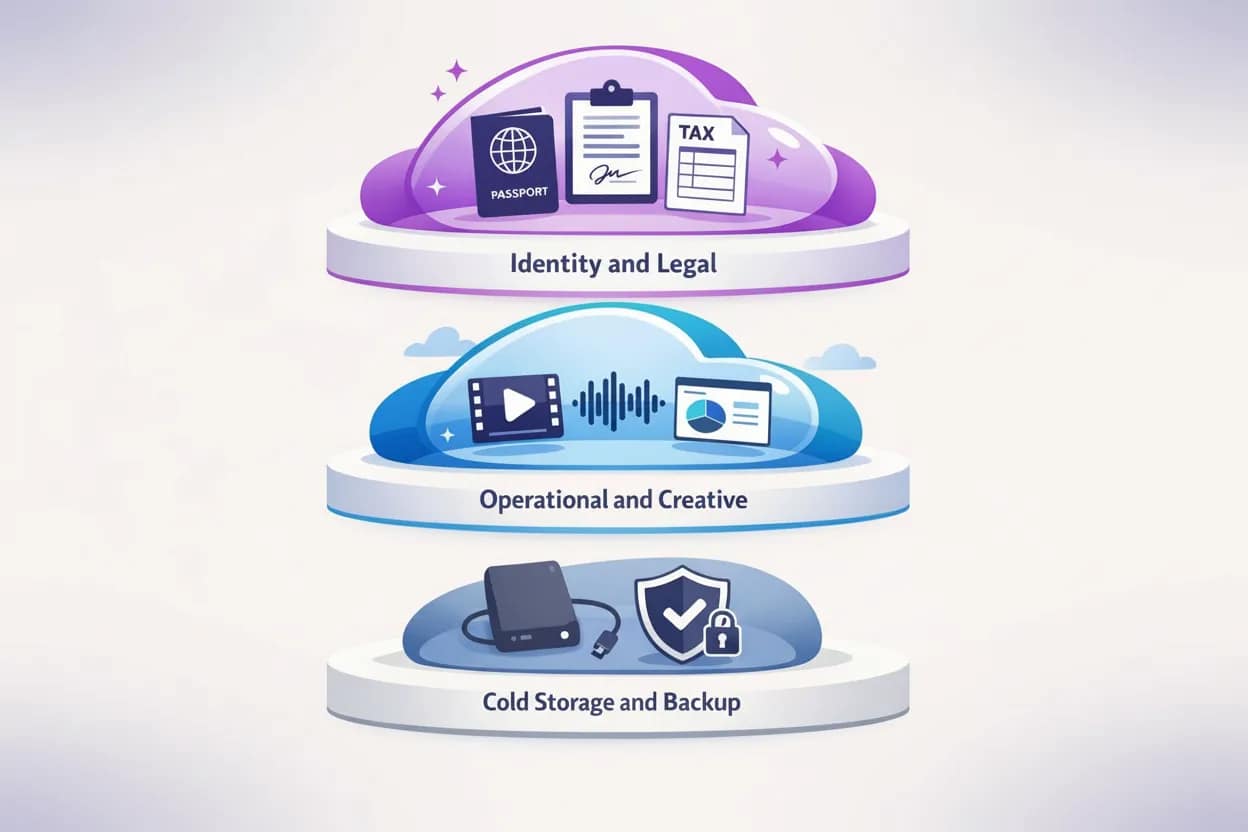
Tier 1: Identity and legal in Proton Drive
Anything that would make my stomach drop if it leaked went into Proton Drive.
- Passport scans and ID.
- Tax records and accountant files.
- Contracts, NDAs, and statements of work.
- Confidential client strategy docs and research notes.
Here, Proton’s default end to end encryption and Swiss legal context finally lined up with the actual threat model.[4] Proton sits inside a broader privacy stack with Mail, VPN, Calendar and Pass that we have audited in pieces like the Proton VPN UK privacy playbook and our secure email reviews.
Get your vault layer sorted first
If you do nothing else, set up Proton Drive and move your identity, tax, and contract folders there first. You will feel the difference in how you sleep.
👉 Start your Proton Drive account here.
Tier 2: Operational and creative in pCloud
My day to day work lives in pCloud.
- Sales and discovery call recordings.
- Raw video and audio for content.
- Design assets and deck libraries.
- Live client project folders.
The pattern is simple: standard pCloud folders for most working files so I get fast sync, previews, and search; a pCloud Crypto vault for the subset with genuine sensitivity baked in. Independent reviews consistently highlight pCloud’s performance and the appeal of its lifetime pricing model for creatives and small teams.[5]
Give your active projects a calmer home
If your current Drive is a junk drawer, move your live work into a simple pCloud structure and point your recording tools there instead.
👉 Get your pCloud Lifetime offer here.
Tier 3: Cold storage and backup
Anything finished but important has two homes: a pCloud archive area and an encrypted external hard drive that never leaves my flat. Cloud is not backup. Cloud plus a local offline copy is the beginning of a grown up strategy and lines up with every serious guide to SME cloud adoption.[7]
What happened to my workflow after I quit Google Drive
This is the part most people quietly care about. When I say I quit Google Drive, the first question is never about encryption standards. It is “did it wreck your productivity or improve it”.
Week 1: Mild chaos with sharp edges
The first week felt like moving house. Every time I tried to open something, muscle memory shoved my cursor towards Drive.
- Old integrations still tried to save into Drive folders.
- Notion pages and CRMs pointed to dead Drive links.
- A couple of clients replied to old threads with the classic “this link does not work”.
The worst moment was not even technical.
A freelance contractor I work with needed a signed NDA from a folder I had shared months earlier. The kind of document you ignore until the exact five minute window where somebody absolutely needs it to avoid a legal headache.
She opened the link. Drive shrugged. She rang me, halfway between impatient and polite, asking whether I had moved it. I had not moved it.
I had just started quietly migrating other things while that link sat embedded in her inbox, a Notion page, and two separate client chats. It took eleven minutes to find the right version, re share it from the new system, and confirm she could open it. Eleven minutes is nothing on a timesheet. In the context of trust, on a document designed to signal seriousness, it felt like an hour.
That mess was on me for not auditing shared links before the move, but it drove the point home.
Instead of letting admin chaos bleed into deep work, I blocked out specific “link hunting” sessions and used an energy based Todoist workflow that separates high focus and admin grade tasks into the right cognitive windows. Batching all the ugly migration chores into low focus time probably saved me two or three genuinely productive hours in that first week.
If your brain leans ADHD flavoured, the same pattern we use in the Todoist for ADHD playbook applies neatly here: protect your good hours from busy work at all costs.
Weeks 2 to 4: Quiet gains
Once the obvious dead ends were fixed, three things changed.
- Retrieval got boringly fast. Because the Proton and pCloud folder structures were designed deliberately instead of growing like ivy, I stopped playing “where did I put this” every morning. File organisation research is very clear that consistent folder hierarchies and naming conventions cut search time dramatically.
- Background anxiety dropped. Knowing that identity documents and contracts sat in a vault the provider could not casually inspect took a surprising amount of mental noise away. Moving sensitive data into privacy aligned systems is a common turning point in case studies on digital minimalism and mental load.
- Media workflows improved. pCloud handled large uploads and previews better than my bloated Drive account ever did. Web and desktop playback of recorded calls, B roll and assets simply worked, instead of giving me the spinning wheel every time I tried to scrub through.
Was everything perfect. Of course not. Proton Drive still feels slower than Google Photos when flicking through thousands of images. pCloud Crypto adds a small decision step every time you save something sensitive. But the system as a whole felt calmer, clearer, and more aligned with how I actually work.
How I quit Google Drive: the five step layered process
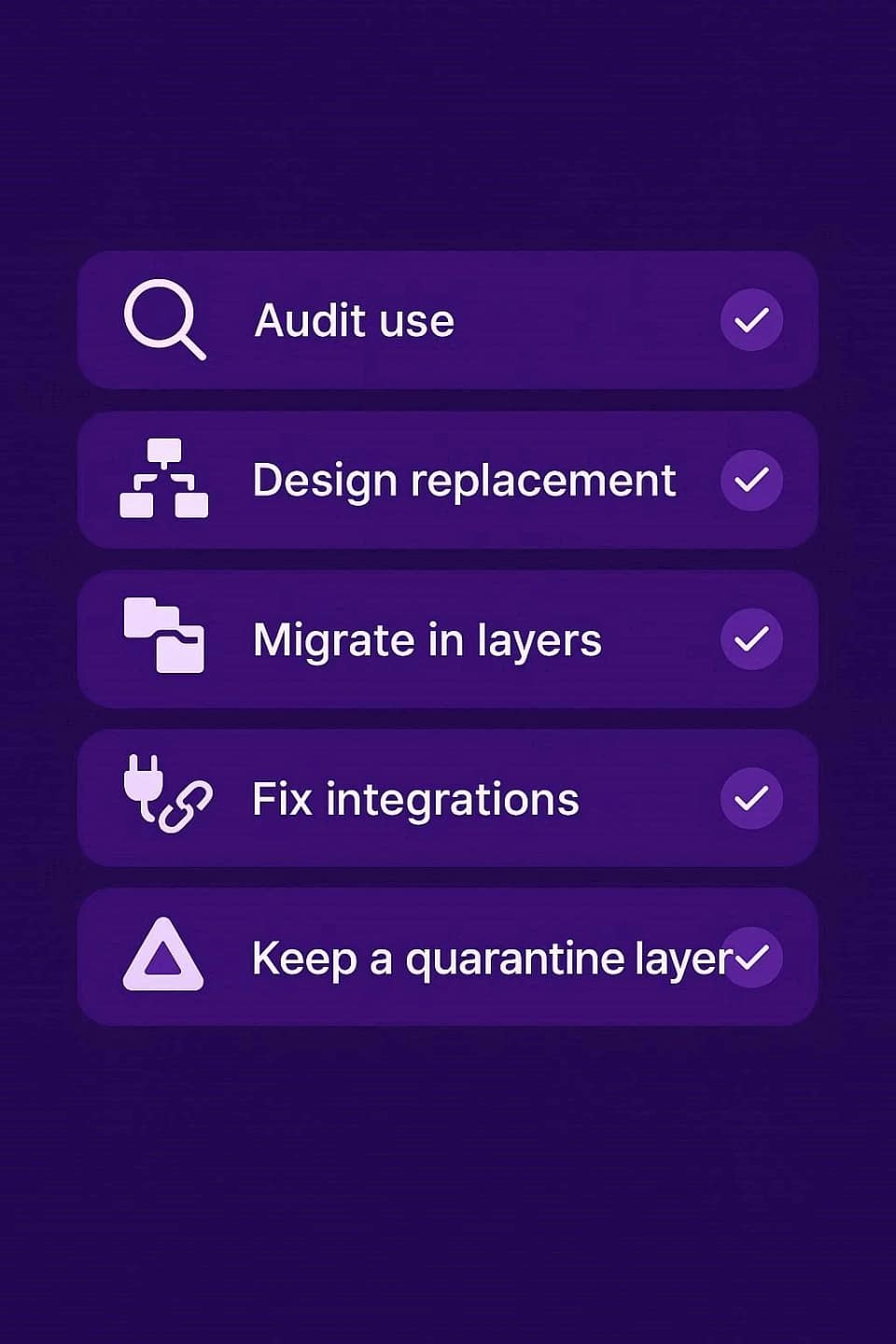
If you are tempted to follow suit, this is the process I would use again if I quit Google Drive a second time.
- Audit how you actually use Google Drive.
For a week, change nothing and simply notice what you open, what you share, and which tools are wired into Drive behind your back. - Decide what replaces what.
Proton Drive for identity, legal, and high risk documents; pCloud for active projects, media, and archives; a minimal Google account if you genuinely need real time co editing on low risk content. - Migrate in layers, not one panic move.
Identity and legal first, then live projects, then the archive once the new structure feels sane. - Fix integrations one by one.
Repoint CRMs, calendar recording dumps, automations, and old shared links deliberately. - Keep a tiny paid G-Drive plan alive for three months.
No new files go in, but old Docs and Sheets stay editable as a read only safety net.
Who probably should not leave Google Drive yet
Despite the title, I do not think everyone should flee immediately.
Staying with Google Drive might make sense if:
- Your job depends on live co editing in Docs and Sheets all day.
- Your entire team is non technical and change management is a genuine risk.
- Your files are mostly low sensitivity and your real risks live elsewhere.
You may still want Proton or pCloud as a parallel vault layer for the small subset of things that really matter. What I would not recommend is treating “we use Google Drive like everyone else” as a privacy strategy.
Since I quit Google Drive: what I use today
Here is the clean version.
- Proton Drive is now my default for anything that would feel catastrophic to leak. Identity documents, contracts, financials, confidential strategy work. It uses end to end and zero access encryption by default and operates from Switzerland, which makes it a good fit if you are trying to build a sensible privacy stack instead of a random collection of tools.
- pCloud holds my working life: active client folders, recordings, content assets, and archives. Standard storage behaves like a modern, fast cloud drive; pCloud Crypto gives me a zero knowledge vault inside that environment for the subset that needs it.[5]
- An encrypted external drive sits underneath both as the “if everything burns, I still have this” layer.
If your life looks anything like mine, here is what I would do in your position.
Get a proper vault for sensitive files
That is Proton Drive. Set it up, move your identity, tax, and contract folders there first, and pay attention to how different it feels knowing those do not live in a general purpose advertising machine.
proton Drive+ (Reader Exclusive)
Claim your discount with 40% off Proton Drive+ today and build your impenetrable stack before the next data grab.
Give your active projects a faster, calmer home
That is pCloud. Create a simple top level structure, point your recording tools and exports there, and stop chasing files through years of half abandoned shared folders.
pCloud Lifetime Offer
Get pCloud here, and seriously consider the lifetime plan if you want to stop thinking about storage bills.
committed to complete privacy? take the Proton Unlimited bundle
Proton Unlimited wraps Mail, VPN, Drive, Calendar, and Pass into a single subscription and solves a huge chunk of your privacy posture in one go. We have already put the Proton stack through its paces in our Proton VPN for Business UK operational audit and related reviews, and it holds up well.
Leverage Proton Drive (with Proton Unlimited) your paranoia-proof vault, perfectly teamed with pCloud for unbeatable data freedom. Escape Google’s ad-fueled spy empire now: rush your identity papers, tax files, and contracts into Proton’s zero-knowledge, end-to-end encryption (500 GB storage + Mail, VPN, Pass, Calendar) untouchable even by Proton. Pair it with pCloud’s massive capacity, and savor ironclad security where Big Tech’s surveillance ends forever.
Proton Unlimited
Tap this reader-exclusive 30% off link to Proton Unlimited and fortify your digital life today
I cannot promise you will click, sign up, and instantly feel the same sense of relief I did. I can promise three things.
- Doing nothing keeps you in a system that was never designed around your risk tolerance.
- Moving without a plan will hurt more than it needs to.
- Following a layered path gives you a calm baseline that respects your time, your brain, and the data people trust you with.
If you have read this far, you already care more about your files than most people. At that point, leaving them in a box you do not control is the strangest move of all.
FAQ: leaving Google Drive without wrecking your life
Will quitting Google Drive destroy my productivity?
Not if you treat it as a system change rather than a mood. Audit how you really use Drive, assign clear roles to Proton Drive and pCloud, migrate in layers, and keep a read only Drive safety net for a few months while you catch stragglers. The same energy based workflow you might use with Todoist works well here too.
Do I have to leave mainstream cloud storage completely?
No. Many people keep a minimal Google account for low risk collaboration while moving sensitive identity, legal, and financial documents into end to end encrypted services like Proton Drive and pushing media plus active projects into pCloud. That hybrid pattern is what I use today.
Is this just paranoia, or are there real risks with Google Drive?
Google is open about scanning content to provide services like spam filtering, malware detection, and improved search. There are documented cases of files being restricted or blocked under abuse policies. That is not evil by default, but it is not the same as a provider designed so it cannot read your files in the first place.
why I Quit Google Drive in 2026 – Sources and Citations
[1]: https://support.google.com/drive/answer/141702
[2]: https://www.tomsguide.com/news/new-google-drive-policy-could-restrict-access-to-your-files-what-you-need-to-know
[3]: https://proton.me/drive/security
[4]: https://proton.me/security/end-to-end-encryption
[5]: https://www.switch-to.eu/en/services/eu/pcloud
[6]: https://lifecycletransitions.com/the-hidden-impact-of-digital-hoarding-on-mental-health/
[7]: https://www.ecopiersolutions.com/blog/best-practices-for-naming-and-organizing-digital-documents
[8]: https://baizaar.tools/todoist-energy-based-workflow-zombie-mode/