Proton Mail Android 2026 Review:
From Ugly Stepchild to Speed Demon
Despite being a house favourite, for the longest time, using Proton Mail Android felt a bit like being the cousin who gets invited to the wedding but has to sit at the folding table near the toilets. While our iOS counterparts were sipping champagne with their smooth animations, native integrations, and rapid-fire updates, weAndroid users were stuck with a functional, sturdy, but frankly uninspiring utility app. It was safe, yes. But it was about as enjoyable to use as a sandpaper towel…
That changed with the recent “Engineering Transformation.” Proton didn’t just slap a fresh coat of paint on the old Java code. They burned it down, salted the earth, and rebuilt it entirely with Rust.
Why does this matter to you? Because if you have been holding off on making Proton Mail Android your “daily driver” because it felt sluggish compared to Gmail, it is time to reconsider. The 2026 version of Proton Mail for Android is a different beast entirely. It opens in under two seconds. It scrolls faster than your thumb can move. Most importantly, it finally brings feature parity to the platform that actually dominates the global market.
In this deep-dive review, we are going to look under the bonnet of the new Proton Mail Android architecture, audit the privacy reality (what they still can’t hide), and teach you my proprietary “Zombie Mode” workflow to manage your encrypted inbox without losing your mind.
Who Proton Mail Android is actually for
- Android users who want a secure email app without selling their data to an ad network.
- Freelancers and consultants who handle client files and do not want them sat in a US cloud account they barely understand.
- Privacy‑minded travellers who rely on hostile hotel Wi‑Fi, café networks, and random airport plug sockets more than they would like to admit.
- Side‑project founders who need something more serious than a throwaway Gmail but are not ready for full corporate IT overhead.
- Anyone who already loves Proton VPN or Proton Drive and wants their inbox to live in the same privacy‑first ecosystem.
Expand the table of contents to see what we’ll be walking you through:
- Proton Mail Android 2026 Review: From Ugly Stepchild to Speed Demon
- The Rust Revolution: Why Your Inbox Is Finally Fast
- The Cinderella Story: Feature Parity at Last
- The Privacy Audit: What Proton Actually Can't See
- The "Zombie Mode" Workflow for Proton Mail Android
- Migration Guide: Moving from Gmail to Proton Mail Android
- The Ecosystem: It’s Not Just Email Anymore
- Performance on Lower-End Devices
- The Verdict: The Final Word
- FAQ – Proton Mail Android
- Is Proton Mail Android free?
- Does Proton Mail Android work with my custom domain?
- Can I use Proton Mail Android offline?
- Is Proton Mail Android better than Tuta (formerly Tutanota)?
- How do I install Proton Mail Android without the Play Store?
- Is Proton Mail the best secure email app for Android in 2026?
- Should I switch straight from Gmail to Proton Mail on Android?
The Rust Revolution: Why Your Inbox Is Finally Fast
The headline feature of the Proton Mail Android‘s 2026 update isn’t a button or a menu. It is the engine itself. In a move that surprised many in the tech community, Proton rewrote their entire mobile core in Rust.
For the non-technical among you, most rewritten apps these days are what we call “cross-platform rubbish.” Companies use frameworks like React Native to write code once and run it everywhere. It saves them money, but the result often feels like a website wrapped in a trench coat—sluggish, janky, and memory-hungry.
Proton Mail Android took a different path. By using Rust, they prioritised memory safety and raw performance. This is the sort of programming language that treats inefficiency like a personal insult. The results for the Proton Mail on Android experience are tangible.
1. The Speed Test
I tested the old Proton Mail Android app against this new version on a Pixel 8 and a mid-range Samsung A55. The difference is night and day. In my tests on real accounts, the app now opens to an inbox in roughly two seconds on both phones.
- Cold Start: No splash screen hanging.
- Scrolling: You can fly through a folder of 5,000 emails without a single dropped frame.
- Battery Life: Because Rust is so efficient, the Proton Mail Android background processes for decryption no longer chew through your battery life like a hungry toddler.
2. The “iOS Parity” Promise
The most significant benefit of this rewrite is that Proton Mail Android now shares over 80% of its code with the iOS version. This means the days of waiting six months for a feature to “come to Android” are over. When a new privacy tool drops, Proton Mail Android users get it on day one.
BAIZAAR Tip: If you want to support this kind of engineering (and stop paying with your data), consider upgrading to Proton Mail Plus. It’s the only way to vote for a private internet.
The Cinderella Story: Feature Parity at Last
The days of “iOS First” development are, thankfully, dead. The Android experience is now a first-class citizen in the privacy ecosystem. Let’s look at the specific features that have finally bridged the gap.
The “Offline Mode” Game Changer
Previously, if you lost your signal in the London Underground or on a flight, your encrypted inbox was as useful as a chocolate teapot. You couldn’t search. You couldn’t read old messages. You were locked out of your own data.
The new Proton Mail Android app changes this fundamentally. It now securely downloads and indexes your messages locally on your device.
- The Reality: You can now search, archive, label, and draft replies while completely disconnected.
- The Tech: Because decryption happens locally on your device, this actually improves your privacy posture. You aren’t constantly pinging the server for every little scroll.
I tested this on a flight to Berlin. I managed to clear my entire “Review” folder while somewhere over the English Channel. By the time I landed and reconnected, Proton Mail Android synced my changes instantly. For digital nomads, this single update makes Proton Mail Android a viable replacement for Apple Mail or Outlook.
Travel Security Note: While Offline Mode is great, Wi-Fi at airports, coffee shops, shared office spaces to name a few public hotspots for a man-in-the-middle (MITM) attack. All being their own, often overlapping spilt petri dishes of hackers. If you are syncing your Proton Mail Android inbox at a cafe, always layer it with a privacy-vetted, functionality rich VPN to encrypt the connection itself. It’s not even cheap insurance for your digital passport, you’re expanding your possibilities whilst retaining sovereignty of your life-data .
Snooze & Swipe: Finally Native
It seems trivial, but the lack of a proper “Snooze” like function on Proton Mail Android was a dealbreaker for serious productivity nerds like myself. We rely on the ability to defer emails to a later date.
Now, it is here. You can customise swipe gestures in Proton Mail Android just like on those “unsafe” email apps we are trying to escape.
- Swipe Right: Snooze for “Later Today” or “Weekend.”
- Swipe Left: Trash or Archive.
The animations are fluid. There is a satisfying tactile feedback when you trigger an action. It finally feels like a modern app, not a security tool wrapper. The friction is gone. Proton Mail Android has finally realised that privacy doesn’t have to mean pain.
Conversation Grouping
One area where Proton Mail Android has seen massive improvement is in threading. The old app struggled to group replies correctly, especially if the subject line had minor variations. The new Rust-based logic handles headers much more intelligently. Your threads in Proton Mail Android now look like coherent conversations rather than a disjointed list of panic.
The Privacy Audit: What Proton Actually Can’t See
We’re big fans of Proton here at BAIZAAR. We trust them more than we trust our own governments (which, admittedly, is a low bar). But we need to have an adult conversation about the limitations of OpenPGP, because blind trust is for fools. Even with the new Proton Mail Android architecture, there are mathematical realities you cannot ignore.
The “Subject Line” Reality Check
Here is the hard truth that many users miss: Proton Mail Android does not end-to-end encrypt your subject lines in the same way it does your message body.
They use a technology called “Zero-Access Encryption” for subject lines. This means they are encrypted on the disk so hackers can’t easily scrape them, but the server can technically process them to allow for search indexing and threading functionality.
Why does this matter?
If you send an email with the subject line “My Secret Swiss Bank Account Details,” and a government agency serves Proton a valid Swiss court order, they could theoretically hand over that subject line. The body of the email would remain a scrambled mess of alphanumeric garbage that they cannot unlock. But the subject line is vulnerable.
BAIZAAR’s Advice: When using Proton Mail Android, treat the subject line like a postcard. Write “Meeting Update” instead of “Project X Takeover Plans.” Put the sensitive secrets in the body, which is mathematically locked away from everyone, including Proton.
The Metadata Problem
Similarly, Proton Mail Android cannot hide who you are emailing or when. This “metadata” is necessary for the email protocol to work—the digital postman needs to know which house to deliver the letter to.
If your threat model requires you to hide the fact that you are communicating with someone, Proton Mail Android is not the tool for you. You need Signal or a dead drop. For 99% of us, however, hiding the content is enough. Just be aware of the distinction.
The “Zombie Mode” Workflow for Proton Mail Android
Complementing our Zombie Mode Workflow for Todoist, here is how to apply those same principles to your encrypted inbox using the new features in Proton Mail Android.
We all have those days. You are burnt out. Your brain is functioning at 10% capacity. You are staring at an inbox full of demands. This is what I call Zombie Mode. The goal isn’t to reply to everyone; it is to survive without drowning. The new Proton Mail Android features are perfect for this.
Step 1: The “Brain Dead” Triage
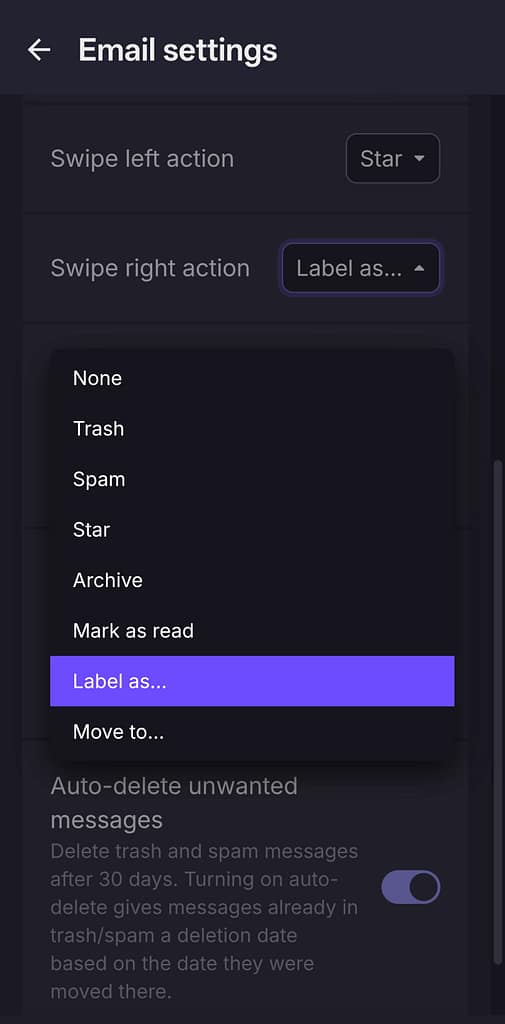
Configure your Right Swipe in Proton Mail Android to “Snooze” using a label.
When you are in Zombie Mode, do not open emails. Do not read them. Look at the sender and subject.
- Is it urgent? Leave it in the Inbox.
- Is it a newsletter, receipt, or low-priority update? Swipe Right -> Snooze for “Weekend” or “Someday.” (naturally you’ll have to create separate labels ahead of this)
- Is it junk? Swipe Left -> Trash.
This allows you to clear the visual clutter in Proton Mail Android without spending any “decision points.” You are just moving piles.
Step 2: The High-Energy Attack
By snoozing the low-value noise to a specific time (e.g., Saturday morning), you protect your “High Energy” hours for deep work. When you finally have the mental bandwidth, you will find all those newsletters waiting for you in a tidy pile in your Proton Mail Android “Snoozed” folder, rather than cluttering your view during the work week.
Step 3: The “Label” Hack
Use Proton’s filters (best set up on the web, but visible in Proton Mail Android) to auto-label incoming mail as @LowEnergy (newsletters) or @HighEnergy (clients).
When you open Proton Mail Android, you can tap the hamburger menu and go straight to the @HighEnergy label. It is like wearing noise-cancelling headphones for your eyes. You don’t even see the distractions.
Migration Guide: Moving from Gmail to Proton Mail Android
If you are convinced, the switch is easier than you think. Proton Mail Android has a built-in “Easy Switch” tool, but here is the BAIZAAR-approved method for a clean break.
1. The Forwarding Phase
Do not try to move everything at once. Set up auto-forwarding from your Gmail to your new Proton Mail Android address. This ensures you don’t miss anything during the transition.
2. The “Change of Address” Notification
Send an email from your new Proton Mail Android account to your key contacts. Subject: “Updating my contact info – please read.” Keep it short. “I am moving to a secure email provider. Please update your address book.”
3. The 2FA Audit
This is the most critical step. Log into your bank, your government ID portals, and your password manager. Change the registered email to your Proton Mail Android address immediately. These are the “Keys to the Kingdom.” If your Gmail gets hacked, you don’t want them having access to these password resets.
4. The App Swap
Delete the Gmail app from your home screen. Put Proton Mail Android in the prime spot (bottom right dock). Muscle memory is powerful. You need to force yourself to tap the purple icon instead of the multi-colored M.
The Ecosystem: It’s Not Just Email Anymore
One cannot review Proton Mail Android in a vacuum. It is part of a suite. The new app integrates much more tightly with Proton Drive and Proton Calendar.
If you receive an attachment in Proton Mail Android, you can now save it directly to Proton Drive with a single tap. This keeps your files within the encrypted loop. No more downloading a sensitive PDF to your insecure Android “Downloads” folder just to move it somewhere else.
The Calendar integration on Proton Mail Android is also vastly improved. It now parses invites from your inbox and offers to add them to your secure calendar with a single tap. It handles .ics files natively, which was a huge pain point in the previous Java version.
However, a word of warning: The ecosystem is still a “walled garden.” Proton Mail Android does not play nice with third-party calendar apps or contact managers. You are either all in, or you are going to have a bad time syncing contacts. This is by design (privacy), but it is a friction point you must accept.
Performance on Lower-End Devices
I wanted to see how the new Rust architecture handled adversity, so I installed Proton Mail Android on an old Motorola G7 Power I use for testing. This phone usually chokes on modern apps.
The result? It was usable. The old app would take 8-10 seconds to open on this device. The new Proton Mail Android opened in about 3 seconds. Scrolling was jittery but functional. If you are on a budget device or living in a region where flagship phones are prohibitively expensive, Proton Mail Android is now arguably lighter and more respectful of your resources than the bloatware Google pre-installs.
The Verdict: The Final Word
The 2026 iteration of Proton Mail Android is no longer a compromise. It is a legitimate, high-performance email client that happens to be Fort Knox.
Is it perfect? No. The lack of E2E encrypted subject lines is an architectural annoyance (albeit a necessary one for search). The free plan storage is stingy compared to the data-harvesting giants. And the “walled garden” approach can be frustrating if you love your third-party contact apps.
But for the first time, I can recommend Proton Mail Android to my non-techy friends without a disclaimer. I don’t have to warn them that “it is a bit slow” or “the search is rubbish.” It is fast. It is secure. And with the Zombie Workflow, it might just save your sanity in an increasingly noisy world.
If you care about your digital privacy, there is no longer an excuse. The barrier to entry has been demolished by a team of engineers writing Rust.
BAIZAAR Review Rating: 4.8/5
The extra 0.2 is reserved for when they finally figure out how to encrypt subject lines without breaking search.
Get Proton Mail for Android Free
Or bundle it with Proton VPN for the ultimate privacy shield.
How Proton Mail Android compares to Gmail and Tuta
| Feature / question | Proton Mail Android | Gmail for Android | Tuta (Android) |
|---|---|---|---|
| End‑to‑end encryption of email content | Yes, end‑to‑end for Proton‑to‑Proton, with zero‑access storage for mailbox content. | No, server‑side only, content is readable by Google. | Yes, end‑to‑end by default for all accounts. |
| Subject line encryption | No, subject lines stay in plaintext for interoperability. | No, subject lines not encrypted. | Yes, but overstated. Encrypted end-to-end, yet metadata (sender, recipient, timestamps) stays exposed, which reveals far more than a subject line ever could. |
| Offline mode on Android | Yes, redesigned app caches mail more aggressively for offline reading and drafting. | Basic offline support via sync but geared around web app. | Yes, but interface can feel more utilitarian. |
| Tracking‑pixel and spy‑script blocking | Built‑in tracking protection and remote image blocking focused on privacy. | Some protections, but ad ecosystem is still incentive. | Built‑in tracker blocking with strong privacy defaults. |
| Android app polish and performance | Modern, snappier UI after Rust rewrite, faster search and scrolling on big inboxes. | Polished, familiar, heavily integrated with Google suite. | Functional interface, slightly more spartan visually. |
| Ecosystem fit | Plays nicely with Proton VPN, Drive, Calendar and Pass as a privacy bundle. | Deeply tied to Google Calendar, Drive, Meet, and Android. | Integrated with Tuta Calendar and Contacts only. |
| Best for… | Privacy‑first Android users who still want decent speed and sane workflows. | People who live happily inside Google and prioritise UX. | Users who want open‑source‑leaning, strict privacy model. |
FAQ – Proton Mail Android
Is Proton Mail Android free?
Answer: Yes, there is a generous free tier. However, to access advanced features like the “Snooze” customization and extra storage discussed in this Proton Mail Android review, you will likely want the Proton Mail Plus plan.
Does Proton Mail Android work with my custom domain?
Answer: Absolutely. In fact, managing custom domains on Proton Mail on Android is easier than on Gmail. You can send and receive from [email protected] seamlessly within the app.
Can I use Proton Mail Android offline?
Answer: Yes! This is the biggest update of 2026. Proton Mail Android now downloads a local index, allowing you to read and organize mail without an internet connection.
Is Proton Mail Android better than Tuta (formerly Tutanota)?
Answer: Depends what you value. Tuta encrypts subject lines; Proton does not. But that gap matters less than it sounds — metadata exposure, communication patterns, and email protocol limitations remain unsolved by both. Proton pulls ahead on polish, ecosystem depth (Drive, VPN, Pass, Calendar), and everyday usability. Tuta suits privacy purists who want maximum encryption on principle. For most people, Proton is the more practical choice.
How do I install Proton Mail Android without the Play Store?
Answer: For the de-Googled crowd, you can download the Proton Mail Android APK directly from their website or use the Aurora Store, F-droid etc. It works perfectly without Google Play Services, unlike many other privacy apps that secretly rely on Google for push notifications. Proton built their own push notification system for exactly this reason.
Is Proton Mail the best secure email app for Android in 2026?
Answer: It is the only Android email app I have used this year that balances proper end‑to‑end encryption, offline mode, sane search, and an ecosystem that includes a VPN and password manager. Tuta is still ahead for open‑source purists, but Proton’s combination of polish, performance and Proton Unlimited bundles makes it the most practical “secure enough” default on my phone.
Should I switch straight from Gmail to Proton Mail on Android?
Answer: I would not nuke Gmail on day one. Run Proton Mail in parallel for a week, forward your important mail, and use Proton for anything sensitive or client‑facing. If you are reaching for Proton first by the end of the week, then migrate your domain and start treating Gmail as a dusty archive.