
OneDrive Phishing Risk 2026:
Microsoft’s OAuth Disaster
Hits 35,000 Users
the Microsoft phishing “phrenzy” & what to do about it
Date Published: May 10th 2026 / Author: Baizaar Lee
35,000 people. 26 countries. Three days in April.
Microsoft’s own threat intelligence team published the forensic breakdown of a credential theft operation so technically polished it bypassed enterprise spam filters, slipped past MFA, and walked away with live authentication tokens from healthcare workers, finance professionals, and entire IT departments. All within a 72-hour window between 14 and 16 April 2026.
The bit nobody is shouting about loudly enough: the architectural flaw that made this campaign so brutally effective is still completely live. Unpatched. Ongoing. The Phishing-as-a-Service kit that powered it changed hosting providers after Europol shut it down in March and just… kept going.
Microsoft disclosed the campaign. Professionally. Carefully. With excellent graphs. Naturally, without fixing the underlying problem.
This piece covers what actually happened, why OneDrive’s architecture makes this a structural issue rather than simply a bad-luck quarter and what someone with files worth protecting should consider changing, following this reminder of Microsoft’s clear lack of responsibility when it comes to users privacy and security.
The migration checklist is roughly two-thirds down if you are already convinced on Microsoft-Migration and just want the practical bit.
Understanding the OneDrive phishing risk 2026 starts here.
- OneDrive Phishing Risk 2026 – What Actually Happened?
- How AiTM Phishing Bypasses MFA
- Microsoft OneDrive & Why This Is Not Another ordinary Phishing campaign
- What This Risk Actually Means for Your oneDrive Files
- BAIZAAR's OneDrive Security & Privacy Rating
- Your Exit Options: IceDrive vs Proton Drive vs pCloud
- Cloud Storage Security & Privacy Matrix
- How to Actually Do This: The OneDrive Migration Checklist
- Step 1: Audit Your Microsoft OAuth Permissions Right Now
- Step 2: Decide What Actually Needs Protecting
- Step 3: Set Up Your New Provider on a Free Tier First
- Step 4: Download the Desktop Sync Client
- Step 5: Migrate Sensitive Folders First
- Step 6: Run Both Accounts for 30 Days
- Step 7: Update Integrations and Revoke OneDrive Access
- OneDrive Phishing Risk 2026 – Frequently Asked Questions (fAQ)
- OneDrive Phishing Risk 2026 & BAIZAAR's Verdict
- BAIZAAR's Privacy-First Cloud Storage Alternatives
OneDrive Phishing Risk 2026 – What Actually Happened?
How AiTM Phishing Bypasses MFA
Arrives
Link
Gate
Sign-In
Harvested
The disclosure landed on 5 May 2026 from Microsoft’s Defender Security Research Team, reported via The Hacker News. The April campaign was not remarkable because phishing is new. It was remarkable because of how cleanly it operated at scale. The phishing itself is the visible surface of the OneDrive phishing risk 2026. The architectural problem underneath it is what actually demands attention.
Victims received emails that appeared to come from internal compliance senders. Display names read “Internal Regulatory COC.” Subject lines referenced “non-compliance case logs.” The templates were polished enterprise HTML with what Microsoft called “preemptive authenticity statements” baked into the copy, language specifically crafted to neutralise the reader’s scepticism before they reached the link. These emails landed in inboxes because they were dispatched via legitimate email delivery infrastructure, passing SPF, DMARC, and DKIM checks without issue. Your spam filter had nothing to go on.
One click led to a PDF. The PDF led to a CAPTCHA page, credibility theatre. The CAPTCHA page led to a convincing Microsoft sign-in replica. That fake page was not collecting passwords. It was running an Adversary-in-the-Middle (AiTM) operation, capturing live Microsoft authentication tokens in real time as users typed. The attacker walked away with a valid session token. No password needed. No MFA code requested. Full, authenticated access to every OneDrive file that account could reach.
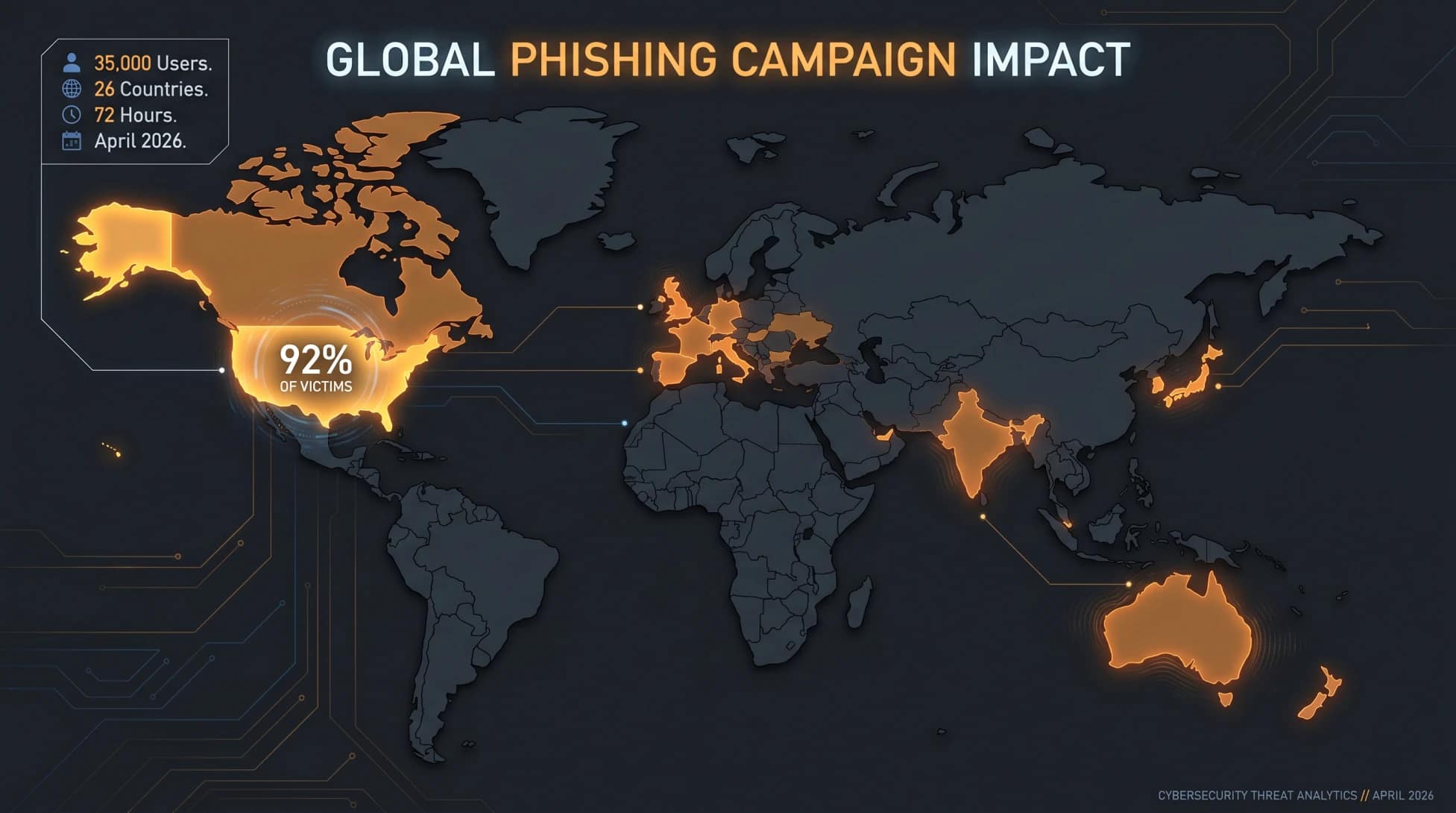
The April 2026 Microsoft OneDrive phishing campaign ran from 14 to 16 April 2026, targeting 35,000 users across 13,000 organisations in 26 countries. Attackers used enterprise-style HTML email templates posing as internal compliance notices and routed victims through CAPTCHA-gated pages to an Adversary-in-the-Middle (AiTM) phishing interface that harvested Microsoft authentication tokens, bypassing MFA entirely. 92% of targeted users were in the United States. The sectors most affected were healthcare (19%), financial services (18%), and professional services (11%). The campaign was disclosed by Microsoft’s Defender Security Research Team on 5 May 2026.
The Numbers Sitting Behind This OneDrive Phishing Risk 2026 Campaign
The April campaign at the centre of the OneDrive phishing risk 2026 does not exist in isolation. It is a data point in a much larger picture that Microsoft published at the same time.
8.3 billion email-based phishing threats were detected by Microsoft in Q1 2026 alone.
QR code phishing rose from 7.6 million incidents in January to 18.7 million in March. That is a 146% increase in just twelve-weeks. Business Email Compromise crossed 10.7 million incidents in the same quarter. Credential harvesting now accounts for the overwhelming share of phishing objectives; malware delivery has fallen to roughly 5-6% of attack goals because stolen session tokens are worth considerably more than an infected endpoint.
| Campaign | Date | Volume | Organisations Hit | Countries |
|---|---|---|---|---|
| 401k / Invoice SVG campaign | Feb 23-25, 2026 | 1.2M messages | 53,000+ | 23 |
| HTML redirect campaign | March 17, 2026 | 1.5M messages | 179,000+ | 43 |
| COC / Compliance AiTM campaign | April 14-16, 2026 | 35,000 users | 13,000+ | 26 |
The March 17 campaign alone accounted for 7% of all malicious HTML attachments Microsoft detected across its entire infrastructure that month. These are not one-off incidents. This is the normal operating environment for anyone whose files live inside a Microsoft identity.
Microsoft OneDrive & Why This Is Not Another ordinary Phishing campaign
The phishing is the surface layer. The architectural problem underneath it is what actually demands attention. The OneDrive phishing risk 2026 is not a temporary condition. It is a structural flaw in how Microsoft stores, encrypts, and shares access to your files.
When you connect a third-party application to OneDrive via the File Picker such as Slack, ChatGPT, Trello, ClickUp, any of them, the connection automatically grants that application a files.read.all OAuth permission scope. Not scoped to the folder you clicked on. Not limited to the specific file you were trying to share. The entire drive. Every document. Every folder. This was documented by Oasis Security and has not been patched as of the date this article was published.
Now layer the AiTM attack directly on top of that.
An attacker holding your Microsoft session token does not just access your account. They inherit your entire OAuth permission footprint. Every application you connected to OneDrive over the past few years becomes an immediate lateral movement opportunity. They do not need those apps’ credentials. They have your active session. The delegated trust is already sitting there, waiting.
You connected a workflow tool to OneDrive eight months ago. You have probably forgotten it exists. An attacker with your session token has not forgotten.
Kaspersky’s analysis of the Amazon SES abuse angle makes it plain: “Attackers aren’t using suspicious or dangerous domains; instead, they are leveraging infrastructure that both users and security systems have grown to trust.” That is precisely why this works at the scale it does. A spam filter cannot flag an email that passes every authentication check because it was genuinely sent from legitimate AWS infrastructure.
Tycoon 2FA and the Industrialisation of the Problem
Phishing-as-a-Service has changed the economics of the OneDrive phishing risk 2026 attack class fundamentally. Tycoon 2FA is a commercially available AiTM kit delivering the complete attack chain including infrastructure, lure templates, token harvesting, redirect handling – all setup as a ready-to-run service. No development skill required. Microsoft’s Q1 2026 threat intelligence names Tycoon 2FA alongside Kratos (formerly Sneaky 2FA) and EvilTokens as active PhaaS frameworks being deployed against Microsoft 365 environments.
Europol disrupted Tycoon 2FA’s hosting in early March 2026. The platform migrated and kept operating. The February campaign: 1.2 million messages, 53,000 organisations, 23 countries – used SVG attachments routed through a CAPTCHA before landing on a fake sign-in page. The pattern is identical every time because the pattern reliably works every time.
What This Risk Actually Means for Your oneDrive Files
Concrete threat assessment: who is actively exposed to the OneDrive phishing risk 2026 right now.
If any of the following applies, the risk is live now, not hypothetical:
- You have connected Slack, ChatGPT, Notion, Trello, ClickUp, or any other third-party tool to OneDrive at any point in the last three years. The
files.read.allgrant is almost certainly still active unless you have explicitly revoked it. - You use Microsoft 365 with MFA enabled and believe that protects you from credential theft. It does not protect you from token theft. These are different problems.
- You store anything in OneDrive you would not want a stranger to read: contracts, client data, financial records, health documents, personal correspondence.
- You have not reviewed your Microsoft OAuth permissions recently. Most people have not.
The fourth point is the one that matters most and receives the least attention. Microsoft holds your OneDrive encryption keys. They are not a zero-knowledge provider. A session token obtained via AiTM gives an attacker the same access Microsoft already has: full read access to your plaintext files. MFA was never designed to defend against token theft. It defends against password theft. These are architecturally different attacks.
The US CLOUD Act still applies regardless. Without any breach occurring, US authorities can compel Microsoft to hand over files stored on their infrastructure. This is statutory law, in operation since 2018, with no opt-out for individual users.
At what point does accumulated risk become an actual decision? The April privacy changes. The unpatched OAuth flaw. Now a documented 35,000-user campaign from their own threat intelligence report. Three separate vectors. One product. Microsoft’s own data.
BAIZAAR’s OneDrive Security & Privacy Rating
Microsoft OneDrive: 2/5
Privacy and Security Assessment, May 2026
This rating reflects BAIZAAR’s independent assessment of the OneDrive phishing risk 2026 across six dimensions for privacy-conscious personal and professional use.
| Dimension | Score | Notes |
|---|---|---|
| Encryption architecture | 1/5 | Provider-held keys; zero-knowledge option does not exist |
| OAuth permission model | 1/5 | files.read.all flaw confirmed and unpatched |
| MFA bypass resilience | 2/5 | AiTM token theft renders MFA effectively irrelevant |
| Jurisdiction | 2/5 | US CLOUD Act applies; no individual opt-out |
| Threat actor interest | 1/5 | 35,000 users targeted in 72 hours, April 2026 |
| Feature set and usability | 5/5 | Genuinely excellent; Office 365 integration is best in class |
OneDrive is a very good product for people who are not particularly concerned about who can read their files. That used to describe most people. It is shrinking smaller group now.
Your Exit Options: IceDrive vs Proton Drive vs pCloud
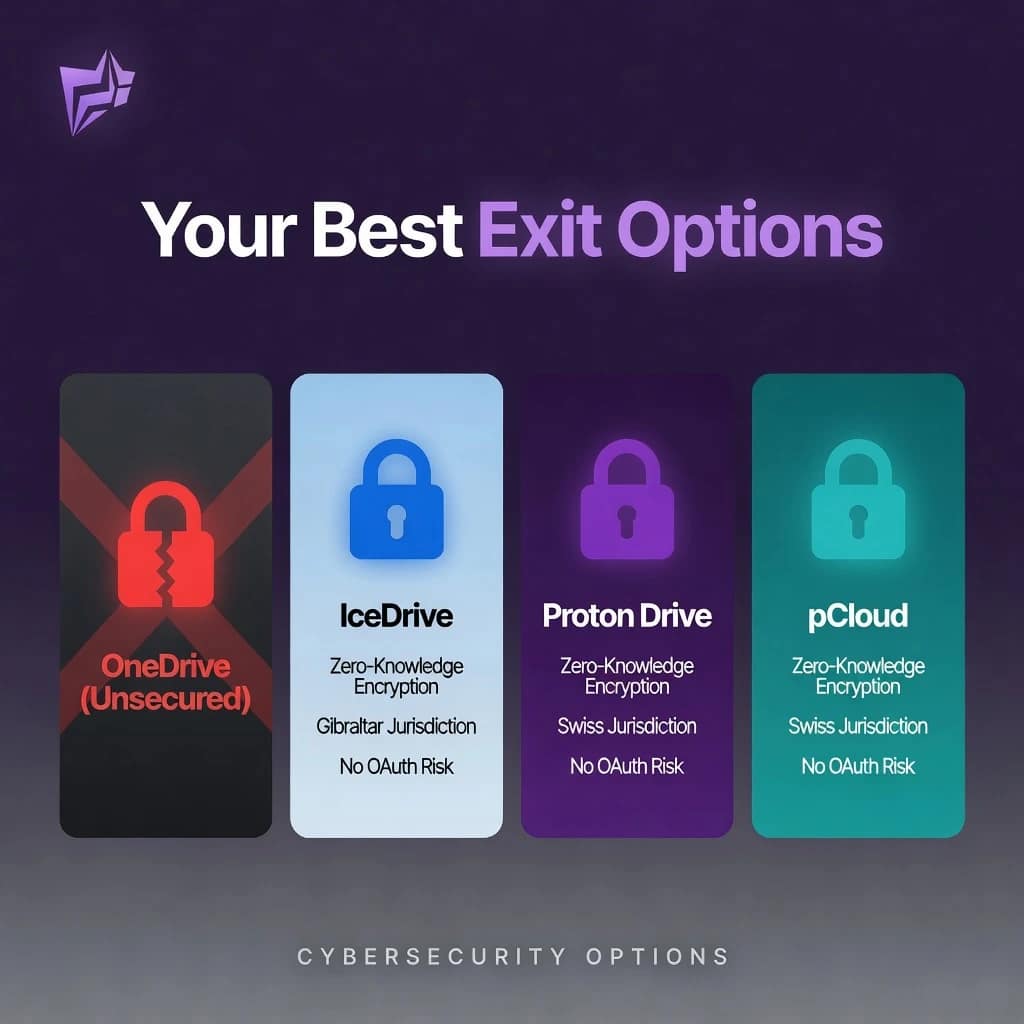
Three handpicked, road-tested options. Each addresses a specific structural failure in OneDrive’s current architecture. None of them are perfect. One honest caveat per product, as promised.
IceDrive – Best Lifetime Option for UK-Based Privacy Users
BAIZAAR Rating: 4.5 / 5
IceDrive uses client-side zero-knowledge encryption. Files are encrypted on your device before they leave it. IceDrive’s servers receive an encrypted blob and nothing else. An attacker who obtained your IceDrive credentials would be looking at an unreadable archive. The decryption key never reaches their servers.
The jurisdiction point matters specifically for British readers. IceDrive is based in Wales. Post-Brexit, the UK operates under its own data protection framework: UK GDPR and the Data Protection Act 2018. The US CLOUD Act has no jurisdiction over a Welsh/Gibraltar-based company. For professionals storing client-related materials, that is a meaningful architectural difference, not just a marketing point.
Lifetime plans start from around £99 for 150 GB, with 1 TB available at approximately £229. Prices are accurate as of May 2026; verify directly with IceDrive before purchasing. One payment, no recurring subscription, zero-knowledge encryption, Gibraltar jurisdiction.
Honest caveat: the mobile app has historically been the product’s weak point. Large batch uploads on iOS have been inconsistent. It is improving, but if you are primarily mobile-first and need a seamless on-the-go experience, factor that in before committing.
Check out IceDrive’s Lifetime Plan Deals Available here.
One payment. Lifetime storage. Zero-knowledge encryption. UK jurisdiction.Find All IceDrive Plans & Pricing Options here (Includes Monthly & Annual Subscriptions)
(Prices verified May 2026, confirm directly with IceDrive before purchasing)
pCloud – The Strongest Value Lifetime Option in 2026
BAIZAAR Rating: 4.6 / 5
pCloud is currently the strongest value proposition in the lifetime cloud storage space. The Infinity plan in particular: if you have not looked at it recently, it is worth ten minutes of your time. The lifetime pricing structure means you are insulated from the subscription creep that has hit almost every cloud storage provider over the past two years.
Their zero-knowledge option is called pCloud Encryption. It is not on by default, which is a meaningful distinction from Proton Drive. Enable it before you upload anything. Their desktop and mobile apps are consistently rated among the smoothest in the privacy-focused storage space, which is precisely where IceDrive currently has its known friction.
Honest caveat: pCloud is headquartered in Switzerland and operates EU servers. Confirm which data region your account is provisioned to. For most users this is irrelevant; for those in regulated industries, it is worth one minute to check.
Grab your pCLOUD LIFETIME Plan with our BAIZAAR Reader Discount with 33%+ OFF
One-time payment. Massive storage. No monthly bill.(Prices verified May 2026, please confirm directly with pCloud before purchasing)
Read BAIZAAR’s full pCloud vs OneDrive 2026 comparison for the detailed side-by-side breakdown.
Proton Drive – Best for the Complete Privacy Stack
BAIZAAR Rating: 4.7 / 5
Proton Drive is the closest thing available to a zero-compromise privacy solution. Zero-knowledge encryption is on by default. No toggle to find, no add-on to purchase. Swiss jurisdiction. End-to-end encryption across Mail, VPN, Calendar, and storage as part of a single coherent ecosystem.
The genuinely compelling pitch for Proton Drive is not the storage itself. It is the Proton Unlimited bundle. One subscription replaces your email provider (Proton Mail), VPN (Proton VPN), password manager (Proton Pass), and cloud storage simultaneously. If you are paying for any of those separately, the maths tends to work out in Proton’s favour before you have finished the calculation.
Current offers (verify directly before purchasing):
- Proton Drive Plus: £0.90/$1/€1 for the first month (80% off), then standard pricing; or 40% off annual plans
- Proton Unlimited: 34% off with a 30-day money-back guarantee
Honest caveat: Proton Drive’s desktop client is functional but less polished than pCloud’s. The product roadmap is credible and they shipped meaningful improvements in January 2026, but if seamless desktop drag-and-drop is your priority criterion, pCloud or IceDrive will feel more comfortable day-to-day.
Try Proton Drive Plus, with this absolute steal with 80% OFF your first month.
Zero-knowledge encryption by default. Swiss jurisdiction. Only £0.90/$1/€1 to start.Enter Complete Privacy with Proton Unlimited with our BAIZAAR Reader Discount: 34% OFF (includes a 30-DAY Money Back Guarantee)
Drive, Mail, VPN, Sentinel, Lumo and Pass. One subscription. Complete privacy stack.(Offers verified May 2026, confirm with Proton before purchasing)
For a complete Proton Drive plan comparison and pricing breakdown, see our user-friendly comparison here – Proton Drive pricing plans 2026 on BAIZAAR.
OneDrive vs IceDrive vs Proton Drive vs pCloud – How They Compare
Cloud Storage Security & Privacy Matrix
Comparing mainstream and privacy-focused cloud storage providers across key security metrics.
| Security Feature | OneDrive | IceDrive | Proton Drive | pCloud |
|---|---|---|---|---|
| Zero-knowledge encryption |
No
|
Default on
|
Default on
|
Optional (add-on)
|
| Provider can read your files |
Yes
|
No (with ZK on)
|
No
|
No (with Crypto)
|
| CLOUD Act jurisdiction |
USA
|
Gibraltar / UK
|
Switzerland
|
Switzerland
|
| Lifetime plan |
No
|
Yes
|
No
|
Yes
|
| MFA bypass risk (token theft) |
High
|
Not applicable
|
Not applicable
|
Not applicable
|
| OAuth over-permission risk |
Confirmed unpatched
|
Not applicable
|
Not applicable
|
Not applicable
|