Is Microsoft Edge Safe
For Passwords In 2026?
A Paranoid Productivity Reality Check
By Baizaar Lee | BAIZAAR | Published: 6 May 2026 | Est. 10 min read
Every password you have ever trusted to Microsoft Edge has been sitting in your computer’s memory, unencrypted, in plain text, every single time you open the browser.
Not locked. Not protected by a master password. Not behind anything a moderately curious attacker would need to sweat over.
A Norwegian cybersecurity researcher named Tom Jøran Sønstebyseter Rønning, who goes by @L1v1ng0ffTh3L4N on X and specialises in penetration testing using only tools already present on a target system, recently discovered that Microsoft Edge decrypts your entire saved password vault at startup and keeps every single credential resident in process memory as cleartext for the whole browser session, whether you visit those sites or not.1
When Rønning reported this to Microsoft, the company’s official response was that the behaviour is “by design.”2
That is the sentence I want you to sit with for a moment.
By design. Not a bug. Not a mistake. A deliberate architectural choice, quietly affecting every person who has saved a password in Edge since the browser launched. German IT publication Heise.de independently replicated Rønning’s findings, creating and saving a password, closing and reopening Edge, and confirming that the credential could be retrieved from process memory in plain text.
So. Is Microsoft Edge safe for passwords? In short: not in the way most people assume. This article explains exactly what happened, what it means for you, how it compares to other browsers, and what you can realistically do about it this weekend without deleting your entire digital life.
- What Did Microsoft Edge Actually Do With Your Passwords?
- Is Microsoft Edge Safe For Passwords, Or Not? The Honest Assessment
- Which Is Safer for Passwords, Microsoft Edge or Google Chrome?
- What Is the Safest Place to Keep Passwords in 2026?
- Browser Password Security
- How to Move Your Passwords Out of Microsoft Edge: A One-Weekend Escape Plan
- Do I Need to Worry If My Passwords Have Already Been in Edge?
- Why Microsoft's "By Design" Response Is the Most Expensive Answer in Cyber Security
- BAIZAAR's Conclusion:
- the Microsoft Edge Password Safety Issue (FAQ)
- Is Microsoft Edge safe for passwords in 2026?
- How do I see leaked passwords in Microsoft Edge?
- Do I need to worry about the Edge password leak?
- Which is safer for passwords, Microsoft Edge or Google Chrome?
- What is the safest place to keep passwords in 2026?
- Should I change my passwords after the Edge password plain text disclosure?
- Can I scan my phone to see if my accounts have been compromised?
- Where should I not store my passwords?
- Is Microsoft Edge Safe For Passwords In 2026? – References & Sources:
What Did Microsoft Edge Actually Do With Your Passwords?
The Technical Reality of Edge Password Storage
When you save a login in Microsoft Edge, the browser stores it in an encrypted database on your hard drive. That part is fine. The problem is what happens when you open Edge the next morning.
Rather than decrypting each password individually at the moment you actually need it for a specific site, Edge decrypts every password in your vault simultaneously at startup and holds them all in the browser’s process memory as cleartext strings.
Think of it like a safe that automatically opens every morning, puts all your valuables on the kitchen table, and leaves them there all day. The safe still exists. It still locks at night. But for the hours you are using it, everything is out in the open.
The practical implication is that any attacker, or any malware with access to the process memory of the Edge browser process can read every single password you have ever saved. No specialised cracking tools required. Zero brute force required. Simply a memory dump.
Why Rønning’s Research Changes the Conversation
Tom Rønning is a penetration tester with a specific and rather elegant niche. He works exclusively with tools already present on target systems, the kind of approach that mirrors exactly how sophisticated real world attackers operate. When someone with that methodology identifies a problem and documents it clearly enough for a mainstream German tech publication to replicate it step by step, the concern is not theoretical.
Rønning has stated he plans to publish a simple tool on GitHub that lets anyone verify the behaviour themselves. That transparency is the opposite of fear mongering. It is a gift to every person currently trusting Edge with their bank login, email account, and anything else worth stealing.3
Is Microsoft Edge Safe For Passwords, Or Not? The Honest Assessment
Safe by Whose Definition?
Microsoft’s “by design” response reflects a specific and narrow threat model: if an attacker already has administrative access to your machine, you are compromised regardless of how passwords are stored. This argument is technically coherent in a purely theoretical sense.
It is also, as David Shipley, CEO of Beauceron Security, pointed out, “waving the white flag at cybercriminals and turning that white flag into a blank check for info stealers.”
The old argument assumes a binary outcome.. either you are safe or you are fully compromised. The reality of modern credential theft is far messier than that. Memory scraping attacks, credential harvesting malware, and exploitation of disconnected Remote Desktop sessions all exist in a middle ground where partial access to a system is enough to extract cleartext passwords from Edge’s memory.
When the “By Design” Excuse Becomes Genuinely Dangerous
On a personal laptop used by one person, the risk is elevated but perhaps manageable with good baseline hygiene.
On a shared family PC where three people each use the same Windows user account and have Edge set as the default browser? The credentials belonging to every family member who has saved a password in Edge are sitting in that browser’s memory simultaneously.
On a corporate terminal server, a Citrix environment, or an RDS farm where dozens of concurrent user sessions run on the same underlying Windows host? A single attacker with admin access to that host can dump cleartext passwords for every logged in user, including users in disconnected sessions who closed their remote session but whose Edge process is still running in the background.
College computer labs. Hotel business centre PCs. Shared warehouse machines. Any environment where “everyone is an admin” because nobody configured it properly. In all of these, Microsoft’s “by design” answer means one thing: your passwords are a liability.
Which Is Safer for Passwords, Microsoft Edge or Google Chrome?
This is one of the most searched questions following the Rønning disclosure, and the answer is a genuine difference rather than tribalism.
Google Chrome introduced App-Bound Encryption specifically to address process memory exposure of credentials. Under this design, passwords are decrypted on demand, tied to a specific application context, and are not left hanging in memory between site visits. Security researchers have broken App-Bound Encryption before, but doing so requires determined effort and specific exploit chains rather than a one-line memory read.
| Feature | Microsoft Edge | Google Chrome | Proton Pass |
|---|---|---|---|
| When does it decrypt passwords? | At browser startup (all credentials) | On demand per site | When you explicitly unlock the vault |
| Credentials in plain text RAM? | Yes, throughout the session | Rarely; only briefly per use | Never; end-to-end encrypted |
| Vendor can access via sync? | Yes (Microsoft account sync) | Yes (Google account sync) | No (zero-knowledge architecture) |
| Independent security audit? | No public audit of password manager | Limited | Yes, third-party audited |
| Response to researcher disclosure | “By design” | Active patching history | N/A (no comparable issue found) |
Neither Edge nor Chrome is a zero-knowledge password manager. Both vendors can theoretically access your synced credentials via their cloud infrastructure. Both are convenience tools, not serious credential vaults.
The difference is that Chrome at least makes a reasonable effort to minimise the plain text exposure window. Edge, as things stand on 6 May 2026, does not.
What Is the Safest Place to Keep Passwords in 2026?
Browser Password Security
Microsoft Edge
Google Chrome
Proton Pass
Data reflects standard default configurations as of 2026. Custom user settings may alter security profiles.
Why Browser Password Managers Keep Failing the Sniff Test
The appeal of the built-in browser manager is real. It is there. It works automatically. It never nags you to pay for a subscription. For low-stakes logins, the newsletter you subscribed to in 2019, your local council rubbish collection portal, the convenience arguably outweighs the risk.
For your primary email account, your online banking, your company’s internal systems, your cloud storage, your NHS login, your tax account, and your pension provider? The calculus shifts dramatically. These are the accounts that, once compromised, hand an attacker the keys to impersonate you, drain accounts, reset everything else, and cause months of cleanup work.
The Edge disclosure is not an isolated incident. It is the latest in a long line of browser password manager failures, from Chrome’s own App-Bound Encryption bypass research to the permanent conversation about what happens to your saved credentials when a browser extension goes rogue.4
What “Zero-Knowledge Password Manager” Actually Means
A zero-knowledge password manager encrypts your vault on your device before it ever leaves your machine. The provider stores only ciphertext, which is unreadable scrambled data that is useless without the key. The key never leaves your device. The provider cannot read your passwords. A court order served on the provider gets nothing, because there is nothing readable to hand over.
Proton Pass is built on exactly this model. It uses Argon2 for key derivation (a memory-hard algorithm specifically designed to make brute-force attacks expensive), AES-256-GCM encryption for the vault itself, and a zero-access architecture in which Proton’s servers never hold decryption keys. This is the same Swiss-based infrastructure that underpins Proton Mail – a product that has been audited by external security researchers and has held up under legal data requests from law enforcement, precisely because there is nothing readable to produce.
When researchers ask “what is the safest most secure password manager”, the architecture I just described is the bar that the answer needs to meet. Edge does not come close. Chrome does not either.
🔐 This Is Precisely What Proton Pass Was Built For
Proton Pass stores nothing in plain text. Your vault is encrypted before it leaves your device, using the same security architecture that has protected Proton Mail users through court orders and government data requests. Edge cannot say that. Chrome cannot say that either.
BAIZAAR readers get 50% off Proton Pass right now.
Claim your 50% off Proton Pass here →
Affiliate link. BAIZAAR earns a commission if you upgrade. It does not affect the price you pay, the discount is real.
How to Move Your Passwords Out of Microsoft Edge: A One-Weekend Escape Plan
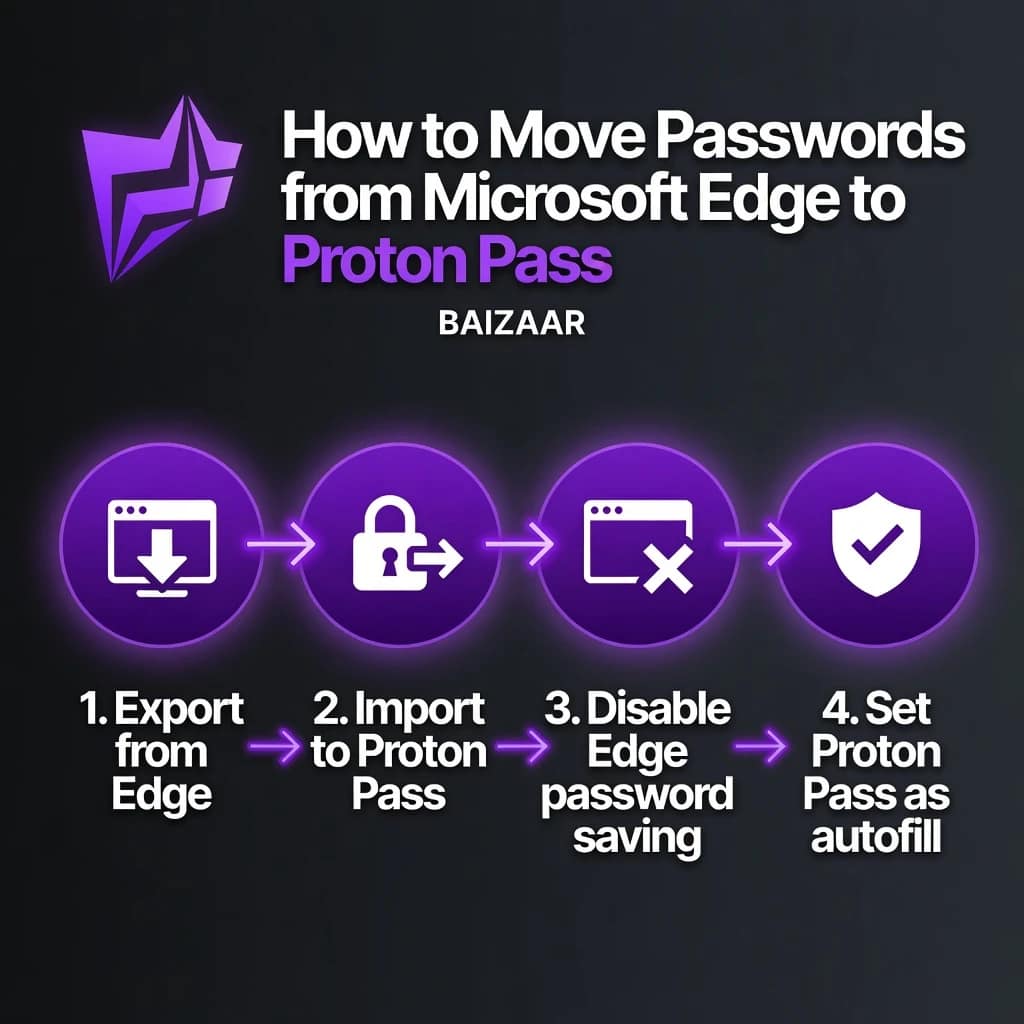
The four steps will take most people two to three hours across a Saturday morning.
Step 1 – Export Your Edge Passwords
Open Edge, navigate to edge://settings/passwords, scroll to the bottom of the Saved Passwords section, and click the three-dot menu next to “Saved Passwords.” Select Export passwords. Edge will ask for your Windows PIN or password as confirmation, then generate a .csv file.
Important: that .csv file is a plain text document containing every saved username and password in readable form. Do not email it. Do not save it to a cloud drive that is not end-to-end encrypted. Treat it like you would treat a physical list of your bank PINs. You will delete it once the import is done.
Step 2 – Import Into Proton Pass
Download Proton Pass from proton.me/pass and create a free account. Inside the app, go to Settings › Import, choose “Microsoft Edge” from the dropdown, and upload your exported .csv. Proton Pass will pull in every credential and store them in your encrypted vault. The plain text CSV can be permanently deleted immediately after.
Note for cautious migrants: if you would rather not export a CSV at all, you can simply use Proton Pass as your default going forward and re-enter credentials one at a time as you log into each service over the next fortnight. Slower, but zero exposure.
Step 3 – Disable Password Saving in Edge
Once your credentials are safely in Proton Pass, go back to edge://settings/passwords and turn off “Offer to save passwords.” Then delete all existing saved passwords from the Edge vault. There is no point leaving them there once they are in a safer home.
Step 4 – Set Proton Pass as Your Browser’s Autofill Manager
Install the Proton Pass browser extension for Edge or Chrome from proton.me/pass/download. Enable autofill in the extension settings. From this point forward, Proton Pass fills your credentials on demand, decrypts only the one you need, and never leaves your whole vault sitting open in memory.5
Enable two-factor authentication on your most critical accounts while you are doing this. The migration is a good forcing function for the 2FA you have been meaning to set up since approximately 2021.
Quietly worth knowing: If you sign up for Proton Unlimited rather than Proton Pass standalone, you get Proton Mail, Proton Drive, Proton VPN and Proton Pass in a single subscription. BAIZAAR readers can currently access 90% off the first month or 34% off the annual plan. Zero reason to hand your passwords to a browser that calls plaintext memory storage a feature.
Do I Need to Worry If My Passwords Have Already Been in Edge?
Should I Change My Passwords After This Disclosure?
This is the question that matters practically, and the honest answer is: it depends on your risk profile.
If you use Edge on a personal laptop that has never left your home, has strong local account credentials, and has no history of infections or remote access sessions, the existing exposure risk from this design is low. The passwords were in memory, but someone would have needed access to your device during an active session to exploit that.
If you use Edge on a shared work machine, a Windows domain-joined corporate device, or any computer with Remote Desktop or VPN access enabled, the risk calculus is different. Change the passwords for your most important accounts: email, banking, cloud storage, work systems – as a precaution.
How Can You Tell If You Were Part of a Data Breach?
This question keeps surfacing in searches around the Edge story, and it is worth addressing directly. The Edge design issue itself does not result in a “breach” in the conventional database-dump sense. It is an exposure surface, not a confirmed data loss event.
To check whether any of your credentials have appeared in publicly known breaches, visit haveibeenpwned.com – Troy Hunt’s long-running, independent, and well-respected breach notification service. It checks your email address against hundreds of known breach datasets without storing your actual password.6
If a result comes back positive for any site where you reuse a password, change that password on every service where you have used the same credentials. Then stop reusing passwords. This is the single highest-impact change most people can make to their personal security posture, and it is precisely what a password manager like Proton Pass makes trivially easy by generating and storing unique credentials for every site.
Why Microsoft’s “By Design” Response Is the Most Expensive Answer in Cyber Security
David Shipley of Beauceron Security put it clearly: “It’s clearly not a technical hurdle. It’s a motivational one, which shouldn’t surprise anyone because Microsoft is giving away the browser. You don’t pay for it, so why should they care about locking it down more than the bare minimum?”
That is a harsh observation but a grounded one. Google’s Chrome team built App-Bound Encryption in response to exactly this class of attack. The capability to protect in-memory credentials exists. Microsoft has simply not chosen to implement it.
For individual users, the action is clear. Stop using Edge’s password manager for anything you actually care about, and move those credentials to a zero-knowledge vault this weekend.
For IT decision-makers and security teams: this is the moment to update your browser policy, disable Edge password saving via Group Policy or Intune, mandate a vetted enterprise password manager, and brief your service desk on what to tell staff. Our deeper dive into the enterprise risk implications of the Edge password memory issue is available here for security leaders who need the full picture.7
BAIZAAR’s Conclusion:
Edge Built a Filing Cabinet With the Key Taped to the Front
The Microsoft Edge password manager is not broken in the sense of having a bug someone introduced accidentally. It is broken in the more uncomfortable sense of having been built this way, deliberately, and defended that way publicly.
Your passwords deserve better than a browser that treats “we left them all out in plain text” as an acceptable architectural decision.
Proton Pass is end-to-end encrypted, built on a zero-knowledge architecture that has already been pressure-tested by legal demands in multiple jurisdictions, independently audited, and available at a price that makes the excuse “it’s too expensive to switch” genuinely hard to sustain. BAIZAAR readers get 50% off right now. You do not need a reason that is more compelling than “Microsoft just told the world your passwords live in RAM.”
Your Passwords Are In Plain Text Right Now. This Fixes That.
Proton Pass encrypts your credentials before they leave your device. Proton never holds the decryption key. Your vault is yours, not Microsoft’s, not Google’s – yours. Swiss law, independent audits, and an architecture that has held up under real legal scrutiny back that up.
Get 50% off Proton Pass via our BAIZAAR Readers Exclusive Offer Here →
Or go further: Proton Unlimited: The Full Proton Swiss-Suite (Proton Pass, VPN, Drive, Mail & Lumo + More) with up to 90% off your first month →
the Microsoft Edge Password Safety Issue (FAQ)
Is Microsoft Edge safe for passwords in 2026?
Microsoft Edge is not safe for storing high-value passwords. Research published in May 2026 confirmed that Edge decrypts all saved passwords at startup and stores them as plain text in process memory for the entire browser session, regardless of whether those sites are visited. Microsoft has described this behaviour as “by design.” For important credentials, a zero-knowledge password manager such as Proton Pass provides meaningfully stronger protection.
How do I see leaked passwords in Microsoft Edge?
To see passwords saved in Microsoft Edge, navigate to edge://settings/passwords in the browser address bar. Here you can view, export, and delete all saved credentials. If you want to check whether any of your passwords have appeared in known data breaches, visit haveibeenpwned.com and enter your email address.
Do I need to worry about the Edge password leak?
If you use Edge on a shared machine, corporate device, or in a Remote Desktop environment, the risk is elevated and you should act now by changing critical account passwords and migrating to a dedicated password manager. If you use Edge exclusively on a personal device with strong access controls, the immediate risk is lower, but migrating your credentials to a zero-knowledge vault remains the sensible long-term choice.
Which is safer for passwords, Microsoft Edge or Google Chrome?
Google Chrome is safer for passwords than Microsoft Edge in the specific context of this issue. Chrome uses App-Bound Encryption and decrypts credentials on demand rather than loading the entire vault into plain text memory at startup. Chrome still has limitations and is not a zero-knowledge password manager. For maximum credential security, a dedicated manager such as Proton Pass is the recommended approach by independent security researchers.
What is the safest place to keep passwords in 2026?
The safest place to keep passwords is a dedicated zero-knowledge password manager that encrypts your vault on your own device before syncing to any server. Products like Proton Pass use Argon2 key derivation and AES-256-GCM encryption, ensuring that even if Proton’s servers were compromised, attackers would retrieve only unreadable ciphertext. Browser password managers, including Edge and Chrome – do not meet this security standard for high-value credentials.
Should I change my passwords after the Edge password plain text disclosure?
If your Edge browser ran on a shared machine, corporate terminal server, or any device with remote access enabled, changing passwords for critical accounts is a sensible precaution. At minimum, change the passwords for your primary email, banking, and cloud storage accounts. Use a password manager to generate and store unique credentials for each service going forward to prevent the password reuse problem that amplifies the impact of any future breach.
Can I scan my phone to see if my accounts have been compromised?
For mobile devices, check the breach notification feature built into iOS (Settings › Passwords › Security Recommendations) or use haveibeenpwned.com on your phone’s browser. These checks will flag accounts where your email address or password has appeared in known breach databases. They cannot tell you whether an attacker actively targeted your specific device, but they are a practical first step.
Where should I not store my passwords?
Do not store passwords in browser password managers for high-value accounts, plain text notes apps, spreadsheets, sticky notes, emails to yourself, or cloud documents that are not end-to-end encrypted. All of these either expose credentials in memory, sync to servers where the provider holds decryption keys, or have no access controls at all. The safest storage is a dedicated zero-knowledge password manager.
Is Microsoft Edge Safe For Passwords In 2026? – References & Sources:
- [1] Tom Jøran Sønstebyseter Rønning [@L1v1ng0ffTh3L4N], X post, 3 May 2026: https://x.com/L1v1ng0ffTh3L4N/status/2051308329880719730 ↩︎
- [2] Neowin, “Edge may reportedly leak all your passwords easily and Microsoft says it’s by design,” May 2026: https://www.neowin.net/news/edge-may-reportedly-leak-all-your-passwords-easily-and-microsoft-says-its-by-design/ ↩︎
- [3] CSOOnline / Computerworld, “Edge browser leaves passwords exposed in plain text, says researcher,” 4 May 2026: https://www.csoonline.com/article/4167437/edge-browser-leaves-passwords-exposed-in-plain-text-says-researcher-2.html ↩︎
- [4] Mashable, “Microsoft Edge storing passwords as plain text? Microsoft responds,” 5 May 2026: https://mashable.com/article/microsoft-edge-password-manager-storing-credentials-plaintext ↩︎
- [5] Proton Pass product documentation and security overview: https://proton.me/pass ↩︎
- [6] Have I Been Pwned, Troy Hunt’s independent breach notification service: https://haveibeenpwned.com ↩︎
- [7] BAIZAAR: Best Password Manager for Remote Teams in 2026 (Proton Pass review): https://baizaar.tools/best-password-manager-remote-teams-2026-proton-pass/ ↩︎
Related reading on BAIZAAR:
- Surviving Britain’s War on Encryption: An Unfiltered Proton VPN UK Review 2026
- WhatsApp Signal Privacy Vulnerability: Silent Tracking Attack Exposed 2026
Baizaar Lee is the founder of BAIZAAR, an independent privacy and productivity review publication. BAIZAAR operates with affiliate partnerships with tools we independently review and recommend. Full disclosure policy at baizaar.tools/affiliate-disclosure.