
Bitwarden CLI Checkmarx Supply Chain Attack 2026:
What Actually Happened and How to Protect Yourself
Published: 30 May 2026 | Author: Baizaar Lee | Last reviewed: 30 May 2026
TL;DR: On 22 April 2026, Bitwarden CLI version 2026.4.0 was poisoned for exactly 93 minutes on npm. The TeamPCP threat group hijacked a Checkmarx GitHub Action to do it. Your vault data was never touched. But if you ran npm install @bitwarden/cli during that window, your AWS keys, GitHub tokens, and CI/CD secrets are likely in attacker hands. Rotate everything. Now.
- What is the Bitwarden CLI Checkmarx supply chain attack?
- Has Your Bitwarden CLI Checkmarx Supply Chain Attack Exposure Been Checked?
- What Data Could the Bitwarden CLI Checkmarx Supply Chain Attack Have Accessed?
- Immediate Steps to Secure Your Environment After the Bitwarden CLI Checkmarx Supply Chain Attack
- Alternative Password Managers After the Bitwarden CLI Checkmarx Supply Chain Attack
- How to Prevent Future Attacks After the Bitwarden CLI Checkmarx Supply Chain Attack
- Bitwarden's official response to the CLI Checkmarx supply chain attack
- Frequently Asked Questions About the Bitwarden CLI Checkmarx Supply Chain Attack
What is the Bitwarden CLI Checkmarx supply chain attack?
Understanding the basic compromise
The Bitwarden CLI Checkmarx supply chain attack hit on 22 April 2026. A malicious build of the Bitwarden command-line interface, @bitwarden/[email protected], appeared on the npm registry and sat there for exactly 93 minutes between 5:57 PM and 7:30 PM ET. Attackers got there by poisoning a GitHub Action inside Bitwarden’s own CI/CD pipeline, specifically checkmarx/ast-github-action, weeks.. before the attack landed. That single compromised Action let them inject malicious code into the build and push it to npm without touching a single line of Bitwarden’s actual source code.
The payload lived inside a file called bw1.js. Not subtle, but it did not need to be. It hunted for GitHub tokens, npm publish credentials, SSH keys, AWS access keys, and CI/CD config files. If it found them, they left.
This is one strand of a much wider campaign. The threat group behind it, TeamPCP, has been deploying variations of a self-propagating worm – nicknamed Shai-Hulud by Socket Research, across the open-source ecosystem since early 2026.
How this differs from a regular breach
Most breaches are blunt. Someone forces the front door, copies the database, disappears. Supply chain attacks are different. Slower, more patient, and considerably more damaging per compromised package.
Instead of attacking Bitwarden directly, TeamPCP compromised the tool Bitwarden used to build its software. Think of it like this: a trusted bakery, immaculate kitchen, spotless record. Someone tampers with the flour before it arrives. The bakers follow every recipe perfectly. The bread still hurts people. Bitwarden’s codebase was completely clean. The finished package was not.
This matters for your risk assessment. Standard password manager breaches chase stored credentials. This one targeted developer machines and automated pipelines. Regular Bitwarden users on the browser extension or mobile app were completely safe throughout. Developers running automated npm install on 22 April had a very different day.
The Bitwarden compromise was also only one part of a larger chain. Lapsus$, connected to the same attack campaign, exfiltrated roughly 96 GB of data directly from Checkmarx before dumping it publicly on the dark web days later. One campaign, multiple victims, all linked through shared tooling.
Timeline: how it unfolded
The Checkmarx and Bitwarden compromises did not happen overnight. The groundwork was laid weeks earlier:
- 23 March 2026: Malicious code introduced into Checkmarx’s GitHub repositories. The TeamPCP campaign begins.
- 30 March 2026: Lapsus$ exfiltrates roughly 96 GB of data from Checkmarx’s GitHub environment.
- 22 April 2026, 5:57 PM ET: The poisoned
@bitwarden/[email protected]appears on npm. The 93-minute clock starts. - 22 April 2026, 7:30 PM ET: Bitwarden deprecates the malicious package and revokes pipeline access.
- 23 April 2026: Bitwarden publishes an official statement confirming the 93-minute window and clearing vault data from the scope.
- 26-27 April 2026: Lapsus$ dumps the stolen Checkmarx data publicly. Checkmarx confirms the breach.
93 minutes is actually fast for supply chain attack detection. Cold comfort if your pipeline ran during that hour. But it could have been 93 days.
Why this matters even if you are not a developer
Whether this incident directly affects you comes down entirely to how you use Bitwarden. Browser extension, desktop app, mobile — all fine. Zero exposure, zero risk. Completely untouched.
The danger zone is narrow but catastrophic for the people inside it. One developer workstation running npm during that window could hand over AWS root credentials, full GitHub repository access, and every secret stored in a CI/CD environment. A single compromised token in the right pipeline is often enough to propagate the attack to the next target downstream.
Has Your Bitwarden CLI Checkmarx Supply Chain Attack Exposure Been Checked?
Signs your Bitwarden installation might be affected
The Bitwarden CLI Checkmarx supply chain attack exposure question is simple. Did you run npm install @bitwarden/cli or trigger an automated update on 22 April 2026 between 5:57 PM and 7:30 PM ET? That is the entire exposure window. Everything outside those 93 minutes was a clean build.
If you were in that window, look for these on affected machines:
- Unusual outbound network connections from Node processes.
- Unexpected modifications to
.bashrc,.zshrc, or.bash_profile. - API calls in your GitHub or AWS audit logs timed suspiciously close to the install.
- A file named
bw1.jsinside your global node modules directory. - CI/CD jobs firing outside their normal schedule.
The payload was not a one-shot exfiltrator. It was a dropper, designed to deliver more complex intrusion frameworks from the Shai-Hulud toolset onto infected machines.
How to verify your CLI version
Open a terminal and run bw --version. Version 2026.4.0 means you are in the danger zone. It does not confirm you got the malicious build specifically, but it means you need to verify the exact install timestamp next.
Check your npm logs:
npm list -g @bitwarden/cli
cat ~/.npm/_logs/*.log | grep bitwarden
Cross-reference that timestamp against your shell history on Linux or macOS. Windows users: check your PowerShell history file. The clean replacement Bitwarden pushed immediately after the incident is 2026.4.1. If you are on anything older and installed via npm, verify the date before you do anything else.
Audit commands you need right now
# Check the installed version
bw --version

# View global npm install details
npm list -g @bitwarden/cli --long

# Hunt for the malicious payload file
find / -name "bw1.js" 2>/dev/null

# Review shell profiles for persistence mechanisms
ls -la ~/.bashrc ~/.zshrc ~/.bash_profile
For CI/CD environments: pull your GitHub Actions logs for 22 April specifically. Look for workflow steps that fired without being triggered. The command git log --since="2026-04-22" --until="2026-04-24" narrows down local repository activity around the window.
Your actual risk level
Exposure from the Bitwarden CLI Checkmarx supply chain attack is not uniform. Here is what it looks like in practice:
| Usage Pattern | Risk Level | Primary Concern |
|---|---|---|
| DevOps running automated npm installs in CI/CD on 22 April | Critical | Pipeline secrets and cloud keys exfiltrated |
| Developer using CLI locally, installed on 22 April | High | GitHub tokens, SSH keys, local .env files stolen |
| Standard user, browser extension only | None | Completely unaffected |
| Desktop app or mobile user | None | Completely unaffected |
If you are in Critical or High territory, do not finish reading this article first. Go rotate your GitHub tokens, AWS keys, and npm credentials right now. Then come back.
What Data Could the Bitwarden CLI Checkmarx Supply Chain Attack Have Accessed?
Your vault passwords were not the target
This is where most mainstream coverage on the Bitwarden CLI Checkmarx supply chain attack trips up. Your Bitwarden vault was not breached. The encrypted cloud vault stayed completely secure throughout the entire incident. Bitwarden confirmed this directly.
The payload went after secrets that live openly on developer machines and inside CI/CD environments, not the locked vault. If your automated pipeline called bw get password prod-db-key while running the malicious version, that specific password may have been captured mid-retrieval. The vault encryption was not touched. Individual secrets passing through the CLI during that window were exposed.
The full list of what TeamPCP was collecting
The Shai-Hulud tooling was built to be comprehensive. It did not discriminate:
- GitHub personal access tokens and npm authentication tokens.
- AWS access keys and GCP service account credentials.
- SSH private keys from the
.ssh/directory. - Environment variables and
.envfile contents. - Kubernetes configuration files and cluster access tokens.
- Shell history files, which for most developers, contain embedded credentials from commands run months ago.
This was not a consumer data grab. It was infrastructure access at scale, collected to facilitate further supply chain compromises downstream.
How one stolen token becomes a full network compromise
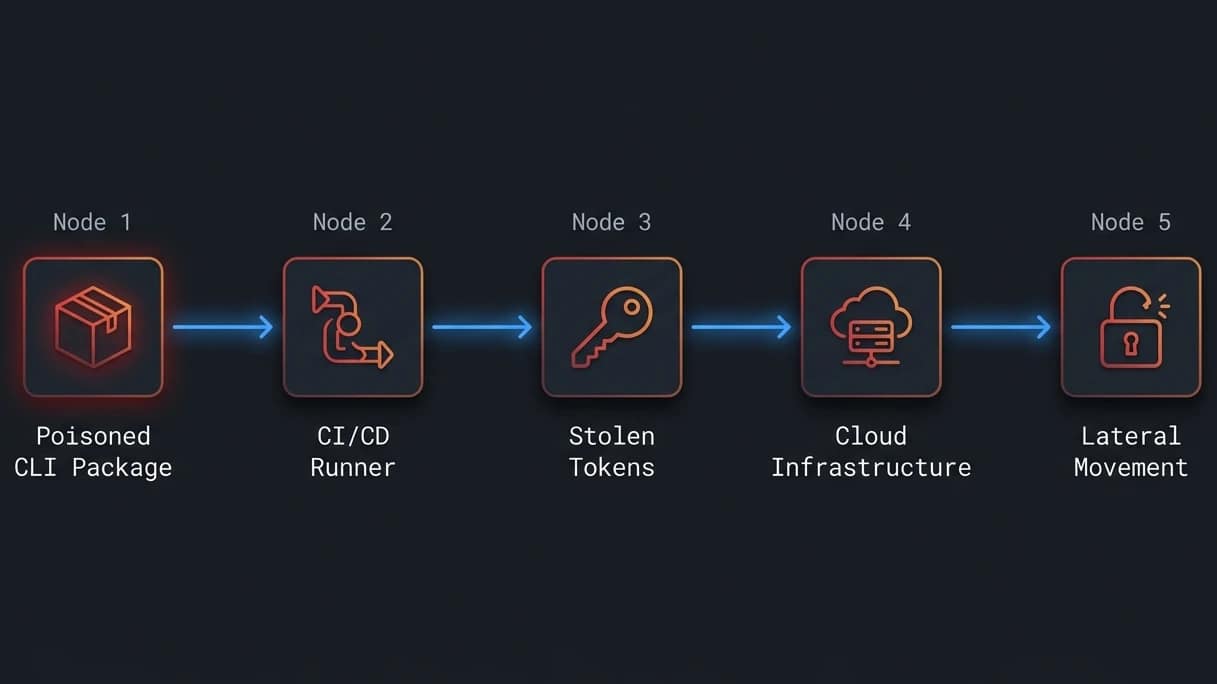
A single GitHub token is usually enough. From that, attackers can read private repositories, inject malicious dependencies into other projects, and push the supply chain attack to the next victim. TeamPCP built this campaign to cascade exactly that way.
Add stolen AWS credentials and you have direct production infrastructure access. Stack that with CI/CD secrets and the attacker essentially owns the deployment pipeline. The npm package was the entry wound. Everything after it is potential blast radius.
Any machine that ran the affected Bitwarden CLI version must be assumed fully compromised. Every secret accessible from that environment needs to be rotated before you can trust it again.
The persistence problem
The Bitwarden CLI Checkmarx supply chain attack payload did not just collect and leave. It checked for shell profile files like .bashrc to establish persistence – a mechanism to continue exfiltrating credentials from future commands long after the initial 93-minute window closed.
A workstation that ran version 2026.4.0 cannot be cleaned with a scan. It needs a full OS reinstall. Stolen credentials that are not rotated immediately can be weaponised months later, long after the security team has moved on.
Immediate Steps to Secure Your Environment After the Bitwarden CLI Checkmarx Supply Chain Attack
Emergency actions: do these before anything else
In the wake of the Bitwarden CLI Checkmarx supply chain attack, act first, investigate second. Speed is your only real advantage here:
- Disconnect the suspected machine from all internal networks immediately.
- Treat the environment as fully compromised, not possibly compromised.
- Revoke all GitHub personal access tokens and npm publish tokens.
- Rotate AWS, Azure, and GCP credentials accessible from that machine.
- Invalidate all CI/CD secrets stored in GitHub Actions or GitLab CI.
Stolen tokens are worthless the moment you rotate them. Every minute you spend investigating before rotating is a minute the attacker still has working credentials.
Remove the compromised CLI version
Scorch the earth on the npm installation:
# Uninstall the global package
npm uninstall -g @bitwarden/cli

# Force clear the entire npm cache
npm cache clean --force

# Confirm it is gone
npm list -g @bitwarden/cli
Windows users: manually inspect %APPDATA%\npm\node_modules\@bitwarden\cli and delete the folder if it persists. Do not attempt to update over the top of the compromised version. Uninstall completely. Clear the cache. Start clean.
Reinstall with version pinning
Once the machine is wiped, and a full OS reinstall is the only real guarantee – install the clean release:
npm install -g @bitwarden/[email protected]
bw --version
For automated environments, this is non-negotiable: pin your dependencies. Update your package.json to use an exact version string with no caret or tilde, "@bitwarden/cli": "2026.4.1". Floating version ranges on security tooling are a liability that this incident just proved lethal. A minor version bump should never auto-deploy into a production pipeline.
Full credential rotation checklist
Work through this methodically:
- Developer accounts: Rotate all GitHub and npm tokens. Review your GitHub audit log for unrecognised IP addresses or API calls in the 22 April window.
- Cloud infrastructure: Rotate AWS keys via IAM. Rotate GCP service account keys via the console. Audit CloudTrail logs for unexpected API calls.
- SSH access: Generate new
ed25519key pairs, deploy public keys to all servers, revoke the old ones. - Pipeline secrets: Replace every secret stored in your CI/CD runner environments, not just the ones you think were exposed.
- Bitwarden account: Review active sessions in your web vault. Confirm two-factor authentication is active.
Right now is the right time to reassess where your secrets live full stop. A password manager with zero-knowledge architecture, no npm delivery pipeline, and servers in Switzerland is a materially different risk profile to what just happened here. Proton Pass Plus is 50% off for BAIZAAR readers, with a 30-day money-back guarantee. No commitment needed to find out if it fits.
For more on securing your overall Bitwarden account structure, see our earlier breakdown: Bitwarden security developments and structural changes in 2026.
Alternative Password Managers After the Bitwarden CLI Checkmarx Supply Chain Attack
For broader context on why supply chain incidents are now the dominant threat vector across developer tooling, see our piece on social engineering and quishing attacks in 2026.
Alternatives for command-line password access
If the Bitwarden CLI Checkmarx supply chain attack has pushed you away from npm-distributed tools while confidence rebuilds, several solid options exist.
Proton Pass has been building out proper developer tooling quietly for the past year. Zero-knowledge architecture means Proton cannot see your stored credentials even if their servers were breached. The supply chain exposure is dramatically lower: no npm delivery, no GitHub Actions build pipeline reliant on third-party Actions. For CLI-integrated password management with a fundamentally different risk model, this is the cleanest available alternative right now.
If the Bitwarden CLI Checkmarx supply chain attack has you reconsidering your entire credential management stack, which it should – get Proton Pass Plus at 50% off with BAIZAAR’s exclusive discount, backed by a 30-day money-back guarantee.
Pass (the standard Unix password manager) uses GPG encryption and a plain git repository. No central server, no npm package. The attack surface is minimal. Managing it across a team requires real technical competence, though. It is the safest option architecturally. It is also the least forgiving.
1Password CLI (op) offers excellent enterprise support and seamless CI/CD secret injection. Massive security budget, and it shows. The catch is purely financial, subscription-only with no meaningful free tier.
Desktop and mobile alternatives
KeePassXC ships its own keepassxc-cli tool with the desktop app. You bypass npm entirely and install through your OS package manager. The limitation is sync, you manage your own vault replication via Syncthing or Nextcloud, which is not always what teams want.
Bitwarden desktop app was completely unaffected by this incident. Honestly, for most users, the CLI was the wrong tool to begin with. The desktop client does everything most people need.
For cross-platform sync with genuine zero-access encryption, Proton Pass is the strongest mobile-first option in this list. The free tier is generous. If you want to pull your entire privacy stack: Mail, Drive, VPN, Calendar, Pass, Meetings + Lumo AI – into one place, Proton Unlimited is 30% off for BAIZAAR readers right now. That is the consolidation move for anyone who has just been reminded how interconnected modern tooling is.
How the main Password Managers alternatives Compare to Bitwarden
| Manager | CLI Support | Supply Chain Risk | Cost | Privacy Posture |
|---|---|---|---|---|
| Proton Pass | Growing | Low (direct download) | Free / paid tiers | Zero-knowledge, Switzerland |
| Pass (Unix) | Native | Minimal (GPG only) | Free | Local, user-controlled |
1Password (op) | Full | Low (direct installer) | Subscription | Strong, enterprise focus |
| KeePassXC | Full (keepassxc-cli) | Low (system packages) | Free | Local-first, open source |
| Enpass | Limited | Low (direct download) | Paid | Local-first, no central server |
| Bitwarden (non-CLI) | No | Not applicable | Free / paid tiers | Open source, audited |
None are perfect. pass is architecturally safest but painful to onboard. 1Password is excellent but expensive. KeePassXC forces you to manage your own sync. Proton Pass gives the best balance of usability, supply chain safety, and genuine privacy posture, which is why it sits at the top of this table.
BAIZAAR Exclusive: Proton Pass Plus is 50% off right now with updated visuals, a streamlined setup flow, and a 30-day money-back guarantee. If you are moving away from npm-distributed security tooling, this is the most straightforward alternative we can recommend.
How to Prevent Future Attacks After the Bitwarden CLI Checkmarx Supply Chain Attack
Monitor your dependencies actively
The Bitwarden CLI Checkmarx supply chain attack was caught quickly because security firms watch npm package publishes. You need the same visibility for your own stack.
Socket.dev offers a free tier that monitors npm dependencies for malicious behaviour: unusual install scripts, obfuscated code, unexpected network calls, before they execute. It integrates directly into CI/CD pipelines. Use it.
Dependabot and Renovate help manage updates. Use them correctly: pin versions tightly, read the actual pull requests, and never configure auto-merge for security tooling without a human reviewing the changelog.
Verify what you install
For npm packages, look for tools publishing with npm publish --provenance. This cryptographically links the package on npm to the specific GitHub Actions workflow that built it. You can verify locally using npm audit signatures.
For critical security tooling, skip raw npm global installs entirely where possible. Prefer your OS package manager: apt, brew, winget. These distribution channels add human review and cryptographic signing that raw npm lacks. The NIST guidelines for software supply chain risk (NIST SP 800-218) are the authoritative framework for implementing these controls at an organisational level.
Build redundancy into your secret management
Relying on a single tool for secrets management is the setup that makes incidents like this catastrophic instead of merely inconvenient:
- Maintain a verified binary of a known-good release in your own internal artefact storage.
- Treat every version bump to a security tool in a production pipeline as a high-risk change requiring explicit human sign-off.
- For extremely sensitive environments, compile from source rather than using pre-built packages.
It creates friction. It also means a compromised npm package cannot hand your AWS keys to a threat actor in 93 minutes.
Stay informed: these sources do the work for you
You cannot defend against threats you do not know about. These are worth tracking:
- Bleeping Computer Security: Consistently fast, accurate, and practical for supply chain incidents.
- CISA KEV Catalogue: The definitive known-exploited vulnerabilities list. Subscribe to the alerts.
- GitHub Security Advisories: Watch repositories you depend on directly.
- npm audit: Run it in every single pipeline build, not just on your laptop occasionally.
Bitwarden’s official response to the CLI Checkmarx supply chain attack
What Bitwarden said publicly
Bitwarden published a statement on their community forum on 23 April 2026, roughly 24 hours after the incident. Adam Eckerle confirmed the exact 93-minute window, tied the compromise to the broader Checkmarx attack campaign, and stated explicitly that no end-user vault data was accessed.
The transparency was genuinely good. Exact version number, exact time window, exact distribution channel. That specificity lets security teams assess exposure fast instead of treating the entire platform as suspect.
What Bitwarden did about it
Bitwarden deprecated the malicious release immediately, revoked the compromised GitHub Action’s access, and pushed the clean replacement – version 2026.4.1, within hours. A CVE is being issued for the 2026.4.0 version.
Internal reviews confirmed no other Bitwarden products were affected. Browser extensions, desktop apps, and mobile clients were all cleared. Going forward, Bitwarden will almost certainly tighten GitHub Actions controls and adopt npm provenance attestation to prevent a recurrence.
No compensation – and what that actually costs you
Bitwarden has not announced compensation for affected users. Standard practice for a contained open-source incident. The core platform remains secure and support is available through community channels.
The real cost here is not financial. It is the hours, likely days spent rotating compromised infrastructure secrets, auditing CI/CD logs, and wiping affected workstations. That is the damage that never shows up in an incident report.
Worth considering while you are doing that work: The time and stress cost of this kind of rotation is exactly why choosing a password manager with a fundamentally lower attack surface matters. Proton Pass Plus is 50% off for BAIZAAR readers, zero-knowledge architecture, no npm delivery pipeline, 30-day money-back guarantee. The switch is worth thinking about.
What open-source projects must learn from this
The Bitwarden CLI Checkmarx supply chain attack proved that the build pipeline is now the primary attack surface. Securing source code is irrelevant if the tool that packages it has been compromised.
TeamPCP targeted shared GitHub Actions used across dozens of projects simultaneously. Every downstream project that consumed checkmarx/ast-github-action was a potential victim. Open-source maintainers need to pin GitHub Actions to specific commit SHAs, not floating tags. The OWASP Top 10 for CI/CD Security is the practical framework for hardening build pipelines against exactly this class of attack. The community is adopting these controls slowly. Attackers are moving much faster.
Frequently Asked Questions About the Bitwarden CLI Checkmarx Supply Chain Attack
When was the Checkmarx Bitwarden CLI compromise discovered?
The malicious package appeared on npm at 5:57 PM ET on 22 April 2026. It was pulled exactly 93 minutes later at 7:30 PM ET. Security firms including Socket Research flagged the anomaly almost immediately. Bitwarden published their official confirmation the following day.
Was Bitwarden company infrastructure directly hacked?
No. Bitwarden’s servers, encryption infrastructure, and user databases were not breached. Attackers hijacked a third-party GitHub Action used in Bitwarden’s CI/CD pipeline. That gave them the ability to publish a malicious package to npm. The core Bitwarden codebase and user vaults were completely secure throughout the incident.
Can I still trust Bitwarden after this supply chain attack?
Yes, in context. Their incident response was fast, transparent, and accurately scoped. A 93-minute detection window for a supply chain attack is genuinely impressive. The underlying issue was reliance on a third-party GitHub Action without adequate controls. Users on browser extensions and mobile apps were never at risk and can continue using Bitwarden with full confidence.
How often should I audit my CLI tools for tampering?
Version-pin your automation tools and treat every update as a change requiring review. A monthly audit of global npm packages is a sensible baseline for developer workstations. Run npm audit in every pipeline build. When a supply chain incident makes news, audit your CI/CD dependencies that same day, not at the next sprint.
What is the best Bitwarden CLI alternative after this Checkmarx compromise?
If you want a password manager that avoids npm delivery entirely, Proton Pass Plus is the cleanest option BAIZAAR recommends right now. Zero-knowledge encryption, cross-platform support, CLI tooling outside the Node ecosystem, currently 50% off with a 30-day money-back guarantee. For teams or individuals wanting the full privacy stack, Pass, Mail, Drive, VPN, and Calendar under one roof (and more..) – Proton Unlimited is 30% off for BAIZAAR readers.