Dropbox Privacy Policy Changes 2026:
What Changed, and What
Was Already There
TL;DR: The Dropbox privacy policy changes 2026 are smaller than the headlines. The new policy, posted on 1 September and effective on 1 January 2027, adds multi-workspace accounts, spells out what team admins can see, and explains how to appeal. You accept it by keeping your account.
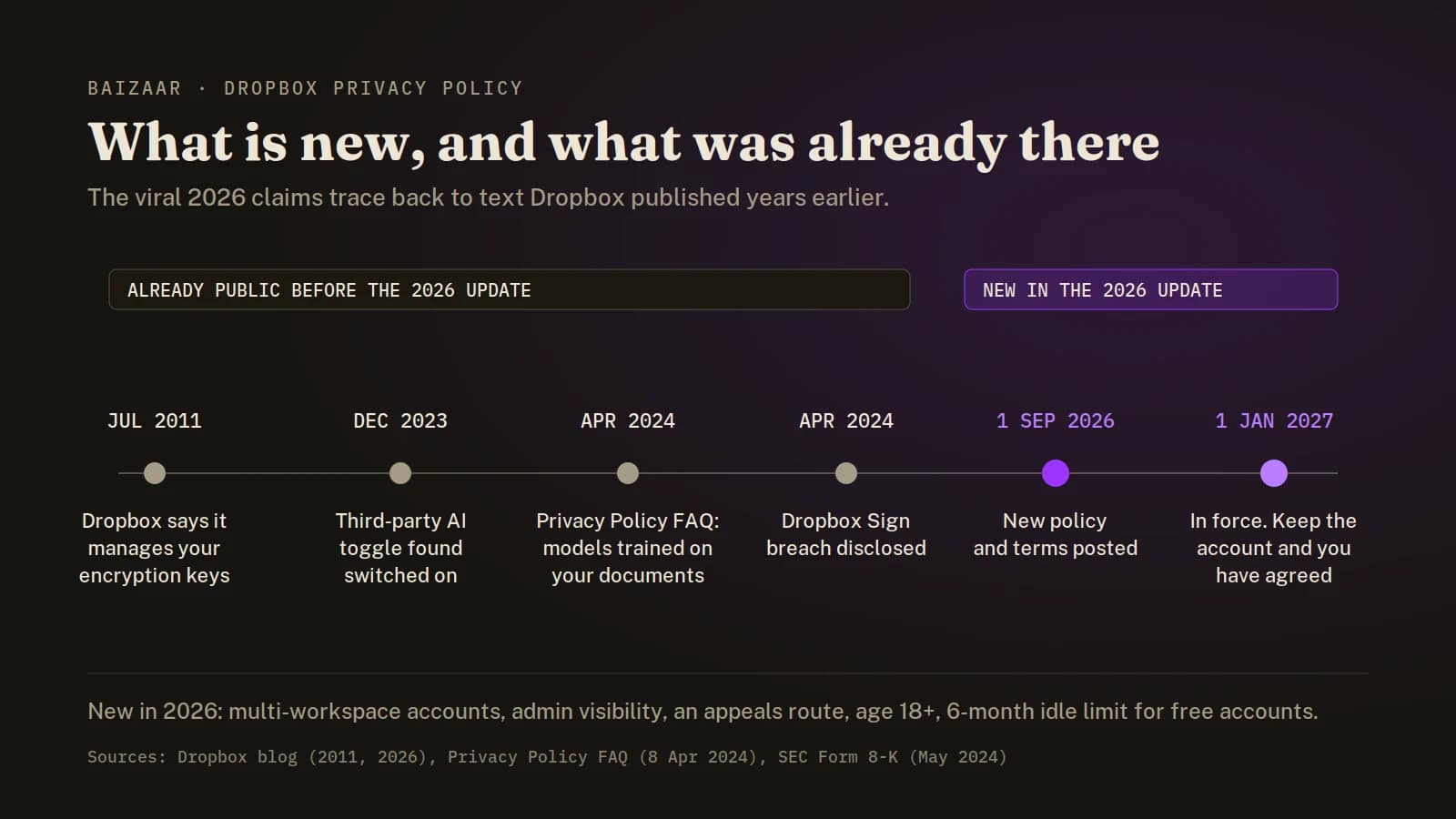
The alarming lines going round Lemmy and Reddit are real. AI models trained on your documents, staff reviewing search clicks, 90 days of browser history pulled in by Dash. None of it is new. Every line sits in the Dropbox Privacy Policy FAQ, dated April 2024.
What matters more than any clause: Dropbox holds the keys to your files. Every one of those lines is a permission, not a technical limit, and zero-knowledge storage removes the permission by removing the key.
Already made your mind up? The two services we would move to are Proton Drive, free for 5 GB, for anything you would hate a stranger to read, and pCloud Lifetime for the bulk. Everyone else, read on, because the viral version of this story gets the date wrong and the diagnosis right.
- What changed in the Dropbox privacy policy for 2026?
- Is Dropbox training AI on your files? The viral claims, checked
- Can Dropbox read your files?
- Why the Dropbox privacy policy matters less than who holds the key
- What should you do before 1 January 2027?
- Which privacy-focused cloud storage should replace Dropbox?
- What zero-knowledge storage will not fix
- Should you leave Dropbox, or just move some folders?
- The BAIZAAR verdict
- Dropbox privacy policy FAQ
- How we verified this
- Sources
- Related BAIZAAR guides
What changed in the Dropbox privacy policy for 2026?
Less than the noise suggests.
On 1 September 2026 Dropbox published a new Privacy Policy, Terms of Service and Dropbox Services Agreement, all taking effect on 1 January 2027. The privacy half of that package does three things.
- One login, several workspaces. You will be able to reach personal and team workspaces from a single account. The new Dropbox privacy policy explains how your data moves between them, and says a team admin may see changes in the state of your other accounts, such as a suspension or removal from another team.
- Purposes spelled out. According to Dropbox, it has further explained which data is used for which purpose. By its own description that is a clarification rather than a new use.
- An appeals route. Refused on a privacy request? You can now appeal by emailing
[email protected].
The Terms of Service changes will touch more people day to day.
| What changes | Current terms | From 1 January 2027 |
|---|---|---|
| Minimum age | 13 in the US, 16 elsewhere | 18, everywhere |
| Idle free accounts | May be closed after 12 consecutive months unused | May be closed after 6 consecutive months, with notice |
| Refunds | Only where the law requires | Also in “other limited circumstances” |
| If you disagree | Cancel before the update takes effect | Cancel and delete your account before 1 January 2027 |
| Workspaces | One account, one plan | Several individual and team workspaces, one login |
Swipe the table sideways for the third column.
Two rows deserve a second look.
If a teenager in your house keeps schoolwork in Dropbox, it needs a new home before January.
And if you keep an old free account as a dusty archive, six months of silence is now enough for Dropbox to start closing it, with an email warning first.
Nobody will be asked to tick a box.
Under the new terms you agree simply by keeping an account after the effective date, and anyone who disagrees has to cancel and delete before 1 January 2027.
Is Dropbox training AI on your files? The viral claims, checked
Partly, in writing, and since at least April 2024.
The claims come from a September 2026 post in the Lemmy privacy community that quoted the Dropbox Privacy Policy FAQ and concluded the service is no longer fit for confidential files.
The quotes are accurate. Presenting them as the new 2026 Dropbox privacy policy is not.
What set the poster off is the relatable part.
A paying customer of ten years searched their Dropbox for a song title and got back health PDFs and photos with sunbeams in them. That is usually the moment people discover their files are indexed by what is inside them, not just by name.
| The claim | What Dropbox’s own pages say | Our read |
|---|---|---|
| “Dropbox scans your documents to train AI” | Dropbox may build models that pick out keywords and topics, trained on your documents and metadata, to power search, sorting and summaries. | True. Internal models, stated plainly. |
| “It shares your data with OpenAI and Google” | Both sit on a list of 23 trusted third parties acting for Dropbox. In December 2023 Dropbox said its AI partners would not train on your data and would delete it within 30 days. The page carrying that promise has since been retired. | Named, yes. The no-training promise is no longer on Dropbox’s current pages. |
| “Humans review your data” | Staff may review which search results you click, and may review questions asked in Dash Answers. Suspected policy breaches get hash-matching and human review. | True, and narrower than it sounds. |
| “It records all your browsing” | Dash imports 90 days of browser history, page content included. | True for Dash users. Nobody else. |
| “This is the new 2026 policy” | The lines live in the FAQ, dated April 2024. The 2026 policy points readers to that FAQ for its AI detail. | Wrong on timing, right on substance. |
Scroll across for our read on each claim.
“These models may be trained on your documents and metadata.” Ten words, section 2 of the Dropbox Privacy Policy FAQ, public since 2024.
One line nobody quoted is, to my eye, the most revealing. In the section on promoting its services, the FAQ lists the content of your files next to device counts and storage used as signals for spotting people who might buy a premium plan.
Your documents can feed the upsell.
Fair is fair, though.
Nothing here says Dropbox sells your files, and the same FAQ states in its data-request table that Dropbox does not sell personal data.
Nobody is running a black market here. What should worry you is that the permission exists at all, lives in a help-centre page rather than the Dropbox privacy policy itself, and can be redrawn.
The OpenAI connection is older than this row as well. In December 2023, users found a Third-party AI setting switched on in their accounts without having touched it.
Drew Houston, the Dropbox chief executive, apologised for the confusion and said no setting sends data to an outside AI service unless you use an AI feature. Reports at the time said the toggle defaulted to on outside the UK and EEA.
Can Dropbox read your files?
Yes.
Files are encrypted with AES-256 at rest and TLS in transit, and Dropbox holds the keys to both. That is competent protection against outsiders. Against Dropbox itself, or anyone who can compel Dropbox, it does nothing.
None of this is hidden. The current Terms of Service say that, to run search, previews and text recognition, Dropbox “accesses, stores, and scans Your Stuff”, and that the permission extends to affiliates and trusted third parties.
The company has said as much since 2011.
A Dropbox blog post from July that year explained that the company manages encryption keys for you, because web access, previews and sharing would be clumsy otherwise, and pointed anyone who wanted their own keys towards TrueCrypt.
That post is still online. Its title, “Changes to our policies”, makes it easy to mistake for this year’s announcement.
End-to-end encrypted folders do exist at Dropbox, on team plans only. A personal Plus subscriber paying $9.99 a month does not get them, a gap we pulled apart in Dropbox vs Proton Drive 2026.
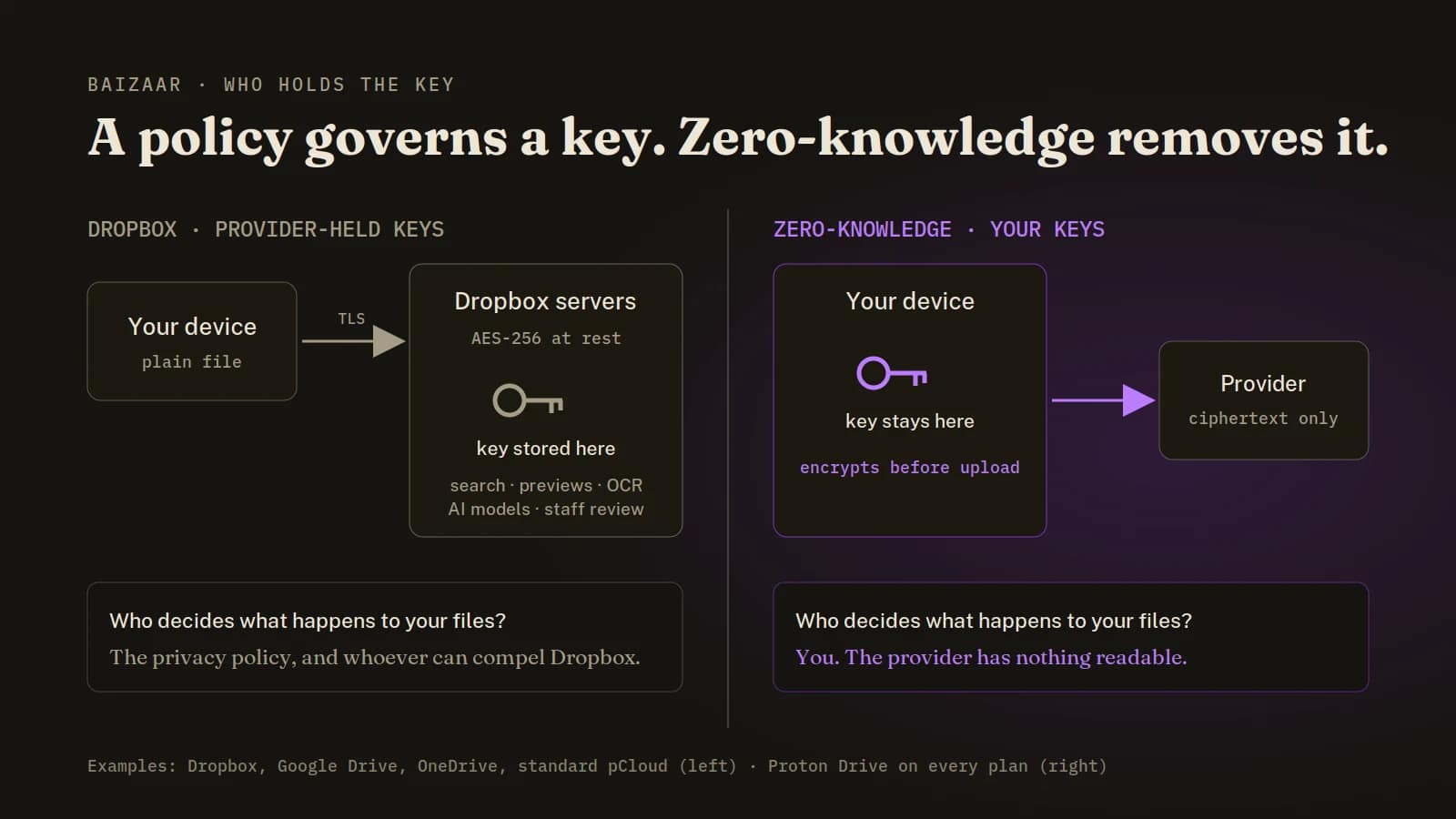
Four terms this page keeps using
- Provider-held keys
- Your files are encrypted, but the company storing them keeps the key. Dropbox, Google Drive, OneDrive and standard pCloud all work this way.
- Zero-knowledge encryption
- Files are encrypted on your device with a key the provider never receives, so the provider stores scrambled data it cannot open. That is how Proton Drive works, on every plan.
- Trusted third party
- A Dropbox term for companies processing data on its behalf, such as hosting or support. They act on Dropbox’s instructions rather than buying your data.
- Legitimate interests
- A legal basis under UK and EU data protection law. The basis lets a company process data without consent, provided you can object and your interests are weighed.
Why the Dropbox privacy policy matters less than who holds the key
A privacy policy is a promise about behaviour. Encryption with a key only you hold is a limit on capability. The first can be rewritten in the next revision. The second holds, whatever the next revision says.
The 2026 update shows the difference neatly.
The new Dropbox privacy policy promises to notify you if a revision meaningfully reduces your rights, and Dropbox decides what counts as meaningful. Its detailed AI language lives in a help-centre FAQ the policy points to, a page with its own update date and no effective date at all.
A smaller example turned up while this page was being checked. The Dropbox help article promising that AI partners would not train on your files, and would delete them within 30 days, now redirects to the general FAQ. The promise may still hold. It is simply no longer written down anywhere we could find.
Then there is the breach question. On 24 April 2024 Dropbox discovered an attacker inside the production environment of Dropbox Sign, its e-signature product. Every Sign user’s email and username was reached, and for some users the attacker also got phone numbers, hashed passwords, API keys and OAuth tokens.
Credit where it is due.
Disclosure came within a week, in an SEC filing. Dropbox said it found no evidence that signed documents were accessed, and that its file storage was not affected.
Sign teaches one narrow lesson, and it is a useful one.
Any company holding your data and the means to read it is worth attacking. A provider that never had the key has nothing readable to lose, whatever its policy says next year.
A policy tells you what a company will do with the key. Zero-knowledge storage means there is no key to do anything with.
What should you do before 1 January 2027?
Five steps before the new Dropbox privacy policy lands, and none of them means leaving Dropbox today.
- Switch off Third-party AI. Dropbox added a Third-party AI setting to account settings in 2023. If yours still shows it, switch it off. If it has gone, check the privacy and AI sections of your settings for whatever replaced it, because Dropbox no longer documents the old one.
- Think twice about Dash. Dash is the tool that imports 90 days of browser history, page content included. Installed the extension or desktop app to try it once? Remove it unless you rely on it.
- Object, if you want it on record. Outside North America, your data controller is Dropbox International Unlimited Company in Ireland, and UK and EU users can object to legitimate-interests processing by emailing
[email protected]. Objecting will not change who holds the key. - Sort your folders by consequence. Passports, tax returns, contracts, medical letters, anything with a signature on it. That pile goes to zero-knowledge storage. Holiday photos can stay put.
- Download before you delete. Rejecting the new terms means cancelling and deleting your account before 1 January 2027. Pull everything down, open a sample to check it survived, then delete. The policy says deletion of stored files starts 30 days later, with some lag in backups.
Keeping a free account as a forgotten archive? Log in before six months pass, or move the lot now while you remember it exists.
Which privacy-focused cloud storage should replace Dropbox?
For most people, two services doing two jobs.
The files nobody else should read go to Proton Drive. The bulk you simply want kept cheaply goes to pCloud. Our Proton Drive vs pCloud comparison lands on the same split, and the 2026 changes to the Dropbox privacy policy make it easier to justify.
| Dimension | Dropbox | Proton Drive | pCloud |
|---|---|---|---|
| Who can read your files | Dropbox | Only you | pCloud, except inside the paid Encryption folder |
| Default encryption | Server-side, Dropbox keys | End to end, your keys | Server-side, pCloud keys |
| Company base | United States | Switzerland | Switzerland |
| Free tier | 2 GB | 5 GB | Up to 10 GB |
| Entry paid plan | 2 TB, $9.99/mo | 200 GB, $3.99/mo | 500 GB, $49.99/yr |
| Pay once | No | No | 500 GB $219, 2 TB $499 |
| Zero-knowledge option | Team plans only | Every plan, free included | Add-on, $49.99/yr or $150 once |
The table scrolls sideways on a phone.
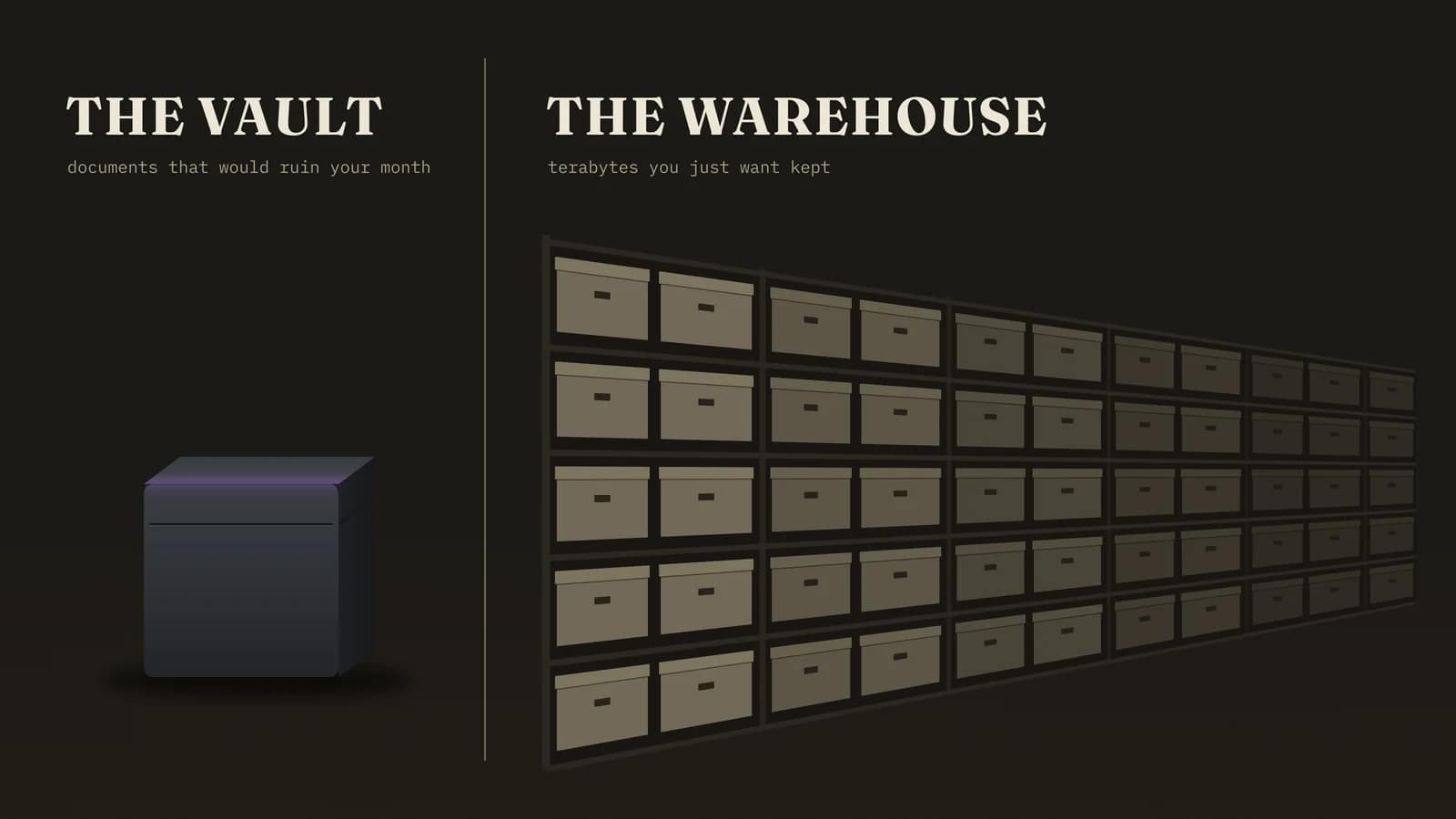
Proton Drive: the vault
Every file is encrypted on your device before upload, on every Proton Drive plan including the free one. File and folder names are encrypted too, with keys generated on your device, and Proton says that makes decrypting any of it impossible from its side. The apps are open source.
The company behind it, Proton AG, is Swiss. Securitum audited the Drive web app in 2021 and the mobile apps in 2022, and Proton has held company-wide ISO 27001 certification since May 2024.
Those Drive-specific audits are getting old, and I would like to see a fresh one. Even so, that is more outside scrutiny than most rivals publish.
The catch is capacity. Drive Plus gives you 200 GB for $3.99 a month on an annual plan, against 2 TB for $9.99 on Dropbox Plus. For identity documents and contracts rather than 4K video, 200 GB is a great many passports.
Then comes the plan that makes the Dropbox comparison awkward.
At $9.99 a month on an annual plan, Proton Unlimited costs exactly what Dropbox Plus does, and gives you 500 GB of Drive plus Proton VPN, Proton Mail, Proton Pass and Calendar.
Paying separately for a VPN or a password manager already? You are overpaying somewhere. See what Proton Unlimited includes, or read our Proton Unlimited review first.
BAIZAAR editorial score for Proton Drive: 4.5 / 5. Encryption you can verify rather than take on trust, marked down for a 200 GB entry ceiling and integrations that are still growing up.
pCloud: the warehouse
With pCloud, a Swiss company, you can pay for storage once.
A 500 GB lifetime plan costs $219 and 2 TB costs $499, against $49.99 and $99.99 a year on subscription, so either lifetime plan pays for itself in four to five years. When you sign up, you pick whether your files sit in its EU data centre in Luxembourg or in the US.
Be clear about what it is not. Standard pCloud storage is encrypted on pCloud’s servers with pCloud’s keys, the same model as Dropbox. Client-side encryption is a paid extra called pCloud Encryption, at $49.99 a year or $150 once, and it only covers files you put inside its dedicated encrypted folder.
That add-on carries a mark against it too. In October 2024, ETH Zurich researchers published an analysis of five end-to-end encrypted storage services and found serious weaknesses in four, pCloud among them, in the scenario of a compromised server. That study did not include Proton Drive.
I could not find a public statement from pCloud on fixes.
Its marketing still points at a 2015 and 2016 hacking challenge, in which nobody claimed the $100,000 top prize. A public contest is not an audit, and the ETH paper is the better guide.
So BAIZAAR uses pCloud for the warehouse, never the vault.
Photos, music, video projects, the 400 GB you want kept but would not mind a court reading. For that job the lifetime maths is hard to beat: check the pCloud Lifetime plans. Want the encrypted folder on top? Add pCloud Encryption knowing its limits, and read what pCloud Crypto covers first.
The vault and the warehouse
For the documents that would ruin your month, Proton Drive. For the terabytes you just want kept, pCloud Lifetime. Both Swiss, both with a free tier you can test before paying anybody.
Proton’s free 5 GB plan is a perfectly good place to start.
Staying on Dropbox? Encrypt before you upload
If your working day runs through Dropbox integrations, you can keep them and still take the key away from Dropbox for your most sensitive files.
Cryptomator, free and open source, encrypts files into a vault on your own machine before the Dropbox app syncs anything, so Dropbox stores ciphertext it cannot read.
Our Cryptomator setup guide uses pCloud, and the process with Dropbox is almost identical. You lose Dropbox search and previews inside the vault, which is precisely the point.
What zero-knowledge storage will not fix
Moving providers solves the key problem that no Dropbox privacy policy can. Eight others come with you.
- Lose your password and your recovery methods, lose the files. A provider that cannot read your data cannot rescue it either. Set up Proton’s recovery phrase the day you sign up.
- Account data still exists. Both services know your email, your billing details and roughly how much you store. Encryption hides content, not the fact that you are a customer.
- Less storage per pound. 200 GB on Drive Plus is a tenth of Dropbox Plus for a bit under half the price.
- pCloud is not zero-knowledge by default. Only the paid Encryption folder is, and the ETH Zurich findings apply to it.
- Audits age. The app-level audits for Proton Drive date from 2021 and 2022.
- A shared link is itself a key. Anyone holding the full link can open the file, so put a password and an expiry date on anything sensitive.
- Leaving does not erase what Dropbox already holds. Deletion starts 30 days after you close the account, and backups lag behind that.
- Sync is not backup. Delete or corrupt a file locally and every synced copy follows. Keep a separate copy on separate hardware.
Should you leave Dropbox, or just move some folders?
Most people should move some folders. Three profiles, and you probably know which one you are.
Stay if your files are mostly shared work documents that live inside Slack, Microsoft 365 or client workflows, and nothing in them would hurt you if a third party read it. Switch off Third-party AI, skip Dash, carry on.
Split if you have a folder of identity documents, finances or contracts. Move that folder to Proton Drive this week and leave the rest where it is. This is where most readers land.
Leave if you never touched the collaboration features, mostly store personal archives, and a US company holding your keys was always the bit that bothered you. pCloud Lifetime for the bulk, Proton Drive for the sensitive part, Dropbox deleted before 1 January 2027.
Whichever you pick, do not delete Dropbox on day one. Move the sensitive folder, open a handful of files on the new service, and only then decide about the rest.
Move the folder that would ruin your month
For $9.99 a month on an annual plan, the price of Dropbox Plus, Proton Unlimited gives you 500 GB of end-to-end encrypted Drive plus Proton VPN, Mail and Pass. Only need storage? Drive Plus is 200 GB for $3.99.
Swiss jurisdiction. Open-source apps. A 30-day money-back guarantee if it does not suit you.
Need terabytes rather than a vault? pCloud Lifetime pays for itself in four to five years.
The BAIZAAR verdict
The Dropbox privacy policy changes 2026 are not the scandal the viral posts describe. The new text is mostly housekeeping: multi-workspace accounts, a firmer age limit, a shorter fuse on idle free accounts. The AI and human-review language people are furious about has sat in a public FAQ since 2024.
That makes the case against Dropbox stronger.
For fifteen years Dropbox has told its users that it holds the keys. Every policy it writes describes what it chooses to do with them.
Some of those choices are reasonable. Others, like using file contents to decide who gets a premium upsell, you only find by reading section 4 of a help page.
If that trade suits your files, stay, switch off Third-party AI and leave Dash alone.
If it does not, a better policy will not fix anything. A provider without the key will. Move the sensitive folder first, and decide about the rest at leisure.
Dropbox privacy policy FAQ
What changed in the Dropbox privacy policy in 2026?
Three things. The policy now covers using several individual and team workspaces from one account, including what team admins can see, explains more precisely which data is used for which purpose, and adds a way to appeal privacy decisions by emailing [email protected].
When does the new Dropbox privacy policy take effect?
1 January 2027. The new Dropbox privacy policy was posted on 1 September 2026 alongside new Terms of Service and a new Dropbox Services Agreement, and you accept all three by keeping your account past that date.
Does Dropbox use my files to train AI?
Its own models, yes. The Dropbox Privacy Policy FAQ says Dropbox may train keyword and topic models on your documents and metadata to power search, sorting and summaries. That language dates from at least April 2024, so it is not part of the 2026 update. A 2023 promise that outside AI partners would not train on your data no longer appears on Dropbox’s current pages.
Does Dropbox share my files with OpenAI?
OpenAI is named on its list of 23 trusted third parties. In December 2023 Dropbox said files went to OpenAI only when you used an AI feature, that OpenAI would not train on them, and that they would be deleted within 30 days. The help page carrying that promise has since been retired, and we could not find it restated anywhere current.
Can Dropbox employees see my files?
They can, technically, because Dropbox holds the keys. The Dropbox privacy policy FAQ describes staff reviewing search-result clicks and Dash Answers questions, and human review of content flagged under its Acceptable Use Policy. Access is governed by internal controls, not by maths.
Can Dropbox read my files?
Yes. Files sit behind AES-256 at rest and TLS in transit, but Dropbox keeps the keys, and its Terms of Service say it accesses, stores and scans your files to provide features such as search and previews. End-to-end encrypted folders exist only on team plans.
What happens if I do not agree to the new Dropbox terms?
You have to cancel your subscription and delete your account before 1 January 2027. There is no opt-out that keeps the account on the old terms. Download your files first and check they open, because deletion begins 30 days after the account goes.
Can under-18s still use Dropbox?
Not from 1 January 2027. The minimum age rises from 13 in the US and 16 elsewhere to 18 everywhere. If your children keep schoolwork in Dropbox, plan the move this term rather than discovering it in January.
Will Dropbox delete my free account if I do not use it?
From 1 January 2027 it can, after 6 consecutive months without access, down from 12. A warning email comes first, according to Dropbox. Paid accounts are not affected by the inactivity rule.
How do I turn off third-party AI in Dropbox?
Sign in on the web and open your account settings from your profile icon. Dropbox added a Third-party AI option in 2023, and if it is still there, switch it off. On team accounts the admin controls it. Dropbox has retired the help page that documented this setting, so if you cannot find it, check the privacy and AI sections of your settings.
Is Proton Drive more private than Dropbox?
Yes, on the question that matters most. Files are encrypted on your device with keys Proton never holds, on every plan including the free 5 GB, whereas Dropbox holds the keys on personal plans. You trade capacity and integrations for it, since 200 GB on Drive Plus costs $3.99 a month against 2 TB for $9.99 on Dropbox Plus.
Is pCloud zero-knowledge?
Only inside its paid Encryption folder, which costs $49.99 a year or $150 once. Standard pCloud storage uses server-side keys, like Dropbox. ETH Zurich researchers reported weaknesses in pCloud’s client-side encryption in 2024, so we treat pCloud as bulk storage rather than a vault.
What is the best privacy-focused cloud storage in 2026?
For sensitive files, Proton Drive: zero-knowledge by default, Swiss, open source and audited, with a free tier to test. For large archives on a budget, pCloud Lifetime. Most people are better served by both than by forcing one service to do two jobs.
How we verified this
Every claim about the Dropbox privacy policy on this page comes from Dropbox’s own documents, read on 25 September 2026: the 2026 Privacy Policy and Terms of Service, the current Terms of Service posted on 7 January 2025, the help-centre update summary, the September 2026 blog announcement and the Privacy Policy FAQ.
The viral claims were checked line by line against that FAQ rather than against the Lemmy post that quoted it. Breach details come from the Dropbox Form 8-K filed with the SEC in May 2024. Proton’s audit history comes from Proton’s own announcements, and pCloud’s encryption findings from the ETH Zurich paper presented at ACM CCS 2024.
One source, the Dropbox AI privacy FAQ, had been retired by our final check on 4 October 2026, so every claim that relied on it is now dated and attributed.
We did not test Dropbox’s AI features, and this page claims nothing about what they do in practice beyond what Dropbox documents. Prices were checked against provider pages in October 2026 and change often.
Sources
- Dropbox 2026 Privacy Policy, posted 1 September 2026, effective 1 January 2027.
- The Dropbox Privacy Policy: frequently asked questions, Dropbox Help Center, dated 8 April 2024. Source for the AI, human review, Dash and third-party lines.
- Dropbox Terms of Service and Privacy Policy updates, Dropbox Help Center, updated 14 August 2026.
- Updates to our Terms of Service, Privacy Policy, and Dropbox Services Agreement, Dropbox blog, 1 September 2026.
- Dropbox Terms of Service, posted 7 January 2025, and the 2026 Terms of Service.
- FAQs about Dropbox AI and your privacy (archived copy), Dropbox Help Center. Dropbox has since retired this page. Source for the December 2023 third-party AI commitments.
- The truth about Dropbox opening up your files to AI, and the loss of trust in tech, The Register, 15 December 2023. Contemporary report of Dropbox’s statements on OpenAI and training.
- Changes to our policies, Dropbox blog, July 2011. Dropbox explains that it manages encryption keys for users.
- Dropbox, Inc. Form 8-K, SEC, May 2024. The Dropbox Sign incident.
- The AI trust crisis, Simon Willison, 14 December 2023. The Third-party AI toggle.
- End-to-End Encrypted Cloud Storage in the Wild: A Broken Ecosystem, Hofmann and Truong, ETH Zurich, ACM CCS 2024.
- Proton Drive security, Proton. States that Securitum has audited Proton Drive and links the published audit reports.
- DropBox’s New Privacy Policy is Not So Private, Lemmy privacy community, September 2026. The post behind the viral claims.
Related BAIZAAR guides
- Dropbox vs Proton Drive 2026: which wins?
- Proton Drive vs pCloud in 2026: the vault and the warehouse
- Proton Drive pricing plans 2026, every plan explained
- Is pCloud Lifetime really worth it?
- OneDrive privacy risks 2026: what Microsoft changed
- IceDrive review 2026