iCloud vs pCloud in 2026
The Switch That Saved Me $200, Before You Commit
Date Published: 04/07/2026 / Author: Baizaar Lee / Last Updated: 04/07/2026
Summary: iCloud Vs pCloud in 2026 is the comparison most Apple users end up researching the moment their storage bill creeps past the point of comfort. This guide compares Apple iCloud and pCloud for anyone deciding where to store photos, documents and backups this year, particularly if you’re frustrated by rising iCloud+ subscription costs or split your time between Apple and non-Apple devices. The short version: iCloud remains the simplest option if you’re fully inside the Apple ecosystem and want backup to happen invisibly. pCloud is worth considering if you use multiple platforms, want a large block of storage without an ongoing monthly bill, or want the option of stronger, user-controlled encryption. Neither service fully replaces the other, and the right choice depends on how you actually use your devices, not on which one “wins” in the abstract.
Quick Verdict
- Choose iCloud if you’re Apple-only, want zero-effort device backup, and don’t mind paying monthly for it.
- Choose pCloud if you use Windows, Android or Linux alongside Apple devices, want a large storage allowance without a recurring bill, or want optional zero-knowledge encryption.
- Consider running both during any transition, and potentially long-term if you rely on Apple-specific features like Find My, Keychain or Messages in iCloud.
Most people land in one of those three camps fairly quickly once they’ve seen the actual numbers. That’s really what this whole iCloud Vs pCloud in 2026 debate boils down to: cost versus convenience, and how much either one matters to you personally.
BAIZAAR may earn a commission if you buy through links on this page, at no extra cost to you.
- What Has Changed With iCloud and pCloud in 2026?
- iCloud Vs pCloud: Pricing and Long-Term Value
- iCloud Vs pCloud: Apple Ecosystem Integration
- iCloud Vs pCloud: Cross-Platform Support
- iCloud Vs pCloud: Privacy and Encryption
- iCloud Vs pCloud: Backup and Recovery
- iCloud Vs pCloud: File Sharing and Collaboration
- How Trustworthy Is pCloud Compared With iCloud?
- Is Paying for iCloud+ Worth It in 2026?
- Who Should Choose pCloud?
- Before You Switch: Migration Checklist
- iCloud Vs pCloud in 2026: Comparison at a Glance
- Final Verdict: iCloud Vs pCloud in 2026
- iCloud Vs pCloud in 2026 (FAQ)
What Has Changed With iCloud and pCloud in 2026?
Apple’s iCloud+ pricing structure has stayed largely stable this year. Advanced Data Protection has become more widely promoted, though, as a free opt-in setting for anyone wanting stronger encryption on their existing plan.
pCloud continues to run its lifetime cloud storage offer. It functions as a long-standing promotional pricing model rather than a permanent price commitment, and its Crypto add-on remains a separate paid purchase rather than a bundled feature.
Nothing fundamental has shifted in the underlying architecture of either service this year. Still, it’s worth rechecking both providers’ current pricing pages before making a decision, since promotional pricing can and does change without much warning.
iCloud Vs pCloud: Pricing and Long-Term Value
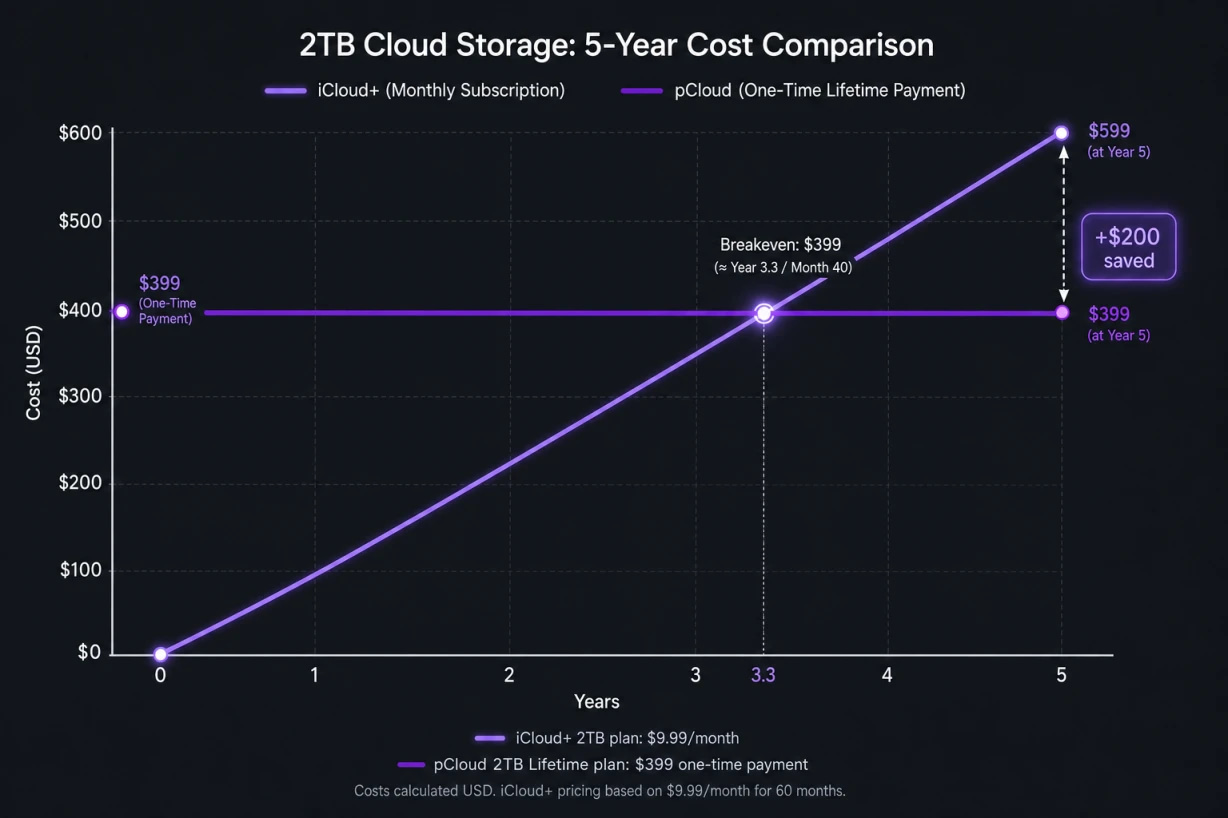
This is where most people start, and for good reason. At the time of writing, Apple’s official iCloud+ pricing in the US is $0.99 a month for 50GB, $2.99 a month for 200GB, $9.99 a month for 2TB, $29.99 a month for 6TB and $59.99 a month for 12TB.
There’s no annual discount tier on any of those plans. Over five years, the 2TB tier totals roughly $600, assuming pricing doesn’t rise in that period, which isn’t guaranteed given Apple’s track record of periodic increases.
pCloud’s current promotional lifetime pricing lists the 500GB Premium plan at $199 (reduced from a $299 list price), the 2TB Premium Plus plan at $399 (reduced from $599), and the 10TB Ultra plan at $1,190 (reduced from $1,890). Each is a single payment.
This is best understood as prepaid long-term storage access under pCloud’s terms, rather than outright ownership of the storage itself. The pCloud Crypto add-on, which enables zero-knowledge encryption, is listed separately at $150, reduced from $229.
Fact-check note: Cloud storage pricing changes reasonably often. The figures above reflect publicly listed pricing at the time of writing and should be rechecked against each provider’s official pricing page before publishing or making a purchasing decision.
Comparing the 2TB tiers on paper, iCloud+’s $9.99 monthly cost would reach pCloud’s $399 one-time price at around month 40, roughly three years and four months in. That assumes no price changes on either side across that stretch.
Whether that maths works in your favour depends entirely on how long you expect to keep using the service, and whether promotional pricing is still available when you buy. For a wider look at how this stacks up against other providers, our pCloud vs OneDrive comparison covers similar long-term cost maths in more detail.
iCloud Vs pCloud: Apple Ecosystem Integration
iCloud is built into iOS, iPadOS and macOS at a system level. It backs up device settings, app data, Messages, Health data, Keychain passwords and Find My location services without any manual configuration on your part.
This deep integration is iCloud’s clearest advantage in the iCloud Vs pCloud in 2026 comparison, and it’s one that pCloud doesn’t attempt to replicate. It simply isn’t designed to sit at that level of the operating system.
pCloud does not back up iOS system settings, Keychain, or Messages. It functions as a file and photo storage service that runs alongside iCloud rather than a full device-backup replacement.
Anyone switching away from iCloud entirely needs to understand this distinction clearly before assuming pCloud covers exactly the same ground. It doesn’t, and it was never trying to.
iCloud Vs pCloud: Cross-Platform Support
iCloud works acceptably on Windows via the iCloud for Windows app. It’s noticeably less capable there than on Apple hardware, though, and there’s no native iCloud client for Android or Linux at all.
pCloud, by contrast, offers dedicated apps for macOS, Windows, Linux, Android and iOS. Functionality stays consistent across all of them, including selective sync and block-level sync, which uploads only the changed portion of a file rather than re-uploading the whole thing each time.
For anyone working across more than one operating system day to day, this is a genuine practical difference, and one of the clearer wins in the iCloud Vs pCloud in 2026 debate. It isn’t a marketing point dressed up to sound impressive.
iCloud Vs pCloud: Privacy and Encryption

This is the section of any iCloud Vs pCloud in 2026 comparison where nuance matters most, and where cruder write-ups tend to oversimplify things badly.
Standard iCloud encrypts data in transit and at rest. Apple already applies end-to-end encryption by default to around 14 sensitive data categories, including Health data, Keychain passwords, and payment information, according to Apple’s own Advanced Data Protection documentation.
For the remaining categories, including iCloud Backup, Photos, Notes and Voice Memos, Apple can technically access the data. That’s because it holds the relevant decryption keys, primarily to support account recovery and legal compliance rather than for any more sinister reason.
Advanced Data Protection (ADP) is a free, opt-in setting that extends end-to-end encryption to roughly 9 additional categories. It covers most remaining iCloud data types, except for a small number tied to core account recovery functions.
Turning ADP on means Apple itself cannot read that data, even under legal request. It also means Apple cannot help you recover it if you lose access to your account and haven’t set up recovery methods in advance, which is worth genuinely weighing up before switching it on.
pCloud’s standard plans use AES-256 encryption at rest and TLS in transit. pCloud holds the encryption keys by default though, similar to iCloud without ADP enabled.
pCloud Crypto, the paid add-on, provides client-side zero-knowledge encryption instead. Files are encrypted on your device before upload, and pCloud itself cannot decrypt them.
This is a genuine security upgrade, but it isn’t included by default. Files stored this way also can’t be previewed in-browser or via the mobile app, which is a small but real trade-off. Our pCloud FAQ answers page covers how the Crypto folder handles file access in more detail.
pCloud is a Swiss-registered company, and Swiss data protection law is generally considered favourable by privacy researchers. This is a meaningful factor in pCloud’s favour.
It isn’t an absolute shield, though. Swiss authorities can still compel data disclosure under Swiss law or international legal assistance agreements in specific circumstances. Jurisdiction affects the legal process required to access data, not whether access is theoretically impossible altogether. pCloud also publishes its own GDPR compliance documentation for readers who want to check the primary source themselves.
iCloud Vs pCloud: Backup and Recovery
On the backup and recovery side of iCloud Vs pCloud in 2026, iCloud does support file version history for documents created in Pages, Numbers and Keynote. It’s accessible via both the Mac Finder and icloud.com, as confirmed in Apple’s own support guide to restoring earlier document versions.
It’s less comprehensive than dedicated version-control systems, and it doesn’t cover every file type equally. It’s not absent though, which is a common misconception worth correcting.
pCloud retains deleted files and previous file versions for a stated 30-day rewind period on paid plans, and supports unlimited individual file sizes. For anyone who accidentally overwrites or deletes something important, both services offer a recovery path, though the mechanics and retention windows differ meaningfully between them.
iCloud Vs pCloud: File Sharing and Collaboration
On file sharing, neither side of the iCloud Vs pCloud in 2026 comparison offers real-time collaborative document editing comparable to Google Workspace. If live co-editing with colleagues is your priority, neither is really built for that job.
iCloud shares files via standard iCloud links with basic permission controls. pCloud offers password-protected download links and some custom branding options for shared links, which suits people sharing large files with clients rather than co-editing documents together.
What Are the Disadvantages of pCloud?
No cloud storage service is flawless, and pCloud’s side of the iCloud Vs pCloud in 2026 comparison has a handful of genuine drawbacks worth knowing before you commit.
- Monthly download traffic is capped at your total storage allowance, which can be limiting for anyone who shares or re-downloads large files frequently.
- There’s no real-time collaborative editing tools available.
- Zero-knowledge encryption requires the separate paid Crypto add-on rather than being included by default.
- Some independent reviews and user reports describe upload throttling on very large batch transfers.
- Files stored in the Crypto folder cannot be previewed within pCloud’s own apps.
- Lifetime pricing is a current promotional offer, not a guaranteed permanent price, and terms can change.
What Are the Disadvantages of iCloud?
Apple’s own service has its own set of limitations too, and any fair iCloud Vs pCloud in 2026 comparison needs to be just as honest about them.
- Subscription-only pricing with no lifetime purchase option and no annual discount, as listed on Apple’s pricing page.
- Weak support outside Apple hardware, with no native Android or Linux client.
- Standard protection leaves several data categories accessible to Apple unless ADP is manually enabled.
- Storage tiers jump from 200GB straight to 2TB, with no useful mid-range option in between.
- If you lose your account and enable ADP without setting up recovery contacts or a recovery key in advance, Apple cannot help you regain access.
Can pCloud Replace iCloud Completely?
Not entirely, and any honest iCloud Vs pCloud in 2026 guide needs to be clear about that upfront rather than overselling the switch. pCloud can comfortably replace photo, video and document storage, which covers most of what people actually mean when they ask this question.
What pCloud cannot replicate is iCloud’s system-level backup of device settings, Keychain passwords, Messages, and Find My. These remain tied to an active iCloud account, even a free one, regardless of where your bulk file storage actually lives.
Most people who switch end up running a hybrid setup. They keep a free iCloud account active purely for those Apple-specific features, while routing photos, documents and larger backups through pCloud instead.
Which Country Owns pCloud, and Is It Really Lifetime?
pCloud is a Swiss-registered company, founded in 2013, and it operates under Swiss data protection law. That’s a genuinely different legal environment to Apple’s US-based iCloud, a point that comes up constantly in iCloud Vs pCloud in 2026 discussions, though as covered above, it isn’t an unconditional guarantee of privacy.
On the “is it really lifetime” question, pCloud has honoured its lifetime storage promise consistently since launch. The pricing itself is promotional rather than fixed forever, but the storage access tied to a completed lifetime purchase has held up as advertised for existing customers.
How Trustworthy Is pCloud Compared With iCloud?
Trust is a recurring theme in iCloud Vs pCloud in 2026 searches, and it tends to come down to three things: jurisdiction, encryption transparency, and track record. pCloud performs reasonably well across all three, without needing to overstate any single factor.
Its Swiss base means data requests generally go through Swiss legal channels rather than US ones. Its standard encryption documentation is publicly available, and the Crypto add-on has been reviewed independently as genuinely zero-knowledge rather than simply marketed that way.
iCloud, meanwhile, benefits from Apple’s broader reputation for security engineering and from Advanced Data Protection being freely available to anyone who wants to switch it on. Both companies have a reasonably strong trust record, just built on slightly different foundations.
Will My Photos Be Deleted If I Stop Paying for iCloud?
This is one of the most common questions behind iCloud Vs pCloud in 2026 searches, and it’s the fear that keeps a lot of Apple users renewing subscriptions they might otherwise cancel. If you stop paying for iCloud+ and your usage exceeds the free 5GB tier, Apple stops syncing new content.
After a grace period, Apple may restrict access to data stored beyond your free allowance until the account is brought back within its storage limit. It isn’t instant deletion, but the uncertainty alone is enough to keep plenty of people paying out of caution rather than genuine need.
Is Paying for iCloud+ Worth It in 2026?
If you’re fully embedded in Apple’s ecosystem, rarely touch a non-Apple device, and value invisible background backup above almost everything else, iCloud+ still does that specific job well. There’s no shame in paying for genuine convenience.
For anyone weighing iCloud Vs pCloud in 2026 over a three-year horizon or longer, though, the lifetime model tends to win on raw cost, cross-platform flexibility, and optional zero-knowledge privacy. It really depends on which of those factors matters most to you personally.
Who Should Choose pCloud?
In the context of iCloud Vs pCloud in 2026, pCloud is worth considering if you regularly use Windows, Android or Linux alongside Apple devices, want a large amount of storage without an ongoing monthly bill, or want the option to add zero-knowledge encryption on top of standard storage.
It also suits people who share large files with clients or collaborators and want more granular control over sharing permissions. If you’re weighing pCloud against other privacy-focused providers rather than iCloud specifically, our Proton Drive vs pCloud comparison is a useful next read.
Before You Switch: Migration Checklist
- Check your current iCloud storage usage under Settings > [Your Name] > iCloud, and note the total size of your Photos, Files and Backups.
- Choose a pCloud plan sized to comfortably cover your current usage plus reasonable future growth, rather than the exact figure you have today.
- Install the pCloud app on your primary device and enable automatic camera upload before doing anything else.
- Allow the initial sync to complete fully over Wi-Fi, and manually verify a sample of photos and documents have transferred correctly.
- Keep iCloud active and unchanged until you’ve confirmed the migration is complete. Don’t cancel or downgrade your Apple plan yet.
- Decide whether you need pCloud Crypto for sensitive files, and set it up separately if so, since it must be configured before files are uploaded to benefit fully.
- Once verified, downgrade or free-tier your iCloud plan for file storage, while keeping the free iCloud tier active if you rely on Find My, Keychain or Messages in iCloud.
- Set a calendar reminder to review both services’ pricing and terms roughly once a year.
iCloud Vs pCloud in 2026: Comparison at a Glance
| Dimension | iCloud | pCloud |
|---|---|---|
| Pricing model | Monthly subscription only, no lifetime option (Apple pricing) | Lifetime one-time (promotional) or monthly |
| Native OS support | Strong on Apple devices, limited on Windows, none on Android/Linux | Consistent apps across macOS, Windows, Linux, Android, iOS |
| Default encryption | ~14 categories end-to-end encrypted by default; rest accessible to Apple | AES-256 at rest; pCloud holds keys unless Crypto add-on is purchased |
| Optional stronger encryption | Advanced Data Protection (free, opt-in) | pCloud Crypto (paid add-on) |
| File version history | Yes, for Pages/Numbers/Keynote and some other files | Yes, 30-day rewind on paid plans |
| System-level device backup | Yes (settings, Keychain, Messages, Find My) | No |
| Jurisdiction | United States | Switzerland (favourable, not absolute) |
| Real-time collaboration | No | No |
Final Verdict: iCloud Vs pCloud in 2026
There’s no universal winner here, and anyone telling you otherwise is probably trying to sell you something without the nuance attached. Based on pricing, privacy, cross-platform support and real-world value, here’s how both services score out of 5.
| Service | Rating | Best For |
|---|---|---|
| Apple iCloud | ★★★★☆ (3.8/5) | Apple-only households wanting invisible backup |
| pCloud | ★★★★★ (4.6/5) | Cross-platform users wanting a one-time payment and stronger privacy |
iCloud remains the better choice for Apple-only households who want backup to happen invisibly and don’t mind the recurring cost of that convenience. It’s dependable, but it’s also the more expensive, more locked-in option over time.
pCloud is the stronger long-term pick for most people reading this. It earns its place for anyone juggling multiple platforms, wanting a large storage allowance without a permanent monthly bill, or wanting the option of genuinely private, zero-knowledge encryption. iCloud’s 2TB tier would cost you roughly $600 over five years, against a $399 one-time payment on pCloud’s equivalent lifetime plan, a real saving of just over $200, and that gap only widens the longer you keep using it.
The most sensible approach for most people considering iCloud Vs pCloud in 2026 is a hybrid one: keep a free iCloud account active for the Apple-specific features you can’t get elsewhere, and move the bulk of your file and photo storage to pCloud’s lifetime plan where the cost savings and cross-platform flexibility genuinely pay off. You can check pCloud’s current lifetime pricing here before it changes.
iCloud Vs pCloud in 2026 (FAQ)
Is pCloud better than iCloud?
Neither is universally better. pCloud tends to suit cross-platform users seeking a large storage allowance without an ongoing subscription, while iCloud suits Apple-only users who want invisible, automatic system backup.
What are the disadvantages of pCloud?
The main drawbacks are a monthly download cap tied to your storage allowance, no real-time collaborative editing, and zero-knowledge encryption sitting behind a separate paid add-on rather than included by default.
What are the disadvantages of iCloud?
iCloud offers no lifetime pricing option, limited support outside Apple hardware, and standard protection that leaves some data categories accessible to Apple unless you manually enable Advanced Data Protection.
Can pCloud replace iCloud entirely?
No. pCloud can replace photo, video and document storage, but it cannot replicate iCloud’s system-level backup of device settings, Keychain passwords or Messages, which remain tied to an active iCloud account.
Which country is pCloud based in?
pCloud is a Swiss-registered company, founded in 2013, and it operates under Swiss data protection law.
Will my photos be deleted if I stop paying for iCloud?
Not immediately. If your usage exceeds the free 5GB tier and you stop paying, Apple stops syncing new content and, after a grace period, may restrict access to data stored beyond your free allowance until the account is brought back within its storage limit.
Is Advanced Data Protection worth enabling on iCloud?
For most users, yes, provided you set up account recovery contacts or a recovery key first, since Apple cannot assist with account recovery for ADP-protected data without them.
Should I run iCloud and pCloud together?
Many people do, at least during a transition period, using pCloud for bulk file and photo storage while keeping a free iCloud account active for Apple-specific features like Find My and Keychain.
pCloud offers a lifetime storage plan and an optional Crypto encryption add-on, both currently available at promotional pricing. If you’re considering a paid alternative to a recurring iCloud subscription after reading the comparison above, you can view pCloud’s current lifetime plans here and the Crypto encryption add-on here. Pricing should be rechecked on pCloud’s site before purchase, as promotional offers change periodically.