Google reCAPTCHA Camera Access
Navigating the New Privacy Concerns of 2026
Date Published: 28/06/2026 / Author: Baizaar Lee / Last Updated: 28/06/2026
TL;DR:
Google’s 2026 visual verification test requires manual approval to use your webcam, meaning silent hijacking is impossible without your explicit browser consent. The primary concern is not secret facial recognition, but rather the normalisation of trading physical biometrics for basic web navigation. To manage Google reCAPTCHA camera access safely, you must actively audit your browser permissions, reject unnecessary hardware prompts, and understand the difference between local browser security and network privacy tools.
Affiliate Disclosure: If you purchase a privacy tool subscription after clicking links on BAIZAAR, we may earn a small commission. This keeps our operational testing independent.
- TL;DR:
- Why Is Google Chrome Asking For Webcam Access?
- Why Am I Suddenly Getting CAPTCHA Tests?
- Liveness Detection vs Facial Recognition: What Is Verified?
- The Real Privacy Risks of Visual Verification
- Privacy Concerns: Is Someone Watching Me Through My Webcam?
- Managing Browser Permissions: How To Turn Off Google Camera Access
- Practical Mitigation Workflow
- Where Proton VPN Fits (And Where It Does Not)
- Decision-Support: What Should You Do?
- google recaptcha camera access: Conclusion
- google recaptcha camera access (FAQ)
Why Is Google Chrome Asking For Webcam Access?
When you visit a website in 2026, you might unexpectedly face a prompt requesting control of your device’s lens. Chrome only accesses your camera if a specific website or extension explicitly asks for it and you have granted permission. The sudden rise in these requests is directly tied to the bot arms race. Automated systems can now solve traditional image grids with higher accuracy than humans, forcing security vendors to demand physical proof of life.
Whenever you encounter a Google reCAPTCHA camera access prompt, the underlying script is trying to activate a standard HTML5 media stream. Your browser acts as a hard barrier between the website’s code and your physical hardware. Google cannot bypass this layer. If you click deny, the site receives absolutely nothing. The friction you feel is entirely intentional, serving as a gateway check to ensure you have a physical body moving in real-time.
Why Does Google Access My Camera?
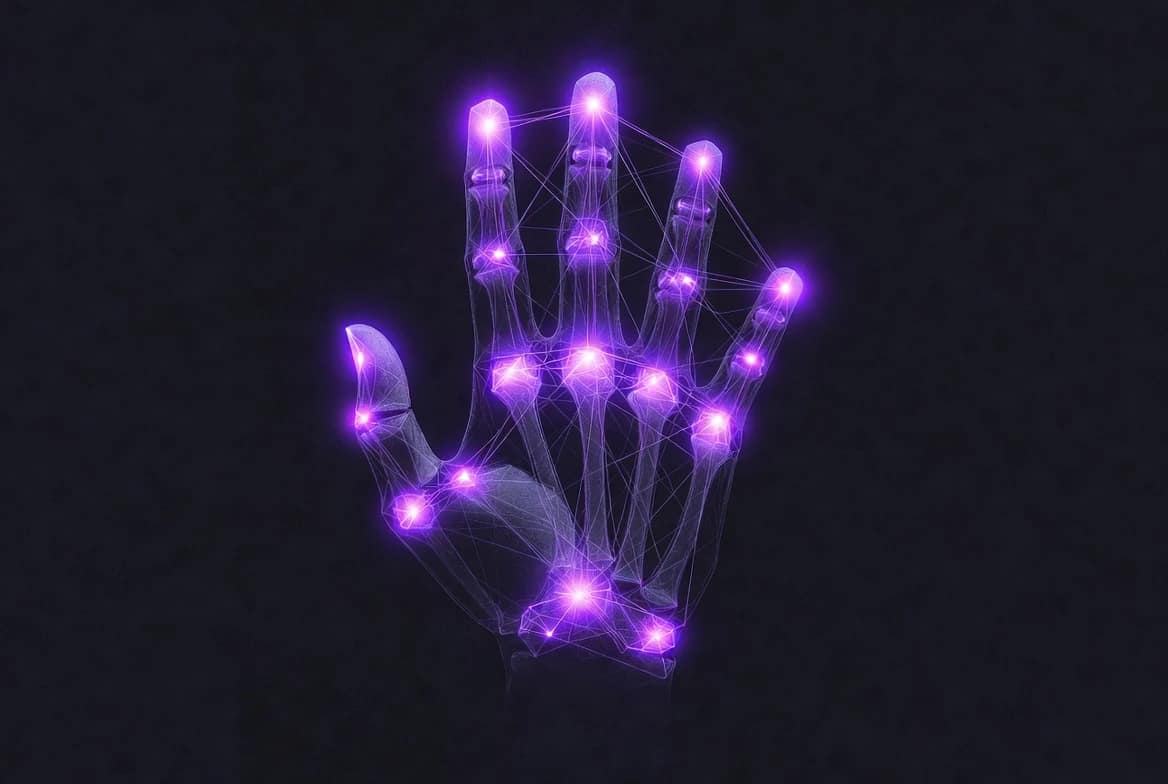
Google is testing a new verification method that requires users to perform a specific hand gesture on camera to prove they are human. According to Google’s official documentation, the system extracts 21 hand-knuckle coordinates to confirm a live human is present. It is not scanning your face to match against a database, nor is it a persistent biometric login system like Apple’s Face ID. It simply uses the camera to verify biological movement. The company claims these short video clips are processed solely for security verification and are deleted immediately after the challenge is complete.
Why Am I Suddenly Getting CAPTCHA Tests?
If you find yourself constantly interrupted by verification screens, your digital footprint is likely triggering automated suspicion. CAPTCHA tests appear when a website’s security system flags your connection as potentially non-human. This often happens if you use shared IP addresses, browse via public Wi-Fi networks, or route your traffic through commercial data centres. With the 2026 updates, triggering a Google reCAPTCHA camera access requirement simply means the security algorithm determined that traditional text or image puzzles were insufficient to prove your humanity.
What Triggers Google reCAPTCHA?
Several specific behaviours trigger these advanced checks. Rapid, robotic mouse movements or perfectly timed keystrokes are immediate red flags. Clearing your cookies obsessively or using a highly hardened browser that blocks standard tracking scripts can ironically make you look more like a bot. Furthermore, using a cheap VPN can pool your internet traffic with thousands of other users on a single server. When Google sees massive traffic spikes from one IP address, it deploys CAPTCHAs to throttle the flow and verify individual users.
Stop sharing your IP with Google
If you are tired of triggering CAPTCHAs because your free VPN pools your IP address with thousands of bots, upgrade to a premium Swiss-based network. Get Proton VPN Plus at 70% off for 2 years ($2.99/mo) and separate your physical identity from your browsing habits today.
Why Is Google Constantly Asking Me To Verify I’m Not A Robot?
If the system constantly doubts your humanity, you are likely suffering from browser fingerprint degradation. Every time you connect, websites read your device’s metadata (screen resolution, installed fonts, operating system version). If your fingerprint looks too generic or aggressively obfuscated, security tools assume you are a scraper script. When you combine an obscured fingerprint with a VPN connection, you guarantee a high-friction browsing experience. This is the exact scenario where you will most frequently face a Google reCAPTCHA camera access challenge. Research from privacy advocates like the Electronic Frontier Foundation (EFF) has long proven that attempting to hide your browser fingerprint often makes your connection stand out even more to anti-bot systems.
Liveness Detection vs Facial Recognition: What Is Verified?
Understanding the difference between biological proof and identity tracking sits at the core of the Google reCAPTCHA camera access debate. Many users hear about visual verification and instantly assume their faces are being added to a global database.
| Feature Dimension | Liveness Detection (Verified) | Facial Recognition (Unverified) |
|---|---|---|
| Primary Goal: | Proving physical human presence in real-time | Matching a face to a specific user identity |
| Data Extracted: | 21 hand-knuckle coordinates and joint movement | Facial geometry, eye distance, jawline maps |
| Data Retention: | Deleted immediately after verification | Stored persistently in identity databases |
| Identity Linkage: | Anonymous, checks only biological movement | Directly tied to a user account or profile |
| Consent Model: | Requires explicit browser hardware permission | Often operates passively in the background |
It is verified that Google extracts hand coordinates to confirm a live human is waving at the lens. It is absolutely not verified that this system performs secret facial recognition. Readers should treat claims of mass facial surveillance via this specific tool as technically plausible concerns rather than proven public facts.
The Real Privacy Risks of Visual Verification
The genuine danger here is not secret facial scanning, but the normalisation of hardware surveillance. If proving you are human requires a camera, the web becomes an exclusionary zone for users lacking specific hardware or those who refuse to participate on privacy grounds. Giving a website permission to see your physical surroundings crosses a boundary from cognitive input to physical reality. Normalising Google reCAPTCHA camera access sets a worrying precedent where visual data becomes the standard currency for accessing basic web portals.
Browser Fingerprinting and Identity Correlation
Even when the video clip is deleted, the event itself creates a data trail. Any Google reCAPTCHA camera access event generates metadata. The exact timestamp, the success rate of your hand gesture, your IP address, and your browser fingerprint are inevitably logged. When a major data broker holds this metadata, it becomes theoretically possible to correlate these distinct verification events across different sessions. This cross-context tracking remains a valid reasoned concern for privacy advocates monitoring the 2026 digital landscape.
Privacy Concerns: Is Someone Watching Me Through My Webcam?
Permission fatigue is a documented psychological vulnerability. Users bombarded with pop-ups often click “allow” simply to proceed, compromising their hardware boundaries out of sheer annoyance. When you habitually grant camera permissions to bypass friction, you leave your hardware exposed to potential abuse.
How To Tell If Someone Is Watching You Through Your Camera
Modern web browsers and operating systems have built-in safeguards to prevent silent monitoring. On both Windows and macOS, a physical or digital indicator light will activate whenever the camera is drawing power. In Google Chrome, a small camera icon will appear in the address bar or the browser tab when a site is actively pulling a video feed. Distinguishing between a genuine Google reCAPTCHA camera access request versus malicious spyware comes down to observing these indicators and knowing exactly which URL you just granted permission to. Official bodies like the W3C Device API privacy guidelines mandate that hardware access must always trigger these visible user alerts.
How Do You Know If Someone Is Mirroring Your Phone?
While a CAPTCHA test only looks at your hand temporarily, persistent battery drain, unexplained data usage spikes, and the camera light activating when your screen is locked are signs of deeper device compromise. If you suspect your phone is mirrored, you must review your application permissions immediately. A website verification test cannot mirror your phone; that requires an installed application running in the background with deeply elevated system privileges.
Managing Browser Permissions: How To Turn Off Google Camera Access
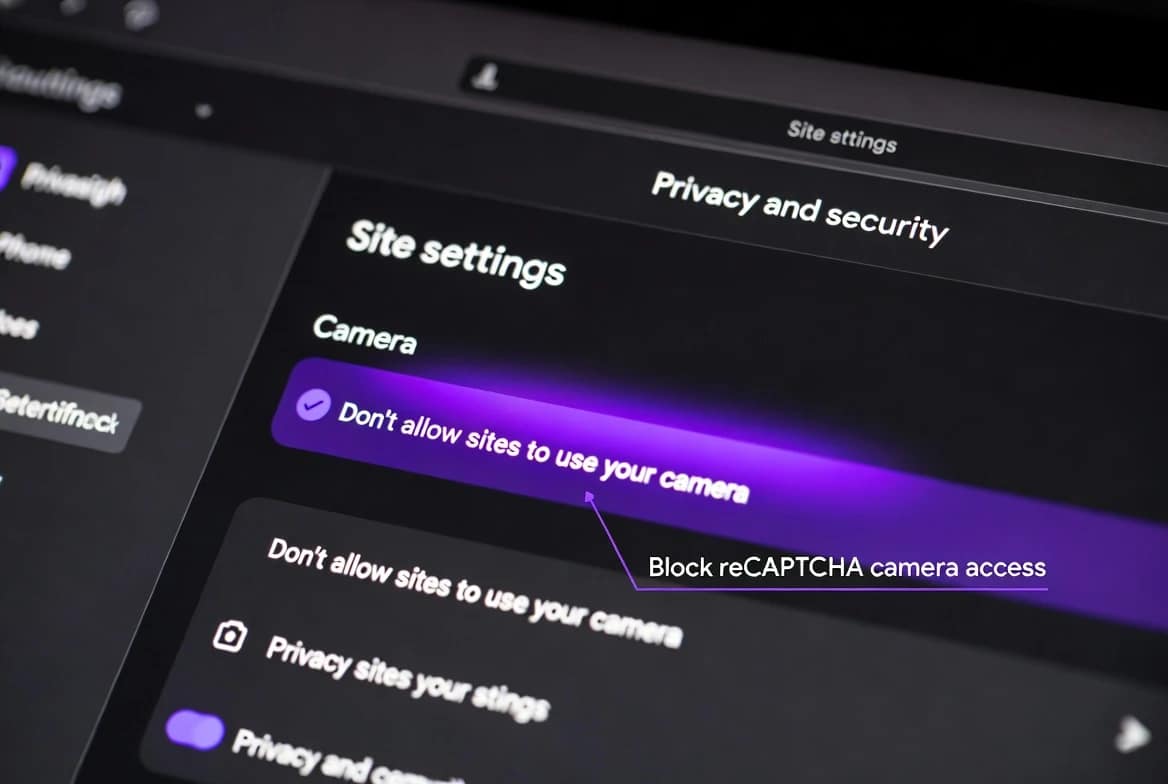
Taking control of your hardware requires proactive browser management. If you want to stop websites from ever requesting your video feed, you must alter your global settings. In Chrome, clicking the three dots in the top right, navigating to Privacy and Security, selecting Site Settings, and then clicking Camera allows you to manage these rules. Choosing “Don’t allow sites to use your camera” will block all access by default. Permanently disabling Google reCAPTCHA camera access requires you to enforce this strict block, though you must accept that doing so will break the functionality of sites relying on visual checks.
Does Chrome Need Camera Permission?
Google Chrome itself requires permission from your underlying operating system to use the webcam. On Windows, you must allow desktop apps to access your camera in the main privacy settings. On iOS and Android, the app will prompt you at the system level before it can even ask you on behalf of a website. This double-layer of consent provides a crucial barrier for Google reCAPTCHA camera access, ensuring that neither the browser nor the website can override your operating system’s core security parameters.
How To Enable Camera When It Is Disabled
If you actually need to complete a verification test but your video feed is failing, you must check three separate layers. First, ensure your device’s physical privacy shutter is open or the keyboard kill-switch is deactivated. Second, verify that your operating system permits web browsers to use the camera. Finally, click the lock icon next to the website URL in your browser and ensure the camera toggle is set to “Allow”.
Why Is Google Chrome Blocking My Camera?
If your camera works in other applications but fails in the browser, Chrome is likely enforcing a previous security decision. If you previously clicked “Never Allow” on a prompt, the browser will permanently remember that choice for that specific domain. Strict corporate IT policies or antivirus software can also interfere with a legitimate Google reCAPTCHA camera access attempt. You must manually clear the site permissions to trigger a fresh consent prompt.
How To Remove Camera Restrictions
To reset your choices, open Chrome settings, navigate to Site Settings, and review the list of restricted websites. Deleting the specific website from the blocked list will remove the restriction. The next time you visit, the browser will treat you as a new user and present the permission prompt again, allowing you to manage the Google reCAPTCHA camera access on your own terms.
Practical Mitigation Workflow
If you want to maintain your privacy without breaking your ability to browse the modern web, follow this exact workflow:
- Read the browser prompt carefully: Always check the exact URL requesting hardware control. Never blindly click “Allow”.
- Review your active permissions: Open your browser privacy settings monthly to clear out old grants. Step 2 involves reviewing your Google reCAPTCHA camera access history and revoking access from sites you no longer use.
- Use “Ask Every Time” settings: Force your browser to forget permissions immediately after you close the tab. This ensures no platform has persistent hardware access.
- Deny camera access if unnecessary: If a basic blog demands visual verification just to read an article, reject the request and find the information elsewhere.
- Utilise hardware switches: Keep your laptop’s physical privacy shutter closed until you explicitly need to prove your humanity.
- Limit linkable exposure: Use private browsing modes or hardened browsers to ensure that if you do complete a visual CAPTCHA, it is harder to link that session to your logged-in accounts.
For a deeper look into why we click “Allow” so quickly and how to stop, read our guide on privacy trade-offs in apps.
Where Proton VPN Fits (And Where It Does Not)
Privacy tools often suffer from bloated marketing expectations. Routing your traffic through a premium network, such as when you choose Proton VPN Plus at $2.99 per month on a 2-year plan, is an exceptional method for masking your IP address, encrypting your internet traffic, and protecting you from local network snooping. If you are forced to complete a visual CAPTCHA, doing so over a premium VPN ensures your physical location is not easily correlated with the verification event.
However, Proton VPN operates strictly at the network layer. It cannot bypass a local Google reCAPTCHA camera access prompt. It cannot stop a website from asking for your camera, nor can it spoof a fake video feed to bypass the test. If a website administrator configures their security to strictly require a physical hand gesture, refusing camera access means you simply cannot enter the site. For more on navigating aggressive security blocks with a VPN, check our analysis on YouTube blocking Mullvad VPN.
Decision-Support: What Should You Do?
When faced with a video CAPTCHA prompt, you must weigh your need for access against your desire for absolute privacy. You can proceed if the service is essential and you trust the platform’s data deletion promises. You can restrict permissions by allowing it once and immediately revoking it. You can look for an alternative route, such as an audio challenge, though these are increasingly restricted to accessibility users.
Ultimately, you must evaluate if the Google reCAPTCHA camera access is worth the specific content you are trying to reach. Sometimes, the only absolute privacy fix is deciding to walk away from a highly intrusive service entirely.
google recaptcha camera access: Conclusion
The shift towards physical verification is an annoying but predictable consequence of smarter AI bots flooding the internet. Your best defence is not paranoia, but strict and uncompromising browser hygiene. Keep your hardware permissions locked down, deny access when a website has no business asking to see your hands, and reserve your visual data for platforms that actually respect your boundaries.
De-Google your entire digital life
Stop feeding Google your data just to check your email or store files. Get encrypted mail, storage, calendar, password management, and a premium VPN in a complete zero-knowledge stack with Proton Unlimited. Lock in Proton Unlimited with 30% off a 1-year subscription ($9.09/mo) today.
google recaptcha camera access (FAQ)
Does Google reCAPTCHA automatically access my camera?
No, your web browser will completely block access until you manually click “Allow” on the system-level permission prompt.
Is Google using this for facial recognition?
The supplied materials verify the system extracts 21 hand-knuckle coordinates for liveness detection, with no verified evidence of facial recognition tracking.
Can any site using reCAPTCHA demand camera access?
Only sites opting into this specific, experimental hand-gesture verification tier will trigger the request, not every site using older versions of the tool.
Does Google reCAPTCHA camera access bypass my VPN?
A VPN secures your internet connection, but it does not control or override the local hardware requests handled by your web browser.
Are they storing videos of my hands permanently?
Google officially states the video clips are deleted immediately after verification and are not used for any other purpose.
What happens if I refuse to grant camera permission?
You will fail the verification check and be denied access to the website or specific service you are trying to reach.
Which browser settings protect me best?
Set your camera permissions to “Ask Every Time” and regularly clear your site settings to ensure no platform retains persistent hardware access.
Is it safe to give apps mic and camera access?
It is only safe if you explicitly trust the developer, you understand exactly why the app needs the hardware to function, and you revoke the permission when you finish using it.
Transparency Statement
This article is based on verified material regarding Google’s current testing of gesture-based verification systems and standard browser permission architecture. Claims regarding permanent biometric data storage, mass facial recognition, and cross-site identity matching remain technically plausible concerns rather than proven facts. Browser behaviour and site implementations change frequently. Readers should always review explicit privacy notices and local legal contexts when making decisions about their personal data.
Affiliate Disclosure
This site uses affiliate links to keep the lights on. If you purchase Proton VPN or Proton Unlimited through links in this article, BAIZAAR may earn a small commission at no extra cost to you. We only recommend tools that provide genuine, mathematically sound privacy benefits. Every product mentioned includes a 30-day money-back guarantee.