StartMail Review 2026:
Private Email That Actually
Fits Real Workflows
By Baizaar Lee | Published: 5th May 2026 | Updated: 5th May 2026
Private email should not require a cryptography PhD or a full client migration. StartMail gives you encrypted, ad‑free email with unlimited aliases, hosted in the EU, and it works with the apps and automations you already use. This BAIZAAR StartMail Review 2026 edition & guide walks through setup, DNS hardening, PGP usage, alias strategy, business deployment and how it compares to Proton Mail and Tuta in 2026.
TL;DR: If you want serious privacy plus IMAP, unlimited aliases and EU jurisdiction, StartMail is now one of the most practical options on the market.
Why StartMail? Privacy Without Burning Your Existing Workflow
Most privacy‑branded email providers solve one problem by creating three more: no IMAP, no third‑party tools, awkward PGP, and migration that feels like pulling teeth. StartMail takes the opposite route.
The political pressure on encrypted communications is not theoretical. In December 2025, the EU’s ‘Chat Control’ proposal – which would have mandated mass scanning of private messages, reached a Council agreement. The EFF’s analysis of the final position confirms that voluntary scanning of unencrypted messages remains permitted under EU law in 2026, with broader enforcement provisions potentially returning later. Using a provider that cannot technically access your content is no longer just paranoia – it is policy awareness.
StartMail is built by the team behind Startpage, the privacy search engine, and is based in the Netherlands under GDPR and Dutch privacy law. It runs as a straightforward, paid email service with no ads and no tracking, plus OpenPGP support and unlimited aliases.
Core features at a glance (2026)
- End‑to‑end PGP support in the web interface for users who enable and use PGP, plus password‑protected emails for non‑PGP recipients.
- Unlimited aliases on all paid plans including burner and long‑term aliases, with quick creation and deletion.
- 20 GB mailbox storage per account, encrypted at rest, with advanced spam filtering and tracker blocking.
- IMAP/SMTP access so you can use Apple Mail, Thunderbird, Outlook, FairEmail and inbox tools like SaneBox.
- EU‑based hosting (Netherlands) with no adtech, no data selling, and a clear privacy‑first business model.
- Custom domain support on paid plans so you can run
[email protected]on StartMail’s infrastructure. - Bitcoin support for annual billing, useful if you want to decouple identifiers from payment where possible.
Get StartMail Today – BAIZAAR Exclusive Discount for Simple, Private Email →
StartMail Pricing 2026: What You Actually Pay
StartMail has a refreshingly simple pricing model. No freemium trap, no micro‑tiers for basic features.
Personal and custom domain plans
- Personal plan: Around $4.99 per month billed annually (approximately €59.88 per year).
- 20 GB storage
- Unlimited aliases
- One
@startmail.comaddress - Option to connect one custom domain
- PGP support and password‑protected emails
- Custom / business‑oriented plan: Around $6.99 per month billed annually (around €83.88 per year).
- Same core features
- 20 GB per user
- Additional accounts for the same domain at 25% off per user, aimed at small teams.
There is no permanent free plan. You get a 7‑day free trial, then you either pay or move on. That is the point: you are the customer, not the product.
For context in this StartMail review 2026, the personal plan costs $4.99/month billed annually – cheaper than most privacy tool subscriptions.
Payment and anonymity
- Pay by card or PayPal as usual.
- On annual plans you can pay with Bitcoin, which lets you avoid putting your full billing profile into yet another SaaS record.
Is this totally anonymous? No, GDPR and Dutch law still apply. But for many BAIZAAR readers, “no ads, no tracking, EU jurisdiction, Bitcoin‑friendly” is already a meaningful upgrade over free US webmail.
The Dutch Data Protection Authority (AP) received over 13,000 privacy complaints in 2025 alone.. a near-doubling from the prior year — and has demonstrated a clear willingness to act, including fining Dutch public bodies €250,000 in early 2026 for unlawful data processing. StartMail’s servers sit under this authority’s jurisdiction. Which is precisely why it matters where your inbox lives.
Getting Started: StartMail Setup (Step‑by‑Step)
Step 1: Create your account
- Head to StartMail.
- Start the free trial and pick your
@startmail.comusername. - Choose the personal or custom‑domain plan, depending on whether you want to bring your own domain.
- Decide how you want to pay (card, PayPal or Bitcoin for annual).
From a privacy perspective, use a strong, unique password and keep your billing email separate from your main inbox if possible.
Step 2: Enable two‑factor authentication (2FA)
After login:
- Go to Settings → Security.
- Enable TOTP‑based 2FA and pair it with an authenticator app (Aegis, Raivo, Proton Pass, 1Password, etc.).
- Avoid SMS wherever possible; SIM swap attacks are still very real.
If your email is the master key to your digital life, treating 2FA as optional is how you end up on a breach report.
Step 3: Generate and manage your PGP keys
StartMail integrates OpenPGP into its web interface, which is a nice balance between command‑line PGP and “we promise it’s encrypted, trust us”.
- Go to Settings → Encryption / PGP in the web interface.
- Generate a key pair for your account (4096‑bit RSA or modern ECC, depending on what StartMail currently offers in the UI).
- Write down your encryption passphrase somewhere secure and do not reuse your account password.
Operational hygiene:
- Export your private key and store an encrypted backup offline (hardware key or encrypted USB).
- Export your public key and add it to your website, key servers or even your email signature for contacts who know PGP.
Remember: email is only end‑to‑end encrypted when both sides use PGP or StartMail’s password‑protected messages.
Step 4: Configure recovery options
StartMail, like most serious privacy tools, cannot help you if you forget both your password and recovery data.
- Store any recovery codes in a separate password manager or offline vault, not in the same inbox you are trying to protect.
- If you use a password manager, make sure its own recovery process does not rely solely on the StartMail address you are securing.
Unlimited Aliases: Building a Real‑World Defence Layer
Aliases are where StartMail quietly crushes many competitors. Every paid account gets unlimited aliases, on your own domain and on StartMail’s alias domains.
81.9% of phishing victims had their email address leaked in a previous data breach before the attack even happened, and over 90% of cyberattacks start with a phishing email,
according to 2025–2026 cybersecurity data. Aliases break this chain: when a breached service only has a disposable StartMail alias, your real address and primary identity stay clean.”
What is an alias in StartMail?
An alias is an extra address that routes into your StartMail inbox but can be created and deleted independently at any time. When a service is breached or turns spammy, you delete the alias and move on. The attacker loses, your primary address stays hidden.
A practical tiered alias system (2026 edition)
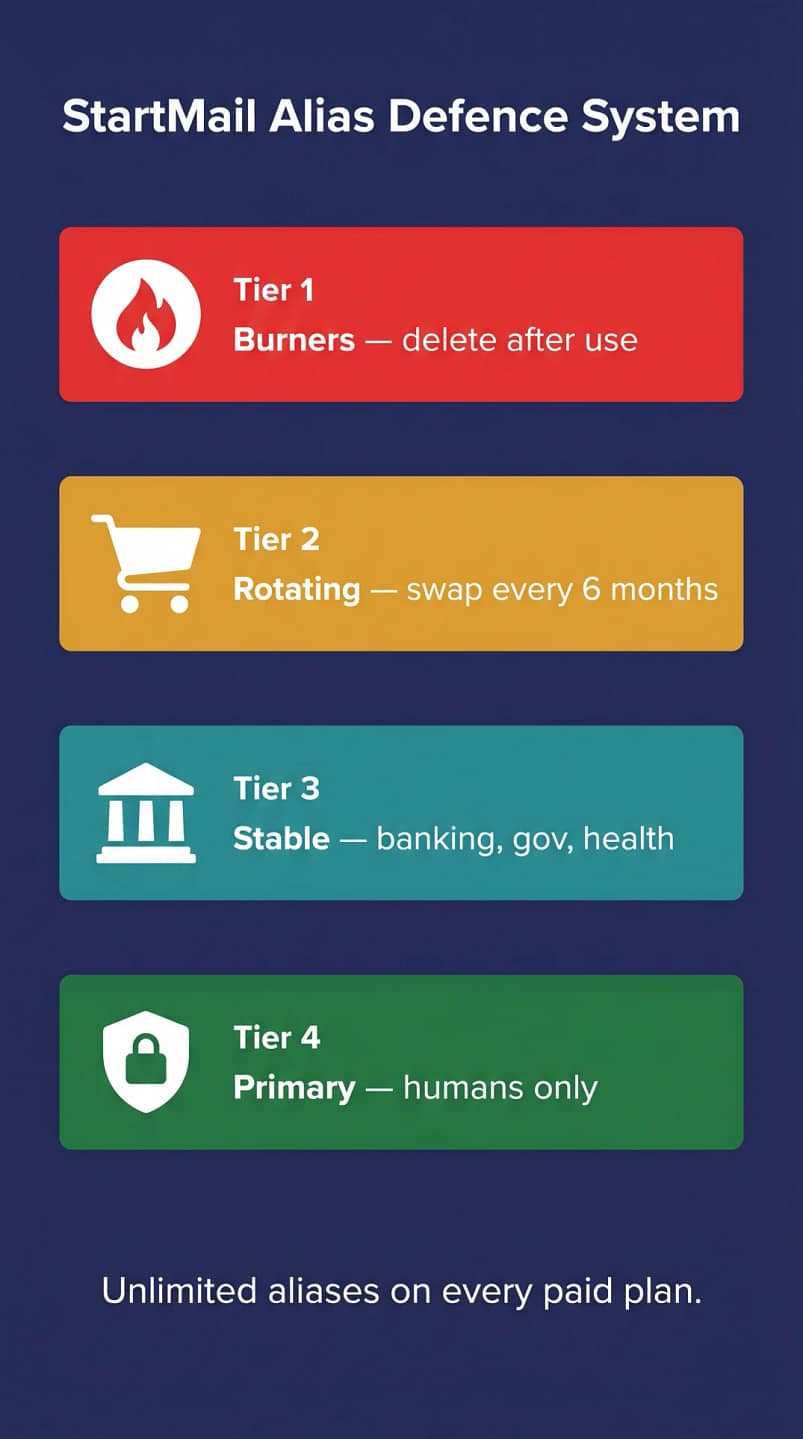
You can still use the four‑tier model from your draft, but let’s tighten it and align with StartMail’s strengths:
Tier 1 — One‑shot burners (startmail alias domains)
Use StartMail’s instant burner aliases for one‑off signups, discount codes, throwaway trials. Example:
Delete them immediately after use or after a week.
Tier 2 — Rotating service buckets (your domain)
Shopping, newsletters, SaaS trials you sort of trust but do not fully love. Examples:
Rotate every 6–12 months. The alias dies, not your identity.
Tier 3 — High‑value accounts (static aliases)
Banking, tax, healthcare, domain registrars. Keep these stable but separate from your social / personal identity:
If you ever suspect abuse, you can still migrate them, but the point here is blast‑radius reduction.
Tier 4 — Primary human identity
Your “call me, text me, send me memes” address. This should be rarely exposed to forms:
[email protected]or a clean variation on your domain
You give this to trusted humans, not newsletter captchas.
Custom Domain Setup & DNS Hardening (2026 Best Practice)
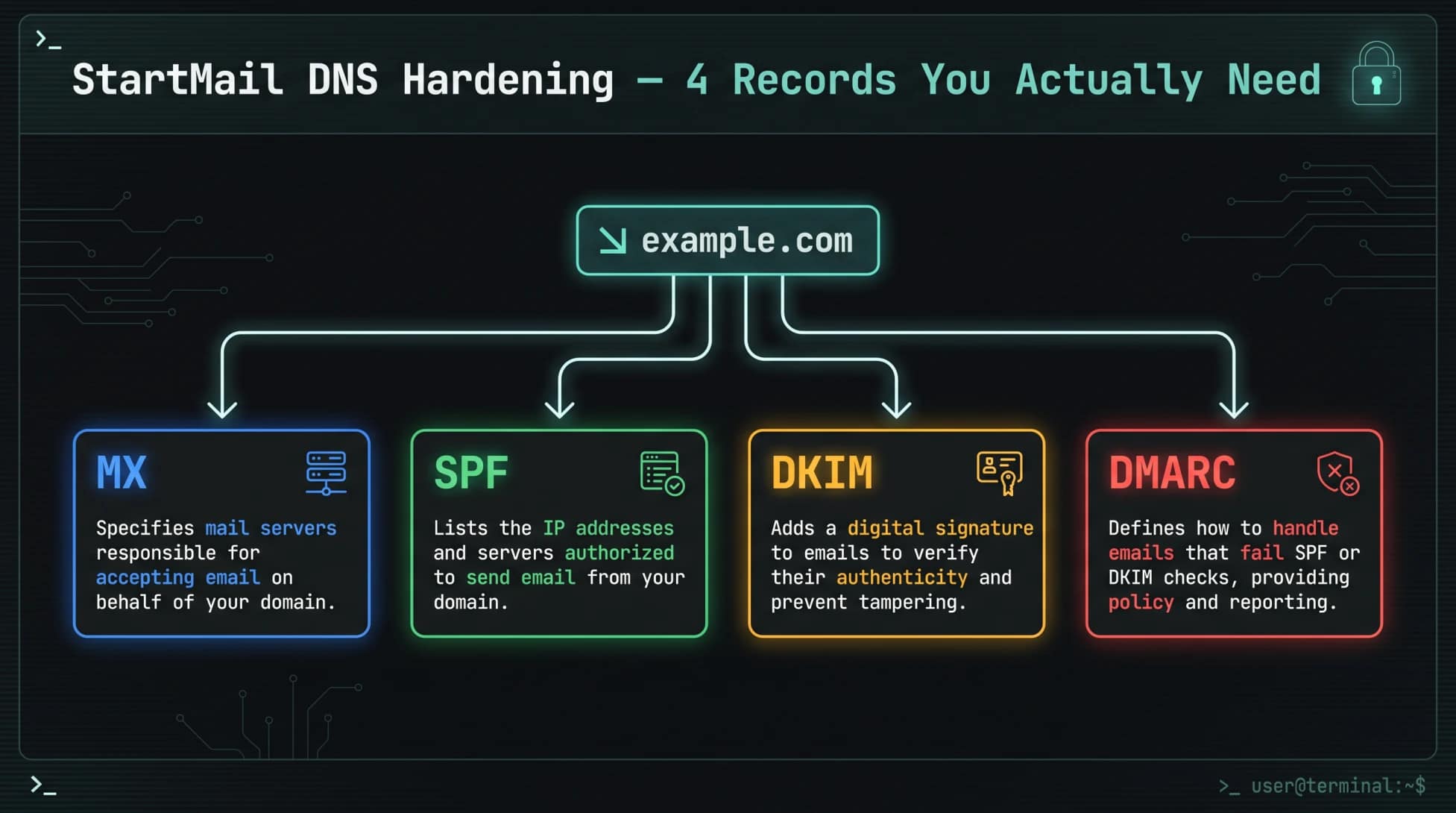
Using StartMail on your own domain is where things get properly grown‑up. It also makes migration trivial in future you just point MX somewhere else if you ever leave.
One detail that separates this StartMail review 2026 from generic guides is the DNS hardening walkthrough below – most competitors gloss over DKIM and DMARC entirely.
Add your domain to StartMail
- In StartMail, go to Settings → Domains → Add domain.
- Enter
yourdomain.com. - StartMail will show the DNS records you need to add (MX, SPF, DKIM, and suggested DMARC).
Make sure you know where your DNS actually lives (Cloudflare, Namecheap, Route 53, your host, etc.) before you start.
Essential DNS records
At your DNS provider, add the records StartMail expects. As of 2026, these are:
MX (mail routing)
MX 10 mx.startmail.comMX 20 mx2.startmail.com
SPF (authorised senders)
Add or update your TXT SPF record at the root:
v=spf1 include:spf.startmail.com -allUse -all (hard fail), not ~all (soft fail), once you are sure no other service needs to send mail for that domain.
DKIM (signature for outgoing mail)
- StartMail gives you a selector such as
s1._domainkey.yourdomain.comand a long TXT value. - Paste it exactly as provided; do not wrap it or add line breaks.
DMARC (spoofing and reporting)
Start with monitoring, then ratchet up:
v=DMARC1; p=quarantine; rua=mailto:[email protected]; adkim=s; aspf=sAfter one or two weeks of clean reports, move to:
v=DMARC1; p=reject; rua=mailto:[email protected]; adkim=s; aspf=sThis stops random servers sending [email protected] without your SPF / DKIM signature.
Advanced DNS and transport hardening
If you want to go beyond “just works” deliverability:
- Consider MTA‑STS and TLS‑RPT to enforce TLS for inbound mail and get telemetry on failed TLS attempts.
- Add CAA records to limit which certificate authorities can issue certificates for your domain, especially if you run other services alongside email.
PGP in StartMail: Realistic Usage & Rotation
How encryption works in practice
- For PGP‑enabled contacts, StartMail can encrypt and decrypt messages in the browser, so you get end‑to‑end content protection with minimal friction once keys are in place.
- For non‑PGP users, StartMail supports password‑protected emails. The recipient receives a link to a secure web page and must enter a shared secret to read the message.
This is not as automatic as Proton‑to‑Proton, but it is far easier to roll out via IMAP clients and standard workflows.
Importing and managing public keys
- Add contacts in StartMail then paste in their public keys via the contact’s encryption settings.
- Once a contact has a PGP key attached, future emails can be encrypted automatically in the web interface.
For serious work, keep a separate note or page listing which contacts are PGP‑capable and how their keys have been verified.
Rotation schedule that will not break your life
For most BAIZAAR readers:
- Personal key: rotate every 12–24 months, or immediately after any suspicion of compromise.
- Business / shared role keys: rotate every 6–12 months, with a clear handover process.
- High‑risk identities (journalists, activism, OSINT): rotate every 3–6 months and treat hardware tokens as the default.
The minimal viable rotation flow:
- Generate the new key inside StartMail or using your preferred PGP tool.
- Announce the new key, signed by the old key, to contacts and on your public key pages.
- Set an expiry on the old key and keep both available during a grace period.
- After the grace period, revoke the old key and update your published key references.
StartMail + VPN: Protecting Metadata in 2026
StartMail does not track your IP or run ads, but your ISP still sees that you are talking to StartMail, which is enough metadata to build an interesting profile.
Sensible configurations
- Everyday: Use a reputable privacy VPN such as Proton VPN or another audited, no‑logs provider, ideally with a nearby EU server for speed.
- Higher‑threat work: Run a multi‑hop or Tor‑into‑VPN setup to further obscure your origin IP, at the cost of latency.
Checklist:
- Always turn on the kill switch in your VPN.
- Use DNS leak protection and consider running DNS through the VPN.
- Disable WebRTC leaks in your browser.
- Connect the VPN before opening your StartMail tab or launching your mail client.
Note: VPNs do not fix email metadata, but they stop simple IP‑based profiling.
StartMail Review 2026 for Business:
Encrypted Collaboration without Vendor Lock‑In
When StartMail makes sense for teams
StartMail is strongest for:
- EU or UK‑based teams who want GDPR‑friendly email without a whole Google / Microsoft stack.
- Organisations that already live in IMAP clients plus a privacy‑stack (Proton VPN, SaneBox, password manager, zero‑knowledge storage).
- Client‑facing professions that need aliases per role and strong anti‑tracking posture, but do not want to force every client onto proprietary webmail.
Key benefits:
- Custom domains with aliases per user and per role (
support@,legal@,press@). - 25% discount on additional accounts when they are added under a main subscription, which keeps per‑seat costs reasonable.
- IMAP compatibility with any corporate email client, mobile app or AI‑safe filtering tool like SaneBox.
Designing encrypted workflows
StartMail’s full IMAP access makes it one of the few private email providers that pairs cleanly with AI-powered inbox triage tools. We tested exactly this in our SaneBox privacy review, where we checked whether SaneBox actually respects your encrypted inbox.
Internally:
- Issue StartMail accounts per employee under your domain.
- Generate PGP keys for high‑risk roles (leadership, legal, security, sensitive client teams).
- Use group aliases (
security@,risk@,founders@) that route to multiple PGP‑enabled users where appropriate.
Externally:
- For clients with PGP: import their keys into contact records and use full PGP mail.
- For clients without PGP: use password‑protected messages for sensitive threads and agree passwords over a separate secure channel such as Signal.
Operationally, this lets you keep email as the lowest common denominator while raising the floor on privacy.
StartMail vs Proton vs Tuta in 2026
This is what most readers actually care about. So let us be honest.
High‑level positioning:
- StartMail: “Traditional IMAP email, unlimited aliases, EU, PGP if you want it” with no extra suite.
- Proton Mail: “Zero‑access encrypted email plus VPN, Drive, Password Manager, Calendar, all under one Swiss umbrella.”
- Tuta (Tutanota): “Encrypt everything by default, even subject lines and calendars, at the cost of IMAP and some interoperability.”
StartMail review 2026: comparison table – StartMail Vs. Proton Mail vS. tuta
| Dimension | StartMail | Proton Mail | Tuta |
|---|---|---|---|
| Jurisdiction | Netherlands (EU, GDPR) | Switzerland, strong privacy outside EU | Germany (EU, strict data protection) |
| Default encryption | TLS + optional PGP; end‑to‑end only when PGP or password‑protected mail is used | End‑to‑end encryption between Proton users by default; zero‑access storage | End‑to‑end for mail, contacts, calendar by default |
| Aliases | Unlimited on all paid plans | Limited by plan; more on higher tiers | Many addresses on higher tiers; strongest via custom domains |
| IMAP/SMTP | Yes, native IMAP/SMTP; works with any client | IMAP/SMTP via Proton Bridge on desktop only | No IMAP/SMTP at all; proprietary apps only |
| Mobile apps | No official apps; rely on third‑party clients via IMAP | First‑party apps on all major platforms | First‑party apps on all major platforms |
| Ecosystem | Email only | Mail, Drive, VPN, Calendar, Pass bundles | Mail, contacts, calendar; no VPN or cloud yet |
| Storage (baseline paid) | 20 GB mailbox | 15 GB on Plus; more on Unlimited | 1–20 GB depending on tier |
| Pricing (individual) | ~$4.99/month billed annually | Roughly $3.99/month for Plus, more for Unlimited | Similar to Proton tiers; varies by region |
StartMail or Tuta Who should pick which?
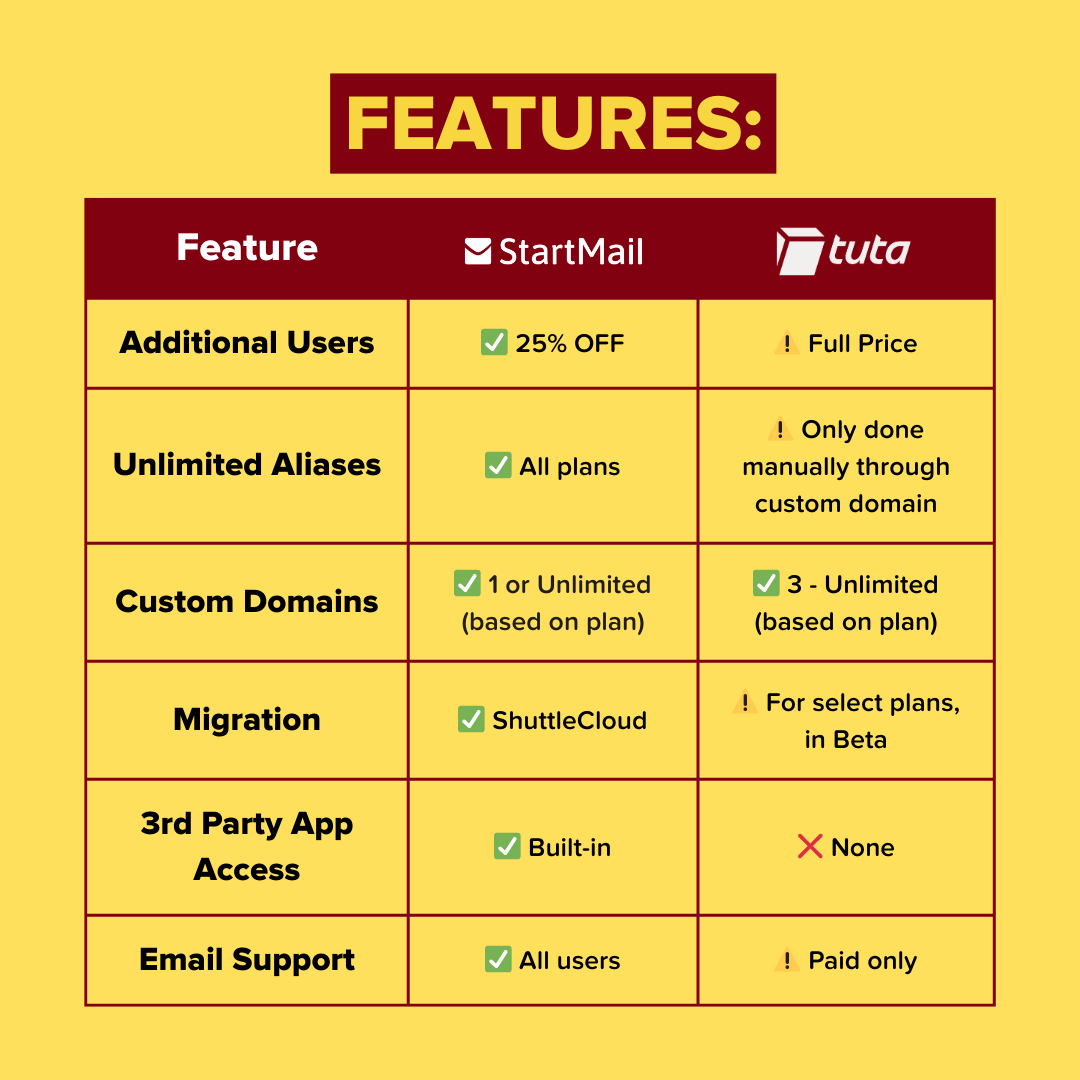
- Choose StartMail if you want IMAP‑friendly privacy, unlimited aliases, and EU hosting and you are happy to compose your own stack for VPN, storage and passwords.
- Choose Proton Mail if you want an all‑in suite with strong defaults and you are willing to adopt their apps and Bridge.
- Choose Tuta if you want maximum mailbox encryption and do not care about IMAP or external client support.
If the Proton ecosystem is what you are really after when some are searching for a complete ecosystem revamp the VPN, Drive and password manager all under one Swiss roof raving then our 30-day Proton Mail hands-on review covers whether it is actually worth the premium.
For BAIZAAR’s typical reader, StartMail is the most natural fit when you are ready to leave Gmail behind but still want:
- SaneBox to sort your rubbish without scanning content.
- An IMAP client on the devices you already own.
- A clear alias architecture for ADHD‑ridden modern life.
StartMail Review 2026: Real‑World Limitations and Threat‑Model Notes
No provider is magic. To be blunt:
- StartMail does not encrypt everything by default. You must actually use PGP or password‑protected emails for end‑to‑end secrecy.
- Email protocol metadata (IP at connection time, recipients, timestamps, subject lines) is not solved by any of these providers. It is inherent to email.
- There are no native StartMail mobile apps, so PGP on mobile can be clunkier than Proton or Tuta.
If your threat model is “government agency with time on its hands”, email is the last thing that should hold your deepest secrets. Use Signal, Matrix or an air‑gapped PGP setup for that.
For everyone else who simply wants to get off surveillance webmail and stop handing advertisers the keys to their inbox, StartMail is a very sane step.
To be fair in any StartMail review 2026, the missing mobile app is the single biggest usability caveat.
BAIZAAR’s Verdict: StartMail Review 2026 Score
After testing StartMail’s setup, alias system, DNS hardening, PGP workflow and IMAP compatibility across multiple clients, here is where it lands in 2026.
| Category | Score |
|---|---|
| Privacy & EU Jurisdiction | ⭐⭐⭐⭐⭐ 5/5 |
| Unlimited Alias System | ⭐⭐⭐⭐⭐ 5/5 |
| IMAP/SMTP Compatibility | ⭐⭐⭐⭐⭐ 5/5 |
| Interface & Usability | ⭐⭐⭐½ 3.5/5 |
| Features vs Competitors | ⭐⭐⭐½ 3.5/5 |
| Pricing & Value | ⭐⭐⭐⭐ 4/5 |
| Support & Responsiveness | ⭐⭐⭐½ 3.5/5 |
BAIZAAR Rating: 4.2 / 5
StartMail is the best private email choice for anyone who wants serious alias-based inbox protection, EU jurisdiction and full IMAP freedom, without being forced into a proprietary app ecosystem. Get StartMail with a 7-Day Free Trial here. It earns a 4.2 because it genuinely excels where it matters most for privacy-conscious users. The deductions are real: no native mobile app, no calendar, a web interface that could be more polished, and a 24-hour auto-logout that will drive power users spare. None of those are deal-breakers for the audience it is built for. For full-suite seekers, our 30-day Proton Mail hands-on review is worth reading alongside this one.
Start Protecting Your Inbox Today
Email is still the root credential of your digital life. If your inbox is a free, ad‑supported product, you are the product.
StartMail gives you:
- Unlimited aliases
- EU‑hosted private email
- PGP when you need it
- Standard IMAP that plugs into privacy‑respecting tools like SaneBox, VPNs and password managers for maximum compatibility.
It will not solve every threat model, and it is not as fully automated as Proton inside its own ecosystem, but for a huge slice of knowledge workers and small teams, it is the least painful way to get out of surveillance mail and into something fit for 2026.
If this StartMail review 2026 has convinced you to make the switch, the 7-day free trial link here is where to start ⬇️
Claim Your 7-day free trial with StartMail – Test Secure & Simply Private Email today.
Frequently Asked Questions: StartMail Review 2026 (FAQ)
Is StartMail a good private email service in 2026?
Yes. In this StartMail review 2026, it stands out as one of the most practical private email providers available, particularly for users who want EU-hosted, GDPR-protected email with unlimited aliases and full IMAP/SMTP access. It does not offer a bundled VPN or cloud storage suite like Proton, and it lacks a native mobile app, but for the core job of private, ad-free email that works with the clients you already use, it delivers cleanly and reliably.
What is StartMail’s pricing in 2026?
StartMail’s personal plan costs approximately $4.99 per month, billed annually at $59.88 per year. A custom domain plan is approximately $6.99 per month billed annually, with additional user accounts added at 25% off – making it a cost-effective option for small teams. A 7-day free trial is available, though a payment method is required upfront. Bitcoin payments are available on annual plans for users who want to minimise their billing paper trail.
Does StartMail support IMAP and SMTP in 2026?
Yes, and this is one of StartMail’s defining advantages in this StartMail review 2026. Full IMAP and SMTP access is available on all paid plans, meaning you can use any standard email client – Apple Mail, Thunderbird, Outlook, FairEmail on Android, and productivity tools like SaneBox. This makes StartMail one of the very few privacy-focused email providers that does not force you into a proprietary app.
How does StartMail’s alias system work?
StartMail offers unlimited email aliases on every paid plan. An alias is a secondary address that routes into your main StartMail inbox but can be created and deleted independently at any time. When a service gets breached or starts spamming, you delete the alias, your real address stays hidden. In this StartMail review 2026, the alias system is rated 5/5 because it is instant, unlimited and requires no technical setup. You manage aliases directly from the dashboard in seconds.
Is StartMail end-to-end encrypted?
StartMail supports OpenPGP encryption, but it is important to be precise: end-to-end encryption only applies when both the sender and recipient use PGP keys, or when you explicitly send a password-protected message to a non-PGP user. Emails stored on StartMail’s servers are encrypted at rest, but this is zero-access encryption rather than automatic end-to-end encryption for all messages. For fully automatic end-to-end encryption between users on the same platform, Proton Mail’s internal messages offer a closer equivalent.
Does StartMail have a mobile app in 2026?
No. As of this StartMail review 2026, StartMail does not offer an official iOS or Android mobile app. You can access StartMail via a mobile browser, or configure any IMAP-compatible mobile client, including the default iOS Mail app, FairEmail on Android, or Canary Mail – using StartMail’s IMAP/SMTP credentials. This is a genuine usability limitation compared to Proton Mail or Tuta, both of which offer polished native apps.
How does StartMail compare to Proton Mail in 2026?
The key difference comes down to workflow philosophy. StartMail is email-only with full IMAP/SMTP freedom, unlimited aliases and EU hosting under Dutch law. Proton Mail offers a complete privacy suite e.g. email, VPN, Drive, Calendar and a password manager, all with stronger default end-to-end encryption between Proton users, but requires using Proton’s own apps or desktop Bridge for IMAP access. If you want a full privacy ecosystem in one subscription, Proton is the stronger choice. If you want private email that plugs into your existing tools without friction, StartMail wins. Our 30-day Proton Mail review covers the full trade-off.
Where are StartMail’s servers located?
StartMail’s servers are located in the Netherlands, making them subject to Dutch privacy law and EU GDPR enforcement by the Autoriteit Persoonsgegevens (AP) — the Dutch Data Protection Authority. The AP received over 13,000 privacy complaints in 2025 and has a documented history of issuing fines for unlawful data processing. No US CLOUD Act, FISA order or UK Investigatory Powers Act applies to Dutch-based servers. For users outside the EU, this remains one of the strongest available jurisdictions for private email hosting.
Is StartMail suitable for small business use in 2026?
Yes, with some caveats noted in this StartMail review 2026. StartMail supports custom domains, unlimited aliases per user, and offers additional accounts at 25% off — making it workable for small teams who want private, GDPR-compliant email without a Google or Microsoft stack. The absence of a calendar, shared storage or team collaboration features means it works best as part of a broader privacy stack rather than a standalone business productivity suite. For teams who already use separate tools for docs and scheduling, StartMail is a clean fit.