
SaneBox Privacy Review: An AI Email Tool That Doesn’t Read Your Mail?

By Baizaar Lee | Last Updated: January 27, 2026 | Reading Time: 12 minutes
TL;DR: We let a robot sort the rubbish so you can focus on the job. Most secure AI email tools scan every word you write to train their models. SaneBox doesn’t. It uses header-only analysis to protect your privacy while still automating your inbox. Here’s the full breakdown.
Right, let’s have an honest chat about your inbox.
If you’re anything like me, you’re probably terrified of two things. First, the 4,000 unread emails staring at you like a judgmental list of failures. Second, the creeping suspicion that the “AI Assistant” offering to summarise those emails is actually reading your bank statements, your NDA-protected contracts, and that awkward email to your doctor.
You’re not paranoid (yet). You’re being real with it, applying some attention.
In 2026, we’ve accepted a lazy bargain. We trade our privacy for convenience. We let Copilot, Gemini, and a dozen other “smart” tools scan the full body of our emails so they can give us a cute three-bullet summary. They’re training on your life.
But there’s one tool that refuses to play that game.
I’ve been testing SaneBox for the last three months. It’s the only secure AI email tool I’ve found that sorts my mess without ever looking at my content. It’s the difference between a postman and a spy.
Here’s my review of the only privacy-respecting email automation platform left standing.
The “Steam” Problem: How Most AI Email Tools Work in 2026
To understand why I trust SaneBox, you have to understand how the others work.
When you ask a standard AI assistant to “summarise this thread” or “draft a reply,” it has to download and process the body content of your email.[1] It reads the text. It parses the attachments. It digests the context.
Sure, they claim the data is “anonymised” or “encrypted in transit.” But the fact remains: for the feature to work, the machine must read the words.
According to the 2026 Email Intelligence Report from SaneBox, by 2027, 408.2 billion emails will be sent and received every day, compared to a still large 281.1 billion in 2018.[2] That’s a 45% increase in less than a decade. More emails mean more data for AI systems to hoover up, analyse, and monetise.
If you’re a lawyer, a GTM leader handling sensitive pricing, or just someone who values their digital dignity, that’s a nightmare. You’re essentially handing your filing cabinet keys to a robot because you’re too tired to file the papers yourself.
The Hidden Cost of “Free” Email AI
Gmail’s business model revolves around scanning your inbox to build targeting profiles.[1][3] Google admitted it scans email to train AI models. They don’t hide this in the terms of service it’s all explicit. But most people don’t read the fine print (maybe get AI to?).
Microsoft Outlook offers similar “conveniences” cloud processing that requires server-side access to your plaintext emails.[4] Even newer players like Superhuman (which I’ve reviewed elsewhere on Baizaar) require full content access to provide their slick summarisation features.
The cost isn’t £30/month. The cost is your metadata, your communication patterns, and your content becoming training data for systems you don’t control.[5][6]
The SaneBox Difference: Header-Only Analysis
SaneBox takes a completely different approach. It’s built on a philosophy of Header-Only analysis, as what the industry calls “metadata-only filtering” (most the technies I know still refer to email headers as just that headers). [7][8]
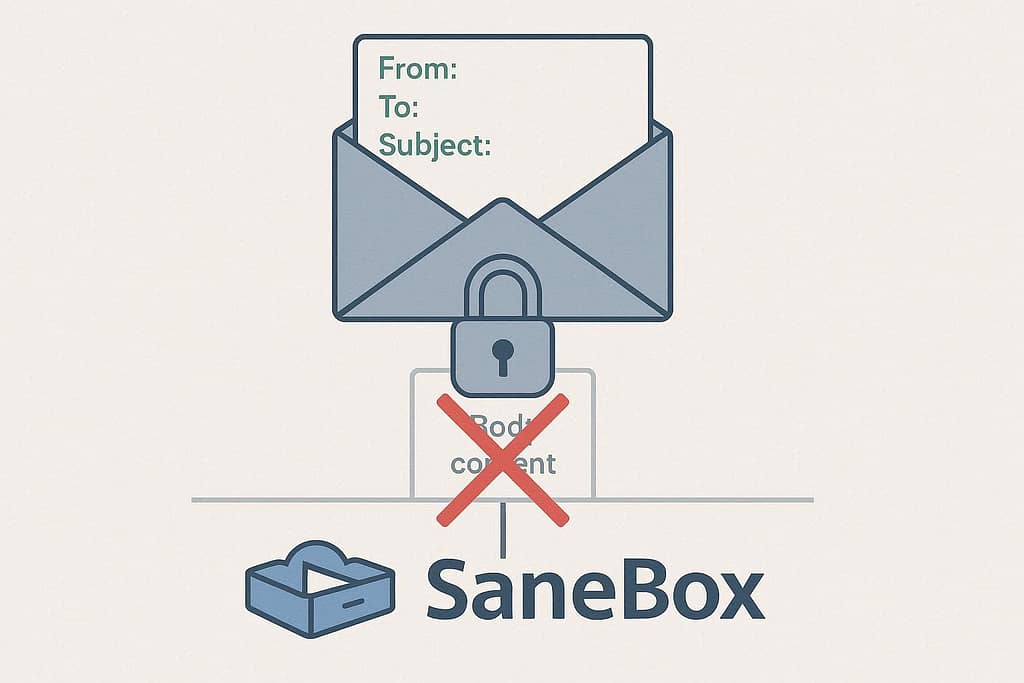
Think of it like the postman.
- The Postman (SaneBox): He looks at the envelope. He reads the sender (From), the recipient (To), and the timestamp. He knows that a letter from “HMRC” goes in the urgent pile, and a flyer from “Domino’s” goes in the bin. He never opens the envelope. He doesn’t know what is inside, only where it came from.
- The Spy (Other AI): They steam open the envelope. They read the letter to see if it sounds important. They might even take notes on it to “help you later.”
Technically speaking, SaneBox looks at the Metadata:
- Sender address
- Subject line (technically metadata, though some systems classify it as semi-content)
- Timestamp
- Your previous interaction history (do you usually open emails from this person?)
It does not download the body of the email. It stays on the server side, moves the email to a folder (like @SaneLater), and leaves the contents encrypted and untouched on your email provider’s servers.
This is the critical architectural difference that makes SaneBox a genuinely secure AI email tool. No content scanning. No body text analysis. No attachment parsing.
Visualising the Privacy Gap: What They Actually See
| Feature | SaneBox (Header-Only) | Standard AI Assistants (Copilot/Gemini) |
|---|---|---|
| Reads Email Body? | NO (Metadata Only) | YES (Full Content Scan) |
| Reads Attachments? | NO | YES (Often for summaries) |
| Data Training? | Your data stays yours. | Often used to “improve the model.” |
| Server Location? | Your own email server (IMAP). | The vendor’s cloud (Google/Microsoft). |
| GDPR/CCPA Compliance? | Yes (SOC2, GDPR compliant). | Varies, often opaque. |
| Can Summarise Emails? | NO (Trade-off for privacy) | YES |
| Can Detect Phishing? | Limited (pattern-based only) | YES (content analysis) |
Privacy Regulations & The 2026 Email Landscape
The regulatory environment has shifted dramatically. GDPR fines can now reach €20 million or 4% of global revenue (whichever is higher).[9][10] The California Privacy Rights Act (CPRA) took effect in 2023, expanding requirements for data minimisation and security safeguards.[9]
Email is now classified as containing “extensive personal data subject to GDPR requirements”.[9] This includes not just the obvious stuff (names, addresses), but also metadata who you communicate with, when, and how often.[5][6]
According to research on GDPR email compliance, 37.2% of websites send marketing emails without proper user consent.[11] But the bigger issue isn’t just marketing, it’s the AI assistants that scan your private correspondence without explicit, granular consent for each use case.
SaneBox’s header-only approach sidesteps this entirely. Because it never accesses the body content, it doesn’t trigger the same GDPR data processing requirements as tools that scan full messages.
The “Add-On Fatigue” Crisis
The SaneBox Email Intelligence Report highlights a critical trend: people are experiencing add-on overload.[2] After experimenting with multiple plugins and productivity add-ons, users are searching for AI-native platforms that can do it all without fragmenting their workflow.
A 2025 study in the International Journal of Information Management showed that while AI can improve knowledge workers’ quality of life, it also heightens “technostress” when tools fragment workflows.[2] There’s another add-on to remember, another step in your workflow, and another interruption.
SaneBox solves this by being invisible. You don’t log into another dashboard. You don’t learn new keyboard shortcuts. It just works in the background, cleaning up your mess without snooping through your drawers.
This aligns perfectly with what we’ve seen in our Entity SEO research, users want tools that reduce cognitive load, not increase it.
Real-World Use Cases: Who Actually Needs This?
SaneBox isn’t for the “Inbox Zero” hobbyist who loves colour-coding tags. It’s for the security-conscious professional who is drowning.
1. Legal & Finance Professionals
You literally cannot use tools that scan client data. Period.
According to the Electronic Frontier Foundation, “end-to-end encryption is the gold standard for protecting communications from surveillance”.[12] But most AI email assistants break that standard by design.
SaneBox is compliant because it never touches the data. It filters based on sender reputation and your historical behavior, not content analysis.
For law firms handling client confidentiality or finance pros managing insider information, this isn’t a “nice to have”, it’s a regulatory requirement.
2. GTM & Sales Leaders
You have high-value threads buried in a sea of generic newsletters and vendor spam.
If SaneBox sees a new lead from a domain you’ve never interacted with, it stays in your inbox. If it sees the 47th email from “LinkedIn Notifications,” it goes to @SaneNews. You don’t miss deals because you were deleting spam.
This is particularly relevant given the 35% of users who are hungry for more AI in email,[2] but who also cite “loss of personal touch” as their biggest fear about AI automation.[2]
We covered this exact problem in our behavioral science email productivity guide, the tools that work are the ones that preserve human decision-making for what matters.
3. The “Paranoid Productivity” Crowd (Like Me)
If you use Proton Mail or care about digital footprints, this is the only automation tool that aligns with your ethics.
The 2026 Email Intelligence Report found that 63% of people would switch email clients for stronger privacy and security.[2] That’s not a niche anymore. That’s mainstream.
For those of us already using zero-knowledge cloud storage and privacy-focused VPNs, adding an email tool that scans our messages would be absurd.
SaneBox completes the privacy stack without compromising it.
The “Warts and All” Trade-Off
I promised you a real review, not a press release. So here’s the flaw in the SaneBox armour.
Because SaneBox refuses to read your emails, it cannot summarise them.
It cannot tell you, “Dave is asking for the Q3 report.” It can only tell you, “Dave sent an email, and you usually reply to Dave quickly, so I’ll put this in your Inbox.”
If you’re addicted to AI summaries, this will feel like a downgrade. You actually have to read your important emails yourself.
But for me? That’s a feature, not a bug.
I don’t want an AI hallucinating a summary of a legal contract.[12] I want the junk hidden so I can focus on the emails that matter. I trade convenience for privacy, and in 2026, that’s a trade I’ll make every single day.
What You Get Instead: The “Invisible Productivity” Model
SaneBox offers what the industry now calls “invisible productivity”.[2] You don’t chase the shiniest new solution. You ask:
- How does this tool fit into my existing tech stack?
- What’s the mental effort required to learn it?
- Will it even fit into my existing routine?
The holy grail email tool doesn’t have bells and whistles. It quietly tidies and organises your inbox while you sleep.
For ADHD brains (like mine), this is critical. We’ve covered this extensively in our Todoist ADHD productivity guides, the systems that stick are the ones that require zero maintenance.
The Verdict: The Boring, Secure Choice
SaneBox is not flashy. It doesn’t have a chat interface. It doesn’t write poetry for you.
It just works, quietly, in the background, cleaning up your mess without snooping through your drawers.
It costs about the price of a pint in London per month (£7/$7). For the peace of mind that my emails aren’t being fed into a global learning model? That’s a bargain.
Get a $25 credit towards SaneBox here and stop the spy-bots. If you’re not ready to commit, you can also try the platform with a $15 credit to test it with your existing workflow.
SaneBox is platform-agnostic, which means it works with Gmail, Outlook, Apple Mail, Proton Mail, Fastmail, so basically any IMAP-compatible email provider. You keep your current inbox. You just get a bouncer who filters out the rubbish.
Frequently Asked Questions About Secure AI Email Tools
Does SaneBox read my email content?
No. SaneBox uses “Header-Only” analysis. It looks at metadata like the sender, timestamp, and subject line to filter your email, but it never downloads or reads the body content.[7][8] This is the fundamental difference between secure AI email tools like SaneBox and content-scanning tools like Copilot or Gemini.
Is SaneBox better than Superhuman for privacy?
Yes, dramatically. Tools like Superhuman and Gemini scan email body text to provide summaries and drafting features.[13][14] SaneBox strictly limits itself to metadata, ensuring your private information remains unseen by AI models. If you want summaries, you trade your privacy. If you prefer privacy, SaneBox is the only viable option.
Can SaneBox work with Proton Mail or other encrypted email providers?
Yes. SaneBox works with any IMAP-compatible email provider, including Proton Mail, Fastmail, Tuta, and others.[7] Because it operates via IMAP and never requests decryption keys, it preserves the end-to-end encryption of privacy-focused email services. We’ve tested it extensively with Proton Mail and it works flawlessly.
What does “metadata-only” actually mean in practice?
Metadata includes sender address, subject line, timestamp, recipient, and your historical interaction patterns (e.g., “you usually archive emails from this sender”).[5][6] It’s the information on the “envelope,” not the letter inside. Metadata-only filtering protects the actual content of your messages while still allowing intelligent sorting based on behavioral patterns.
Does SaneBox comply with GDPR and CCPA privacy regulations?
Yes. SaneBox is SOC 2 Type II compliant and meets GDPR requirements.[7][8] Because it never accesses email body content, it avoids the most invasive data processing requirements that apply to content-scanning tools. For businesses operating in the EU or California, this is a critical compliance advantage over tools that scan full message content.
Can SaneBox detect phishing or malicious emails?
SaneBox offers limited phishing protection based on sender reputation and pattern analysis, but it cannot perform content-based phishing detection because it doesn’t read email bodies.[7] For comprehensive phishing protection, you should combine SaneBox with your email provider’s built-in security (e.g., Proton Mail’s link scanning) or use additional security tools that analyze content with your explicit consent.
How much does SaneBox cost compared to other secure AI email tools?
SaneBox costs approximately $7/month (or ~$5/month paid annually), making it about 1/4 the price of Superhuman ($30/month).[14][15] Unlike Superhuman, which requires learning new keyboard shortcuts and changing your email client, SaneBox works invisibly with your existing setup. The pricing reflects its “do one thing well” philosophy: filter emails without reading them.
Will SaneBox work if I have ADHD or struggle with email overload?
Absolutely. In fact, SaneBox is specifically designed for people who experience “decision fatigue” from manually sorting emails.[16][17] Every newsletter you delete manually is a wasted unit of executive function. SaneBox automates that decision-making without requiring you to build complex filter rules. We’ve covered this extensively in our ADHD email management strategies, and SaneBox fits perfectly into neurodivergent-friendly productivity stacks.
Can I use SaneBox alongside other productivity tools like Todoist or Notion?
Yes. SaneBox integrates via IMAP, so it works independently of your task management system. Many users combine SaneBox email filtering with Todoist for ADHD task management to create a complete “external brain” system. The key is that SaneBox handles the input (filtering emails) while Todoist handles the output (task execution). They complement each other without creating workflow friction.
What happens to emails that SaneBox filters out?
SaneBox moves filtered emails to designated folders like @SaneLater (low-priority emails), @SaneNews (newsletters), or @SaneBlackHole (permanently ignore sender).[18][19] These emails remain in your inbox, just in different folders. You can review them later or set up automatic deletion rules. Nothing is deleted without your explicit instruction, so you never lose important messages.
How does SaneBox compare to native Gmail or Outlook AI features?
Gmail and Outlook’s built-in AI features (like Smart Compose or Focused Inbox) require full content access to function.[1][3] Google and Microsoft explicitly state they scan email content to train AI models and improve services. SaneBox’s header-only approach provides similar filtering benefits without any content scanning. If privacy matters more than AI-generated reply suggestions, SaneBox is the superior choice for secure AI email tools.
Final Thoughts: The Trust Argument
Let’s be direct. If you’re reading this, you’re probably not paranoid (just a bit, in a healthy way) you’re honest with yourself.
Between Cambridge Analytica, the Pegasus spyware revelations, NSA bulk data collection (exposed by Snowden), and the routine sale of location data to law enforcement, the assumption that your email is private is increasingly naive.[12]
Gmail’s business model revolves around scanning your inbox to build targeting profiles.[1][3] They don’t hide this in the terms of service again it’s explicit. But most people don’t read the fine print.
SaneBox’s architecture is fundamentally different. Even if SaneBox wanted to read your emails, the architecture wouldn’t allow it. They don’t request access to the content. They don’t store decryption keys.
That’s not a marketing claim. It’s a technical reality validated by their SOC 2 compliance.[7][8]
For complete privacy beyond email, consider combining SaneBox with privacy-focused infrastructure:
- Proton Mail for end-to-end encrypted email
- Proton VPN for network-level privacy
- Proton Drive for zero-knowledge cloud storage
This creates what we call the “Paranoid Productivity” stack, maximum efficiency without sacrificing digital rights.
Sources & Citations
- Gmail AI Privacy Risks: What It Sees and How to Disable It – Atomic Mail, 2024 – https://atomicmail.io/blog/gmail-ai-privacy-risks-what-it-sees-and-how-to-disable-it ↩
- Email Intelligence Report 2026 – SaneBox eBook, 2026 (Internal research document) ↩
- How AI Threatens Your Email Privacy – StartMail, 2025 – https://www.startmail.com/how-ai-threatens-your-email-privacy ↩
- LLM Deployment in Regulated Enterprise AI Systems – IEEE, 2025 – https://ieeexplore.ieee.org/document/11296166/ ↩
- Protecting Email Metadata in Microsoft 365: Key Security Risks – Guardian Digital, 2024 – https://guardiandigital.com/resources/blog/email-metadata-security-risks ↩
- How Email Metadata Undermines Privacy: 2026 Guide – Mailbird, 2025 – https://www.getmailbird.com/how-email-metadata-undermines-privacy/ ↩
- SaneBox Privacy Policy – SaneBox, 2025 – https://www.sanebox.com/privacy ↩
- SaneBox’s Preparation for GDPR Compliance – SaneBox Help Center, 2024 – https://www.sanebox.com/help/332-sanebox-s-preparation-for-gdpr-compliance ↩
- Email Privacy Laws & Regulations 2026: GDPR, CCPA Compliance – Mailbird, 2025 – https://www.getmailbird.com/email-privacy-laws-regulations-compliance/ ↩
- Complete GDPR Compliance Guide (2026-Ready) – Secure Privacy, 2025 – https://secureprivacy.ai/blog/gdpr-compliance-2026 ↩
- Automating Website Registration for Studying GDPR Compliance – ACM Digital Library, 2024 – https://dl.acm.org/doi/10.1145/3589334.3645709 ↩
- Why Proton Mail Encrypted Email is the Only Inbox I Trust – Baizaar.tools, 2026 – https://baizaar.tools/proton-mail-encrypted-email-the-inbox-i-trust-2026/ ↩
- Superhuman vs. SaneBox: Which One Will Boost Your Productivity? – YouTube, 2025 – https://www.youtube.com/watch?v=RjjB4jaNg4E ↩
- SaneBox vs Superhuman: Which is better? (2026) – YouTube, 2024 – https://www.youtube.com/watch?v=BHmt3KmVGMg ↩
- SaneBox Review: AI Email Management to Achieve Inbox Zero – Prime Productivity, 2025 – https://www.primeproductiv4.com/apps-tools/sanebox-review ↩
- ADHD Email Tips to Beat Your Anxiety – Clean Email, 2025 – https://clean.email/blog/productivity/adhd-email-management ↩
- ADHD Email Management: Strategies, Tools, And Mindset – Life Skills Advocate, 2025 – https://lifeskillsadvocate.com/blog/adhd-email-management/ ↩
- SaneBox: Clean up Your Inbox Today and Keep It That Way Forever – MacStories, 2023 – https://www.macstories.net/sponsored/sanebox-clean-up-your-inbox-today-and-keep-it-that-way-forever-sponsor/ ↩
- Regain Control of Your Inbox with SaneBox – TidBITS Talk, 2022 – https://talk.tidbits.com/t/regain-control-of-your-inbox-with-sanebox/20428 ↩
Disclaimer: This review contains affiliate links. We earn a small commission if you purchase through our links, at no extra cost to you. This supports our independent testing and keeps Baizaar.tools running. Read our full Affiliate Disclosure & Advertising Policy for transparency on how we evaluate and recommend tools.

I am a big fan of Proton Mail, but I want to call out integration with Sanebox as an issue. Proton Mail support IMAP integration with device-local third party clients via the Proton Bridge. The problem is that SaneBox does not have access to a Proton Bridge mechanism and therefore cannot access the encrypted emails. Sanebox reports that Proton is working on a solution, but there is no sign of this work on the Proton website. Any such integration would be a very welcome development, and a huge boost to email security and housekeeping.